
Always wondered how to change your color tiles when you step on them without using a lot of wired stacks? In this tutorial i will show you my trick of how to do this easier. This is only to change the color tiles to a specific color!
1x Wired Selector: Furni In Area
1x Wired Effect: Send Signal
1x Wired Effect: Match Furni to Position & State
1x Small Wired Antenna
1x Color tile

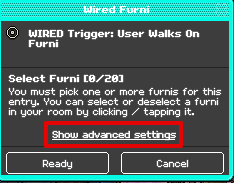
Now click on the Wired Trigger: User walks on furni and then click on 'Show Advanced Settings'
Note: You do not need to select any furniture in this wired.
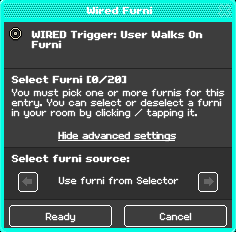
Then you will see 'Select furni source'. Keep clicking the mini arrow until you have found 'Use furni from Selector' then once it is on Use furni from Selector, you can now press Ready.
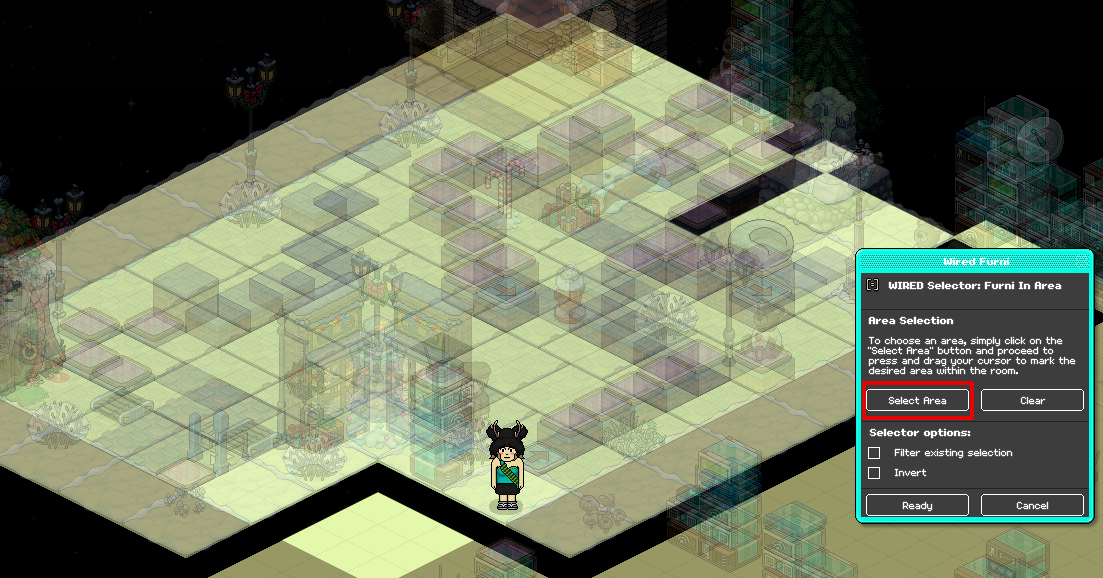
Now click on the Wired Selector: Furni in area and then you can select any area as you wish as long it has color tiles in it otherwise it will not detect all the color tiles that you want to use. Once you have your desired area, you can then press Ready to continue.
Note: in my case, i used the whole room because i want to use all the color tiles.
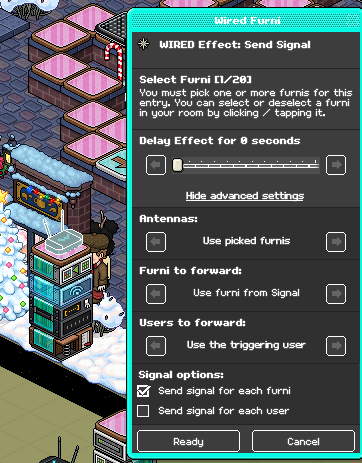
Now click on the Wired Effect: Send signal, make sure that the settings are set as shown below or it will not work and make sure to select the antenna so it will send a signal to it. Once done, press Ready to continue.
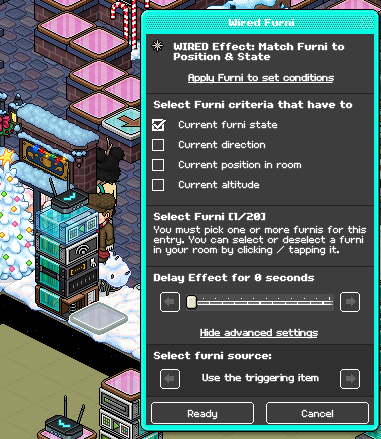
Now click on the Wired Effect: Match furni to position & state. In this wired you will have to click on 'Show advanced settings' just like you had to do in step 1. Then in 'Select furni source' it has to be set to 'Use the triggering item'. Make sure that the settings are the same as mine or it won't work. And with this wired, you will need to select the color tile that belongs to the wired stack only. Ofcourse, you can change the color but in my case it is set to the color blue in the wired.
This is how it will look like when the results are done:

If you need any help with this or you are not sure, let me know and i will help you!
What you need:
1x Wired Trigger: User Walks On Furni1x Wired Selector: Furni In Area
1x Wired Effect: Send Signal
1x Wired Effect: Match Furni to Position & State
1x Small Wired Antenna
1x Color tile
Step 1
Now click on the Wired Trigger: User walks on furni and then click on 'Show Advanced Settings'
Note: You do not need to select any furniture in this wired.
Then you will see 'Select furni source'. Keep clicking the mini arrow until you have found 'Use furni from Selector' then once it is on Use furni from Selector, you can now press Ready.
Step 2
Now click on the Wired Selector: Furni in area and then you can select any area as you wish as long it has color tiles in it otherwise it will not detect all the color tiles that you want to use. Once you have your desired area, you can then press Ready to continue.
Note: in my case, i used the whole room because i want to use all the color tiles.
Step 3
Now click on the Wired Effect: Send signal, make sure that the settings are set as shown below or it will not work and make sure to select the antenna so it will send a signal to it. Once done, press Ready to continue.
Step 5
Now click on the Wired Effect: Match furni to position & state. In this wired you will have to click on 'Show advanced settings' just like you had to do in step 1. Then in 'Select furni source' it has to be set to 'Use the triggering item'. Make sure that the settings are the same as mine or it won't work. And with this wired, you will need to select the color tile that belongs to the wired stack only. Ofcourse, you can change the color but in my case it is set to the color blue in the wired.
Step 6 - GIF
This is how it will look like when the results are done:
If you need any help with this or you are not sure, let me know and i will help you!
 Keegan 2 years ago
 Kitty 2 years ago
 Rotating 2 years ago