
In this guide, you will learn how to set up a Tag Booster!
x1 Tag Pole
x6 Water Jumps
x2 Ice Skating Patches
x1 2x2 Stack Tile
x8 Chairs/Seats
Place two ice skating patches next to each other.
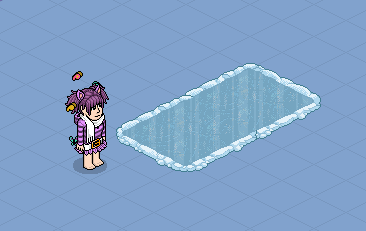
Place the first water jump like this.
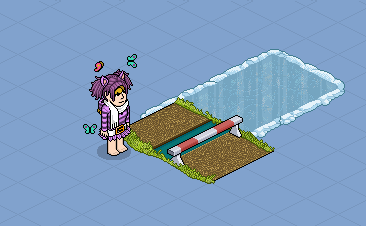
Using the 2x2 stacker tool at 0, place the second water jump like this.
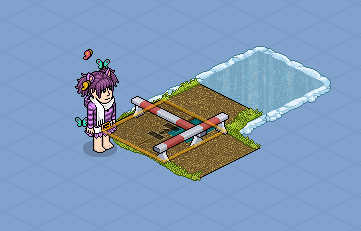
Using the 2x2 stacker tool at 0, place the third water jump like this.
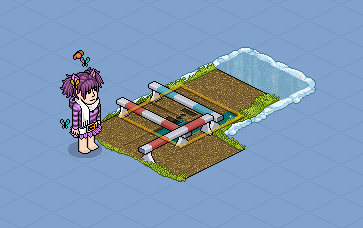
Using the 2x2 stacker tool at 0, place the fourth water jump like this.
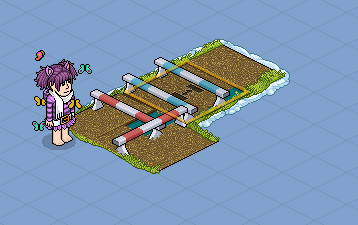
Using the 2x2 stacker tool at 0, place the fifth water jump like this.
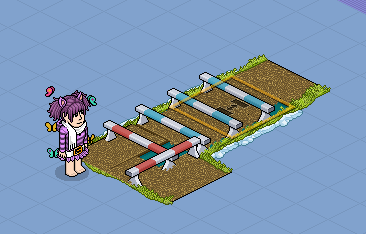
Using the 2x2 stacker tool at 0, place the sixth water jump like this.
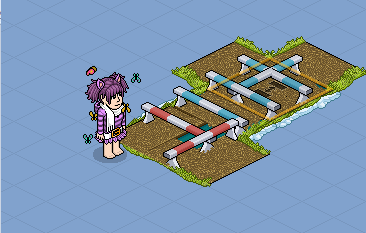
Now add in the chairs on top of the horse jumps like this, make sure the chairs are facing the same way as in the picture below.
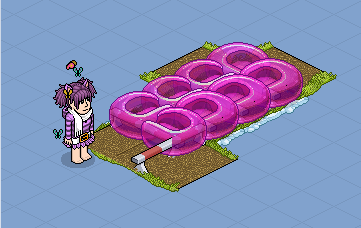
Place your Tag Pole anywhere in the room and then click on one of the chairs.
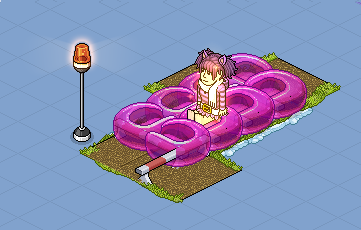
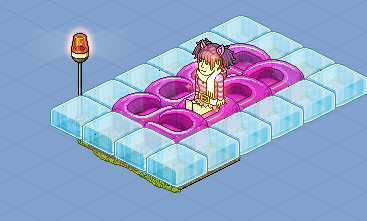
You should automatically move from chair to chair and tag other players. You can add in ice blocks or something around the edge to make it look pretty.
Requirements
x1 Tag Pole
x6 Water Jumps
x2 Ice Skating Patches
x1 2x2 Stack Tile
x8 Chairs/Seats
Step 1
Place two ice skating patches next to each other.
Step 2
Place the first water jump like this.
Step 3
Using the 2x2 stacker tool at 0, place the second water jump like this.
Step 4
Using the 2x2 stacker tool at 0, place the third water jump like this.
Step 5
Using the 2x2 stacker tool at 0, place the fourth water jump like this.
Step 6
Using the 2x2 stacker tool at 0, place the fifth water jump like this.
Step 7
Using the 2x2 stacker tool at 0, place the sixth water jump like this.
Step 8
Now add in the chairs on top of the horse jumps like this, make sure the chairs are facing the same way as in the picture below.
Step 9
Place your Tag Pole anywhere in the room and then click on one of the chairs.
You should automatically move from chair to chair and tag other players. You can add in ice blocks or something around the edge to make it look pretty.
Eevee7 years ago