
Ever wanted to know how to make your own Prize Counter? This guide will show you step by step how to do it!
Note: This wired tutorial is made for 6 prizes. You will need more wired if you choose to have more than 6 prizes but these are the basic wired for the game itself.
13 x WIRED Effect: Toggle Furni State
12 x WIRED Trigger: User Walks on Furni
12 x Numeric Block
7 x Random Banzai Teleporter
6 x WIRED Negative Condition: Furni states DOESN’T match
6 x WIRED Condition: Furni States And Positions Match
6 x Freeze Tiles
6 x Tiles (Large Bleaches Wooden Stage in this instance)
3 x WIRED Effect: Match Furni to Position & State
2 x WIRED Trigger: User Says Keyword
2 x WIRED CONDITION: Group Member
2 x Exit Tiles
1 x Counter
1 x Magic Stack Tile (size does not matter but 2x2 is preferred)
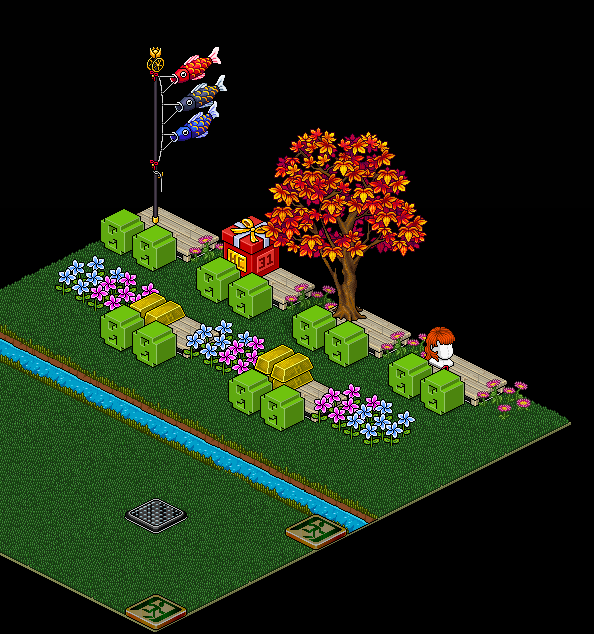
In this step, you will need 6 x Freeze Tiles, 2 x Exit Tiles, 1 x Counter, 1 x WIRED Condition: Group Member, 1 x WIRED Effect: Toggle Furni state and 1 x WIRED Trigger: User Says Keyword.
Place all of your Freeze Tiles in the spot where people will stand.
Note: In this step setup to make sure you block each prize area with either dividers or using a stacker to stack furni in the air.
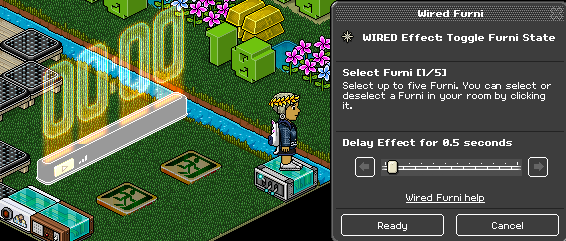
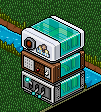
Get your counter and WIRED Effect: Toggle Furni State and double-click it. This piece of wired is the one I am standing on in the image down below.
Click on the counter and set it to a Delay Effect of 0.5 seconds then click ready when you have done so.
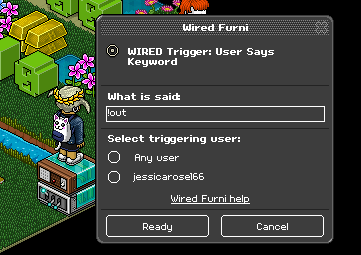
Next step is to stack your WIRED Trigger: User Says Keyword wired on top of your WIRED Effect: Toggle Furni State wired.
Write a keyword that you will use and say when you want to teleport people back into the game once they have stepped on the prize.
Note: If you do not have WIRED Condition: Group Member wired you can click > select triggering user to your Habbo name so only you can do the command. Otherwise, look at the 2nd image down below for how it should look in the end.
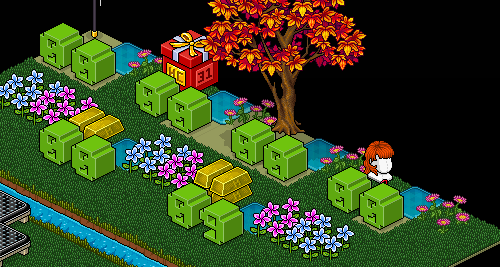
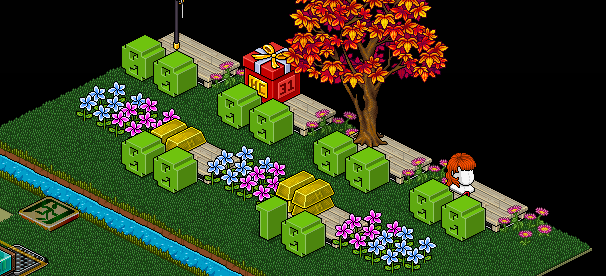
You can now place all of your furni such as grass, random banzai teleporter and wooden stages back over the freeze tiles using a magic stack tile. So it looks like the image down below
In the next few steps, you will prepare for your number counter blocks to know how many people step on each prize.
You will need 2 x WIRED Effect: Toggle Furni State, 2 x WIRED Trigger: User Walks On Furni, 1 x WIRED Condition Furni States and Positions Match, 1 x WIRED Negative Conditions: Furni states DOESN’T match, tiles (or whatever you will use for people to walk on) and 2 Numeric Blocks.
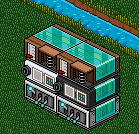
Down below is how it should look stacked.
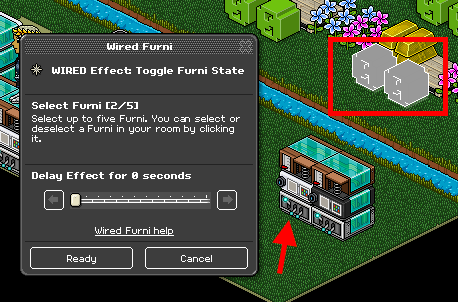
Double click the left WIRED Effect: Toggle Furni State and select the two numeric blocks as shown below. Then click ready once you have done so.
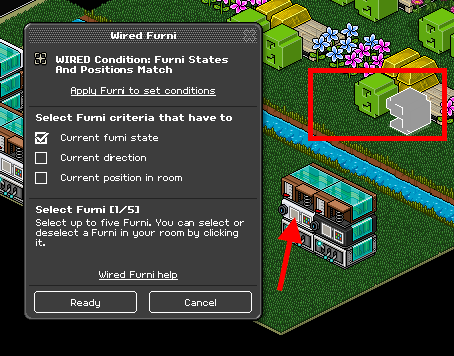
Double click your WIRED Condition: Furni States and Positions Match and select the number on the right and toggle that number to 9. Then tick the 'Curent furni state’ box. Click ready to confirm these actions.
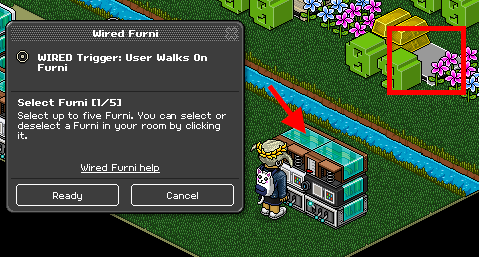
Finally, for this left side stack, double-click your WIRED Trigger: User Walks on Furni and select the item you will be using for players to walk on. Click ready when you are finished.
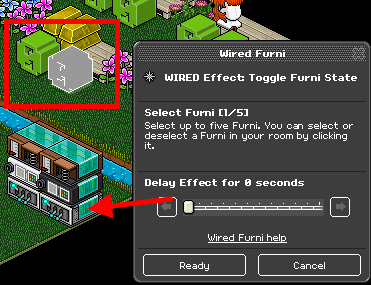
Now onto your right side stack. Double click your WIRED Effect: Toggle Furni State and only click the right numeric block. Click ready when you have done so.
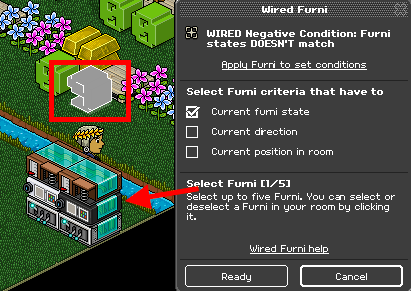
Double click your WIRED Negative Condition: Furni states DOESN’T Match and select the number on the right and toggle that number to 9. Then click the 'Current furni state’ box and click ready once it looks like the image down below.
The final step in this numeric block counter is to double click on your WIRED Trigger: User Walks on Furni and click ready when you are done.
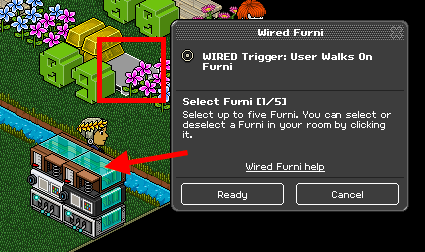
As stated at the beginning of this wired tutorial this is set for 6 prizes, so you will need to do steps 4-9 5 more times.
Your wired in the end once doing it 5 more times and following steps 4-9 should look exact to the image shown below.
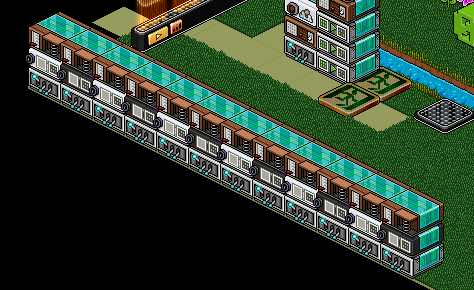
Once players have stepped on the prizes you will need to reset these numeric blocks at the end of the game so they go back to 0 0.
You will need 3 x WIRED Effect: Match Furni to Position & State, 1 x WIRED Trigger: User Says Keyword and WIRED CONDITION: Group Member (If you are making it a group room where you want others to host you will need this wired).
Down in the image below is how it should be stacked.
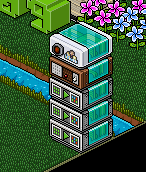
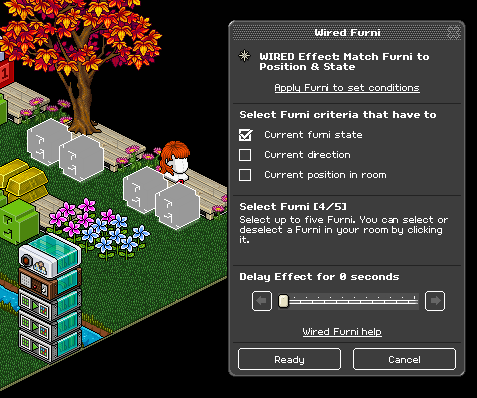
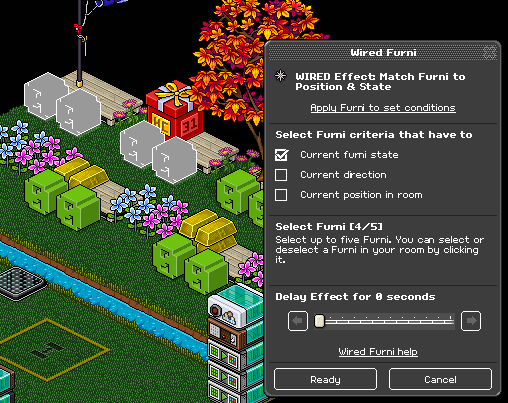
Double-click one of the WIRED Effect: Match Furni to Position and State wired and select 4 of the numeric blocks as shown in the image below. Click ready once you have correctly selected the blocks.
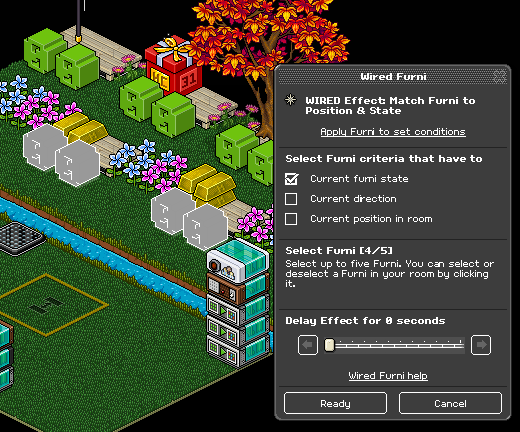
Continue this with the other 2 WIRED Effect: Match Furni to Position and State for the other 4 sets of numeric block numbers and click ready on all of it once you have correctly done so.
This is the end of setting up your Prize Counter game! You can choose the type of prizes you like and arrange your room however you like.
To fully complete your room and game you will need to add AFK Chairs, AFK kicking wired and a possible VIP area to host in.
If you need help setting up this aspect of Prize Counter or the rest of the basic room wired you can add me on Habbo or leave a comment down below!
What You Will Need
Note: This wired tutorial is made for 6 prizes. You will need more wired if you choose to have more than 6 prizes but these are the basic wired for the game itself.
13 x WIRED Effect: Toggle Furni State
12 x WIRED Trigger: User Walks on Furni
12 x Numeric Block
7 x Random Banzai Teleporter
6 x WIRED Negative Condition: Furni states DOESN’T match
6 x WIRED Condition: Furni States And Positions Match
6 x Freeze Tiles
6 x Tiles (Large Bleaches Wooden Stage in this instance)
3 x WIRED Effect: Match Furni to Position & State
2 x WIRED Trigger: User Says Keyword
2 x WIRED CONDITION: Group Member
2 x Exit Tiles
1 x Counter
1 x Magic Stack Tile (size does not matter but 2x2 is preferred)
Room Layout
Step 1
In this step, you will need 6 x Freeze Tiles, 2 x Exit Tiles, 1 x Counter, 1 x WIRED Condition: Group Member, 1 x WIRED Effect: Toggle Furni state and 1 x WIRED Trigger: User Says Keyword.
Place all of your Freeze Tiles in the spot where people will stand.
Note: In this step setup to make sure you block each prize area with either dividers or using a stacker to stack furni in the air.
Step 2
Get your counter and WIRED Effect: Toggle Furni State and double-click it. This piece of wired is the one I am standing on in the image down below.
Click on the counter and set it to a Delay Effect of 0.5 seconds then click ready when you have done so.
Step 3
Next step is to stack your WIRED Trigger: User Says Keyword wired on top of your WIRED Effect: Toggle Furni State wired.
Write a keyword that you will use and say when you want to teleport people back into the game once they have stepped on the prize.
Note: If you do not have WIRED Condition: Group Member wired you can click > select triggering user to your Habbo name so only you can do the command. Otherwise, look at the 2nd image down below for how it should look in the end.
You can now place all of your furni such as grass, random banzai teleporter and wooden stages back over the freeze tiles using a magic stack tile. So it looks like the image down below
Step 4
In the next few steps, you will prepare for your number counter blocks to know how many people step on each prize.
You will need 2 x WIRED Effect: Toggle Furni State, 2 x WIRED Trigger: User Walks On Furni, 1 x WIRED Condition Furni States and Positions Match, 1 x WIRED Negative Conditions: Furni states DOESN’T match, tiles (or whatever you will use for people to walk on) and 2 Numeric Blocks.
Down below is how it should look stacked.
Double click the left WIRED Effect: Toggle Furni State and select the two numeric blocks as shown below. Then click ready once you have done so.
Step 5
Double click your WIRED Condition: Furni States and Positions Match and select the number on the right and toggle that number to 9. Then tick the 'Curent furni state’ box. Click ready to confirm these actions.
Step 6
Finally, for this left side stack, double-click your WIRED Trigger: User Walks on Furni and select the item you will be using for players to walk on. Click ready when you are finished.
Step 7
Now onto your right side stack. Double click your WIRED Effect: Toggle Furni State and only click the right numeric block. Click ready when you have done so.
Step 8
Double click your WIRED Negative Condition: Furni states DOESN’T Match and select the number on the right and toggle that number to 9. Then click the 'Current furni state’ box and click ready once it looks like the image down below.
Step 9
The final step in this numeric block counter is to double click on your WIRED Trigger: User Walks on Furni and click ready when you are done.
Step 10
As stated at the beginning of this wired tutorial this is set for 6 prizes, so you will need to do steps 4-9 5 more times.
Your wired in the end once doing it 5 more times and following steps 4-9 should look exact to the image shown below.
Step 11
Once players have stepped on the prizes you will need to reset these numeric blocks at the end of the game so they go back to 0 0.
You will need 3 x WIRED Effect: Match Furni to Position & State, 1 x WIRED Trigger: User Says Keyword and WIRED CONDITION: Group Member (If you are making it a group room where you want others to host you will need this wired).
Down in the image below is how it should be stacked.
Double-click one of the WIRED Effect: Match Furni to Position and State wired and select 4 of the numeric blocks as shown in the image below. Click ready once you have correctly selected the blocks.
Continue this with the other 2 WIRED Effect: Match Furni to Position and State for the other 4 sets of numeric block numbers and click ready on all of it once you have correctly done so.
This is the end of setting up your Prize Counter game! You can choose the type of prizes you like and arrange your room however you like.
To fully complete your room and game you will need to add AFK Chairs, AFK kicking wired and a possible VIP area to host in.
If you need help setting up this aspect of Prize Counter or the rest of the basic room wired you can add me on Habbo or leave a comment down below!
Eevee7 years ago