
Ever wanted to build this fun Habbo game? Well, this tutorial will show you step by step how to do that!
37x WIRED Effect: Match Furni to Position & State
20x WIRED Effect: Teleport To Furni
19x WIRED Trigger: User Says Keyword
13x WIRED Trigger: User Walks On Furni
18x WIRED Condition: Triggering User is on furni
10x WIRED Condition: Furni states and positions match
10x WIRED Condition: Group Member
1x WIRED Trigger: User stuff collision
1x WIRED Trigger: Repeat effect
1x WIRED Effect: Change furni direction
1x WIRED Add-on: Random effect
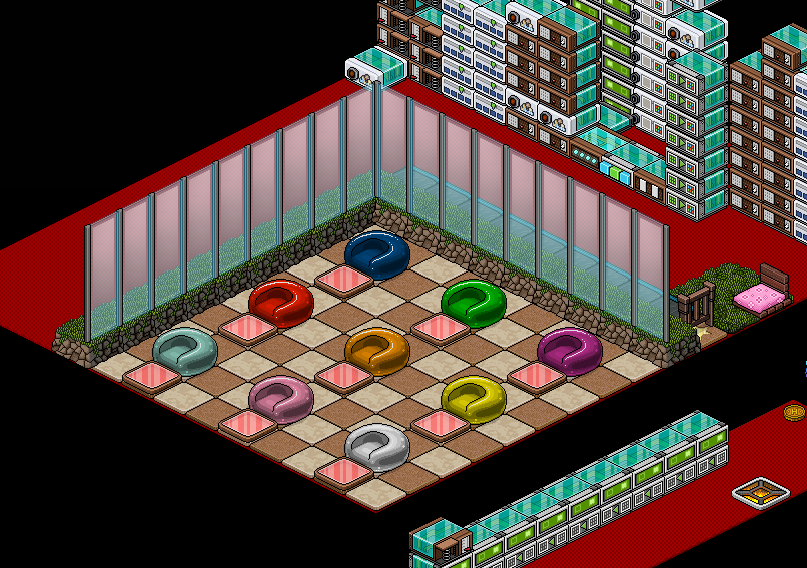
The first step is the automatic line. For this you will need 9x Wired Effect: Match Furni To Position & State, 9x Wired Effect: Tele To Furni & 1x Wired Trigger: User Walks On Furni set up as shown below.
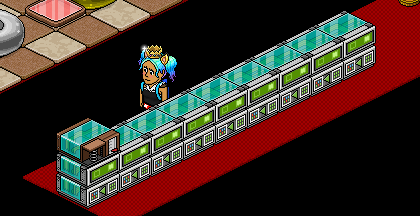
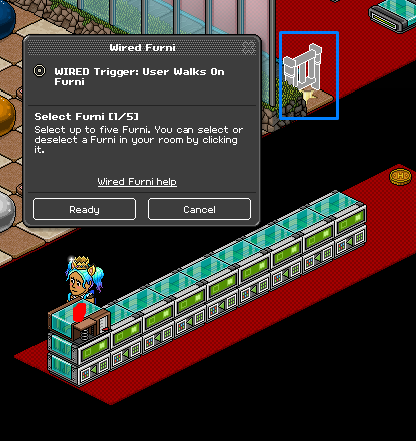
Click on the Wired Trigger: User Walks On Furni and select the gate you are using for your queue.
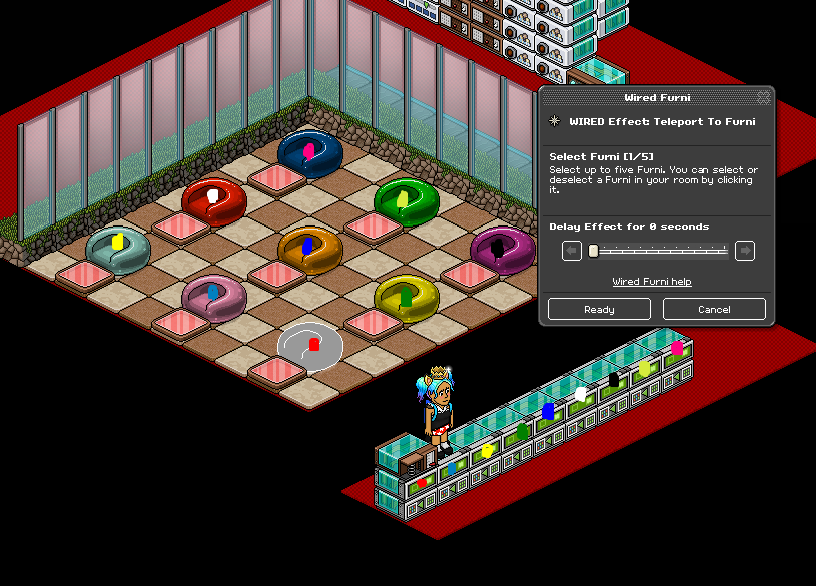
Using the 9x Wired Effect: Tele To Furni’s use each one to select a different coloured pod as shown below.
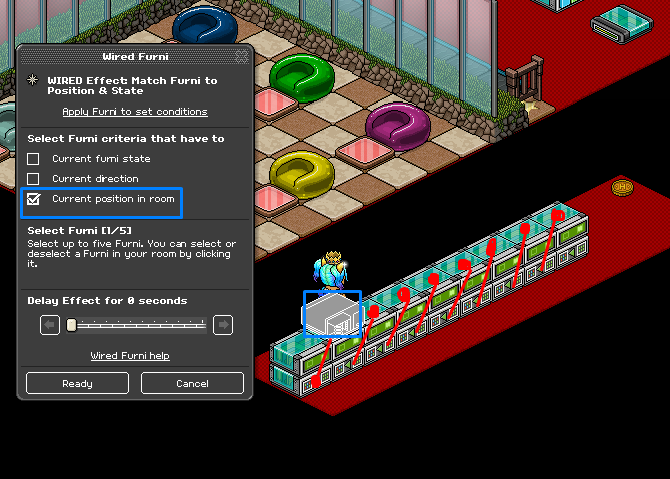
Using 8x Wired Effect: Match Furni To Position & State use each on to move the Wired Trigger: User Walks On Furni across the stack as shown below. Select 'current position in room.’
Note: When you hide you're wired you will need to redo this step!
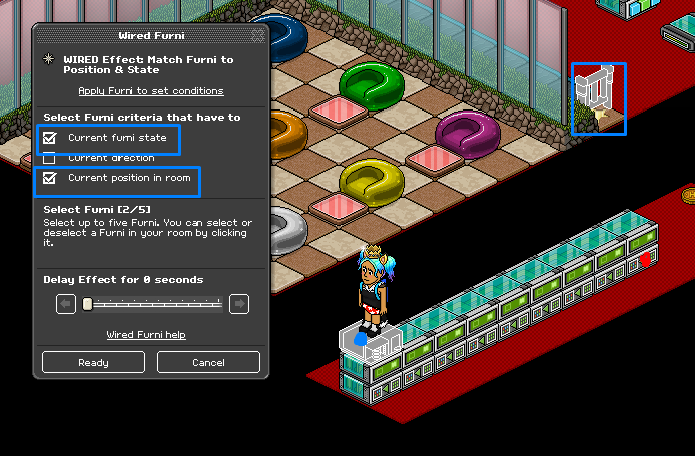
Using the last Wired Effect: Match Furni To Position & State select the Wired Trigger: User Walks On Furni and make sure it is at the beginning of the stack and select the gate where your line is and make sure it is closed. Select 'current position in room’ & 'current furni state.’
Note: When you hide you're wired you will need to re-do this step!
In this step, you are going to create the reset wired for the end of a game and also if you don’t manage to get all seats filled. For this you will need 1x Wired Trigger: User Says Keyword, 1x Wired Effect: Match Furni To Position & State & 1x Wired Condition: Group Member (Optional) set up as shown below.
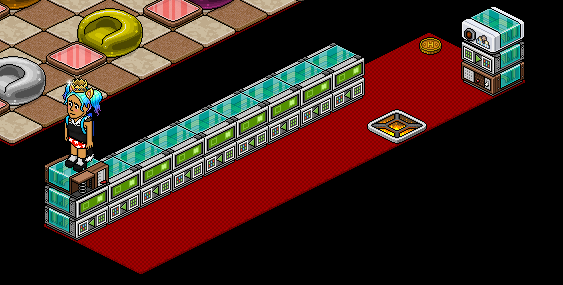
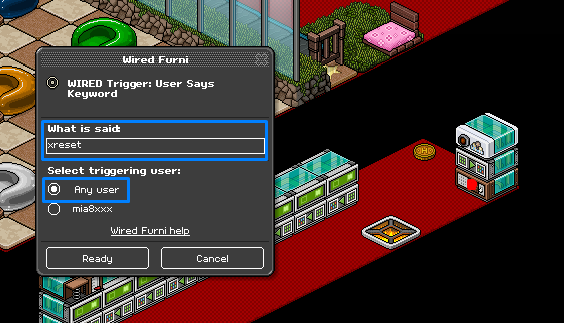
Click the Wired Trigger: User Says Keyword and set it to a word to use to reset the game.
Note: If you aren’t using Wired Condition: Group Member make sure to set it to only you!
Using the Wired Effect: Match Furni To Position & State select the Wired Trigger: User Walks On Furni from the previous step and the flame tile. Make sure the flame tile is out of the game area, select 'current position in room’ & 'current furni state.’
Note: When you hide you're wired you will need to re-do this step!
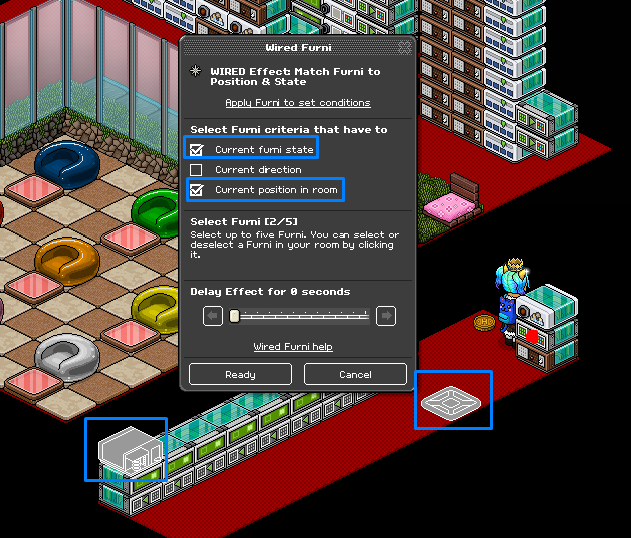
Now you will need to set up when the player steps on the flame tile and say a colour it will go to that coloured pod. For this you will need 9x Wired Trigger: User Says Keyword, 9x Wired Condition: Triggering User Is On Furni & 9x Wired Effect: Match Furni To Position & State set up as shown below.
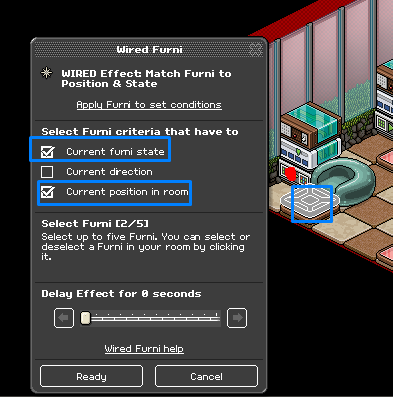
Select the Wired Effect: Match Furni To Position & State and select the flame tile make sure to select 'current position in room.’
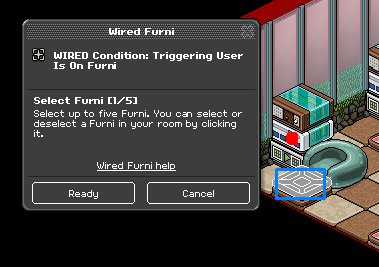
Select the Wired Condition: Triggering User Is On Furni and select the flame tile.
Select the Wired Trigger: User Says Keyword and set it to the colour word to match the colour pod. Make sure to set it to 'Any User.’
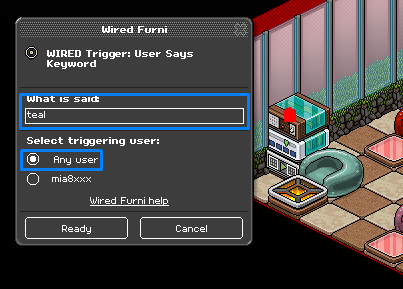
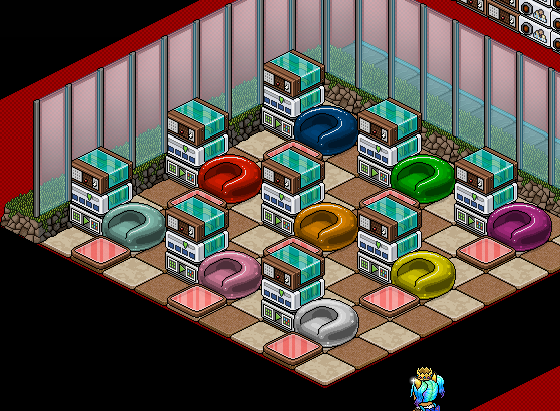
Do this for the other 8 stacks moving the flame tile to the colour tile in front of the pod!
In this step you will learn how to set up the flame tile, for this, you will need 1x Wired Trigger: User Walks On Furni, 9x Wired Effect: Match Furni To Position & State & 1x Wired Add-On: Random Effect set up as shown below.
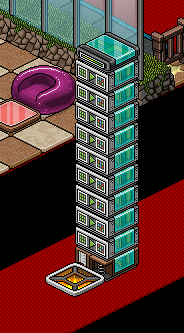
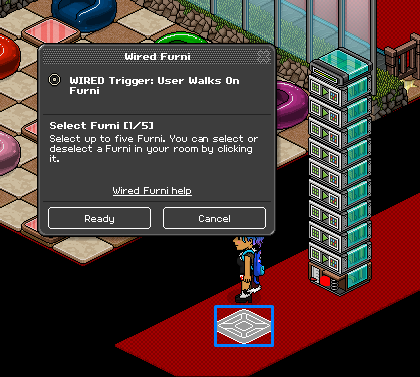
Using the Wired Trigger: User Walks On Furni and select the flame tile.
Using 3x Wired Effect: Match Furni To Position & State select the flame tile. Make sure it is on and you have selected 'current furni state.’
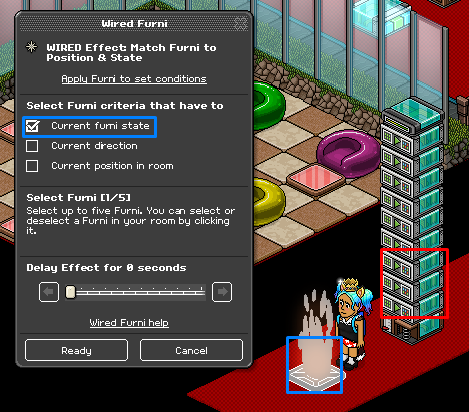
Using the last 4x Wired Effect: Match Furni To Position & State select the flame tile. Make sure it is off and you have selected 'current furni state.’
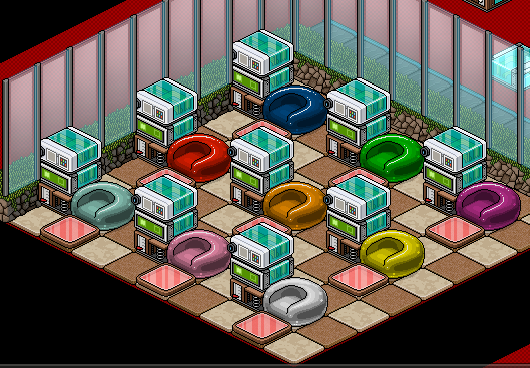
In this step you will learn how to set up so when a player walks on the flame tile it will teleport them back to their seat if they survive. For this you will need 9x Wired Trigger: User Walks On Furni, 9x Wired Effect: Tele To Furni & 9x Wired Condition: Furni States & Positions Match set up as shown below.
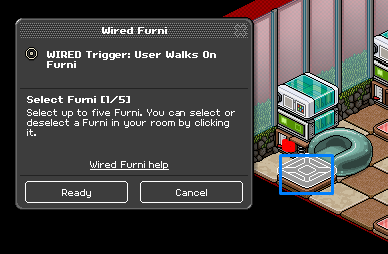
Using the Wired Trigger: User Walks On Furni select the flame tile.
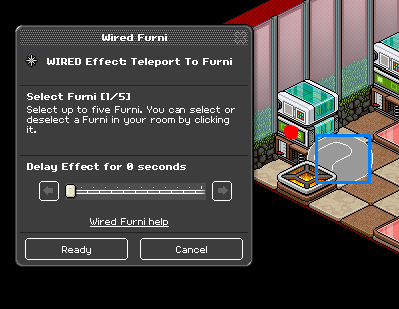
Using the Wired Effect: Tele To Furni and select the coloured pod for that stack.
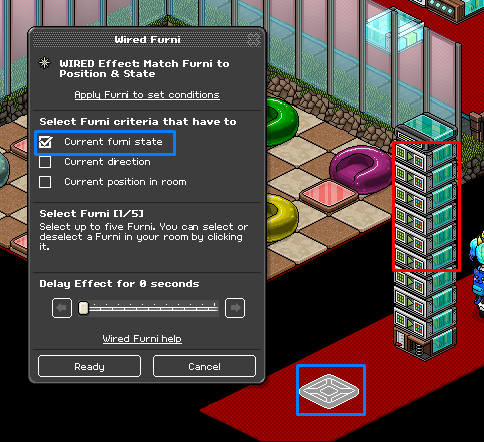
Using the Wired Condition: Furni States & Positions Match and select the flame tile. Make sure to select 'current position in room.’
Do this for the other 8 stacks moving the flame tile to the colour tile in front of the pod!
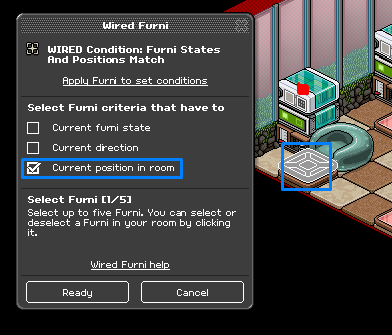
Now you need to set it up so when the flame tile goes on it will eject the player from the game for this you will need, 1x Wired Condition: Furni States & Positions Match, 1x Wired Trigger: Repeat Effect, 1x Wired Effect: Change Furni Direction, 1x WIred Trigger: User Stuff Collision & 1x Wired Effect: Tele To Furni set up as shown below.
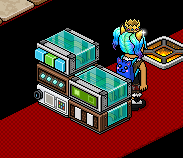
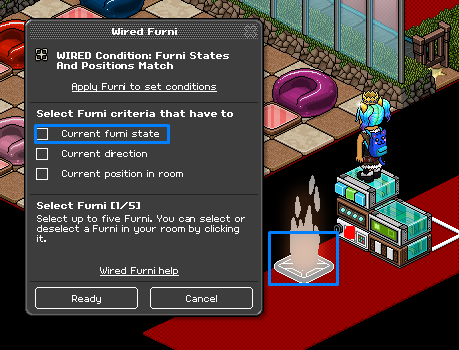
Using the Wired Condition: Furni States & Positions Match select the flame tile. Make sure it is on and you have selected 'current furni state.’
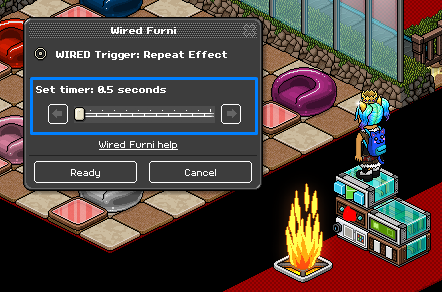
Using The Wired Trigger: Repeat Effect set it to 0.5 seconds.
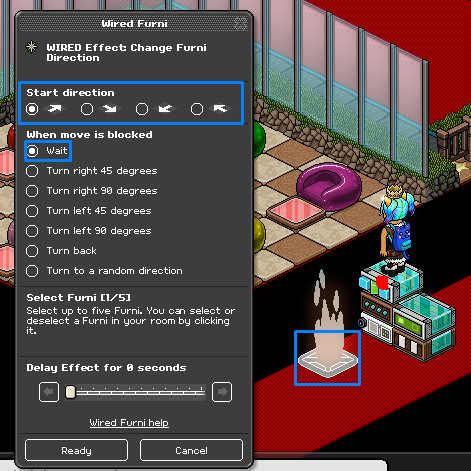
Using the Wired Effect: Change Furni Direct select the flame tile. Make sure to select the direction to your pods are and 'Wait.’
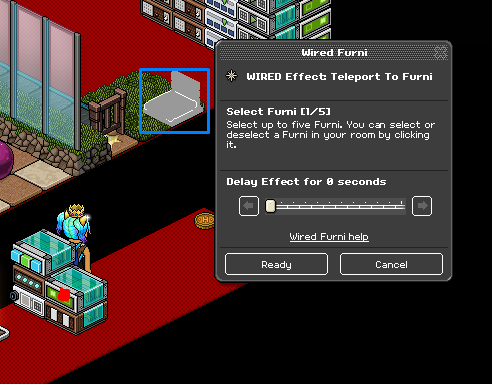
Using the Wired Effect: Tele To Furni and select a piece of furni outside of the game area.
To stop the players standing up before their turn you will need 2x Wired Trigger: User Walks On Furni & 1x Wired Effect: Tele To Furni set up as shown below.
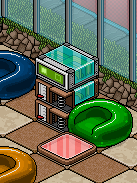
Using the 2x Wired Trigger: User Wals On Furni and select the tiles in front of the pods.
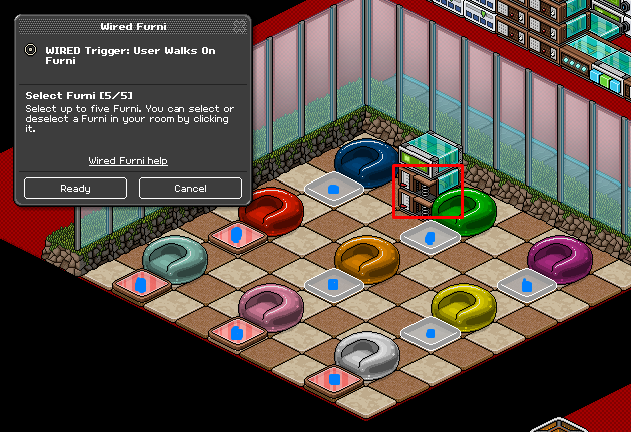
Using the Wired Effect: Tele To Furni and select a piece of furni outside of the game area.
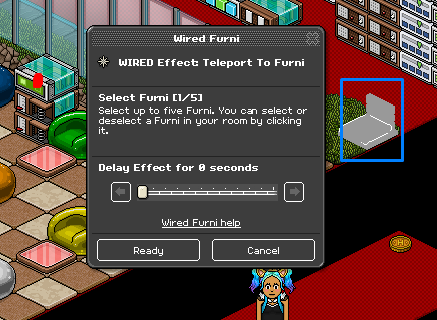
This step is optional as you can move the flame tile manually however if you want to use wired you will need 9x Wired Trigger: User Says Keyword, 9x Wired Effect: Match Furni To Position & State & 9x Wired Condition Group Member (Optional) set up as shown below.
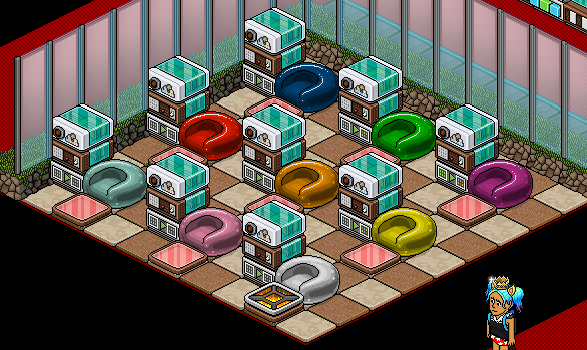
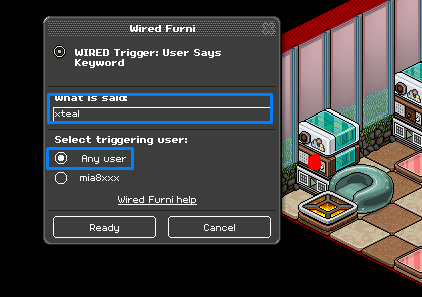
Using the Wired Trigger: User Says Keyword use the colour of the pod and maybe put an 'x’ or '!’ in front of it.
Note: If you aren’t using Wired Condition: Group Member make sure to set it to 'Only You.’
Using the Wired Effect: Match Furni To Position & State and select the flame tile. Make sure you select 'current position in room.’
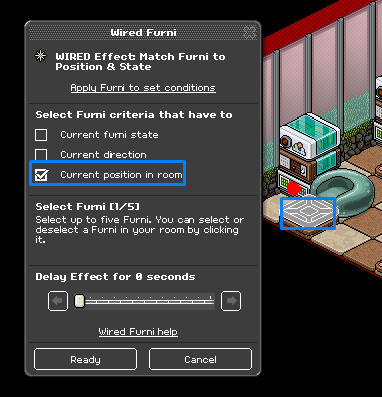
Do this for the other 8 stacks moving the flame tile to the colour tile in front of the pod!
If you need any help please don’t hesitate to comment below!
What You Will Need
37x WIRED Effect: Match Furni to Position & State
20x WIRED Effect: Teleport To Furni
19x WIRED Trigger: User Says Keyword
13x WIRED Trigger: User Walks On Furni
18x WIRED Condition: Triggering User is on furni
10x WIRED Condition: Furni states and positions match
10x WIRED Condition: Group Member
1x WIRED Trigger: User stuff collision
1x WIRED Trigger: Repeat effect
1x WIRED Effect: Change furni direction
1x WIRED Add-on: Random effect
Room Layout
Step 1
The first step is the automatic line. For this you will need 9x Wired Effect: Match Furni To Position & State, 9x Wired Effect: Tele To Furni & 1x Wired Trigger: User Walks On Furni set up as shown below.
Click on the Wired Trigger: User Walks On Furni and select the gate you are using for your queue.
Using the 9x Wired Effect: Tele To Furni’s use each one to select a different coloured pod as shown below.
Using 8x Wired Effect: Match Furni To Position & State use each on to move the Wired Trigger: User Walks On Furni across the stack as shown below. Select 'current position in room.’
Note: When you hide you're wired you will need to redo this step!
Using the last Wired Effect: Match Furni To Position & State select the Wired Trigger: User Walks On Furni and make sure it is at the beginning of the stack and select the gate where your line is and make sure it is closed. Select 'current position in room’ & 'current furni state.’
Note: When you hide you're wired you will need to re-do this step!
Step 2
In this step, you are going to create the reset wired for the end of a game and also if you don’t manage to get all seats filled. For this you will need 1x Wired Trigger: User Says Keyword, 1x Wired Effect: Match Furni To Position & State & 1x Wired Condition: Group Member (Optional) set up as shown below.
Click the Wired Trigger: User Says Keyword and set it to a word to use to reset the game.
Note: If you aren’t using Wired Condition: Group Member make sure to set it to only you!
Using the Wired Effect: Match Furni To Position & State select the Wired Trigger: User Walks On Furni from the previous step and the flame tile. Make sure the flame tile is out of the game area, select 'current position in room’ & 'current furni state.’
Note: When you hide you're wired you will need to re-do this step!
Step 3
Now you will need to set up when the player steps on the flame tile and say a colour it will go to that coloured pod. For this you will need 9x Wired Trigger: User Says Keyword, 9x Wired Condition: Triggering User Is On Furni & 9x Wired Effect: Match Furni To Position & State set up as shown below.
Select the Wired Effect: Match Furni To Position & State and select the flame tile make sure to select 'current position in room.’
Select the Wired Condition: Triggering User Is On Furni and select the flame tile.
Select the Wired Trigger: User Says Keyword and set it to the colour word to match the colour pod. Make sure to set it to 'Any User.’
Do this for the other 8 stacks moving the flame tile to the colour tile in front of the pod!
Step 4
In this step you will learn how to set up the flame tile, for this, you will need 1x Wired Trigger: User Walks On Furni, 9x Wired Effect: Match Furni To Position & State & 1x Wired Add-On: Random Effect set up as shown below.
Using the Wired Trigger: User Walks On Furni and select the flame tile.
Using 3x Wired Effect: Match Furni To Position & State select the flame tile. Make sure it is on and you have selected 'current furni state.’
Using the last 4x Wired Effect: Match Furni To Position & State select the flame tile. Make sure it is off and you have selected 'current furni state.’
Step 5
In this step you will learn how to set up so when a player walks on the flame tile it will teleport them back to their seat if they survive. For this you will need 9x Wired Trigger: User Walks On Furni, 9x Wired Effect: Tele To Furni & 9x Wired Condition: Furni States & Positions Match set up as shown below.
Using the Wired Trigger: User Walks On Furni select the flame tile.
Using the Wired Effect: Tele To Furni and select the coloured pod for that stack.
Using the Wired Condition: Furni States & Positions Match and select the flame tile. Make sure to select 'current position in room.’
Do this for the other 8 stacks moving the flame tile to the colour tile in front of the pod!
Step 6
Now you need to set it up so when the flame tile goes on it will eject the player from the game for this you will need, 1x Wired Condition: Furni States & Positions Match, 1x Wired Trigger: Repeat Effect, 1x Wired Effect: Change Furni Direction, 1x WIred Trigger: User Stuff Collision & 1x Wired Effect: Tele To Furni set up as shown below.
Using the Wired Condition: Furni States & Positions Match select the flame tile. Make sure it is on and you have selected 'current furni state.’
Using The Wired Trigger: Repeat Effect set it to 0.5 seconds.
Using the Wired Effect: Change Furni Direct select the flame tile. Make sure to select the direction to your pods are and 'Wait.’
Using the Wired Effect: Tele To Furni and select a piece of furni outside of the game area.
Step 7
To stop the players standing up before their turn you will need 2x Wired Trigger: User Walks On Furni & 1x Wired Effect: Tele To Furni set up as shown below.
Using the 2x Wired Trigger: User Wals On Furni and select the tiles in front of the pods.
Using the Wired Effect: Tele To Furni and select a piece of furni outside of the game area.
Optional Step
This step is optional as you can move the flame tile manually however if you want to use wired you will need 9x Wired Trigger: User Says Keyword, 9x Wired Effect: Match Furni To Position & State & 9x Wired Condition Group Member (Optional) set up as shown below.
Using the Wired Trigger: User Says Keyword use the colour of the pod and maybe put an 'x’ or '!’ in front of it.
Note: If you aren’t using Wired Condition: Group Member make sure to set it to 'Only You.’
Using the Wired Effect: Match Furni To Position & State and select the flame tile. Make sure you select 'current position in room.’
Do this for the other 8 stacks moving the flame tile to the colour tile in front of the pod!
If you need any help please don’t hesitate to comment below!
EeveesisEeveehosts this all the time!! Thanks for sharing ❤️Eeveei agree sis. best game on habbo!Eevee7 years ago