
There is a fun new game sweeping Habbo Hotel and here is how you can make it for yourself!
1x Wired Trigger: User Walks Off Furni
1x Wired Trigger: User Walks On Furni
2x Wired Trigger: User Says Keyword
1x Wired Effect: Teleport To Furni
6x Wired Effect: Match Furni To Position & State
1x Wired Condition: Furni States And Positions Match
1x Wired Add-On: Random Effect
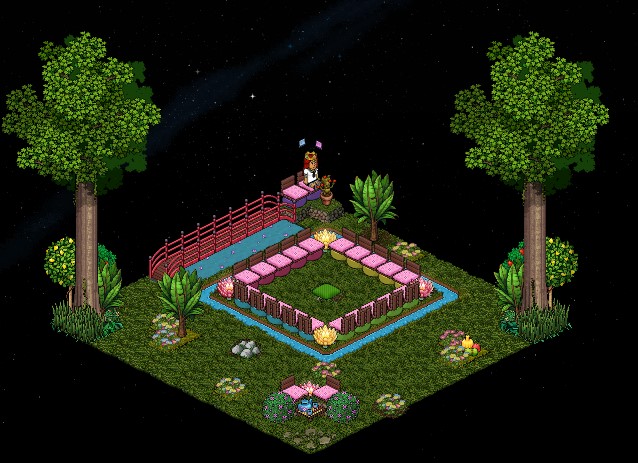
This is an example of a room layout for this particular game. It is like the nervous game set up, your game area must have a section of its own.
In this step, I will show you to set up the pillow that comes into the middle. For this you will need 1x Wired Trigger: User Says Keyword, 5x Wired Effect: Match Furni To Position & State & 1x Wired: Add-on: Random Effect, set up as shown below.
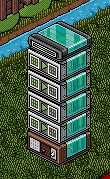
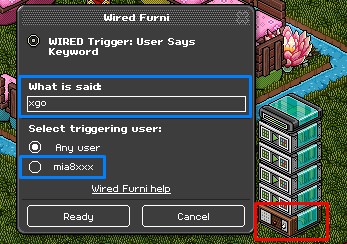
Firstly take the Wired Trigger: User Says Keyword and set it to a word you will remember to start the round.
Please Note: Make sure it is set to only you unless you are using Wired Condition: Group Member!
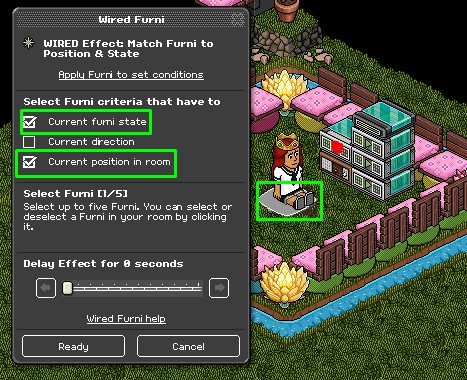
Select the first Wired Effect: Match Furni To Position & State then click the pillow. Make sure the pillow is placed in the centre and is set to the colour green. Select 'current furni state’ & 'current position in room.’
Select the second Wired Effect: Match Furni To Position & State then click the pillow. Make sure the pillow is placed in the centre and is set to the colour red. Select 'current furni state’ & 'current position in room.’
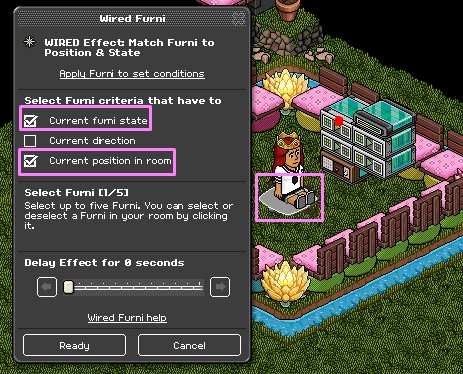
Select the third Wired Effect: Match Furni To Position & State then click the pillow. Make sure the pillow is placed in the centre and is set to the colour blue. Select 'current furni state' & 'current position in room.’
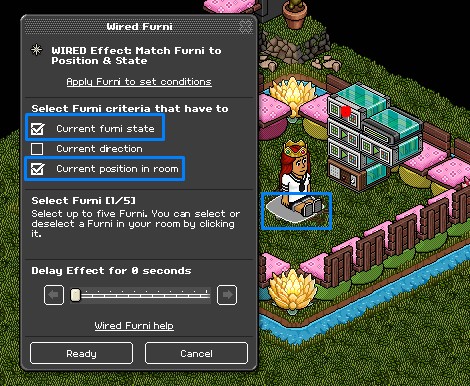
Select the final Wired Effect: Match Furni To Position & State then click the pillow. Make sure the pillow is placed in the centre and is ser to the colour orange. Select 'current furni state’ & 'current position in room.’
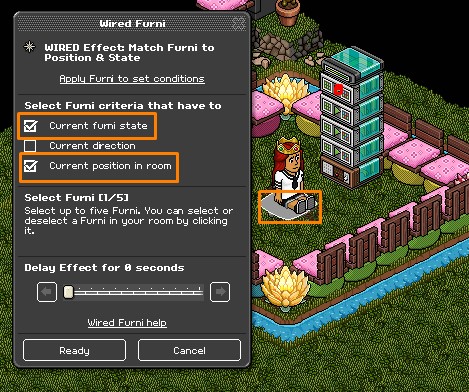
Add the Wired Add-on: Random Effect on to the top of the Wired Effect: Match Furni To Position & State’s.
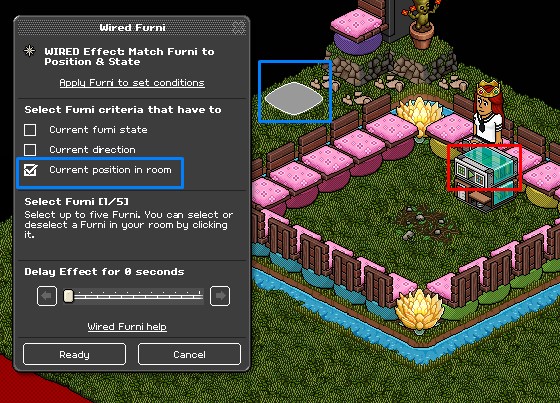
For this step you will need 1x Wired Trigger: User Walks Off Furni & 1x Wired Effect: Match Furni To Position & State, set up as shown below.

Firstly click on the Wired Trigger: User Walks Off Furni and select the pillow.
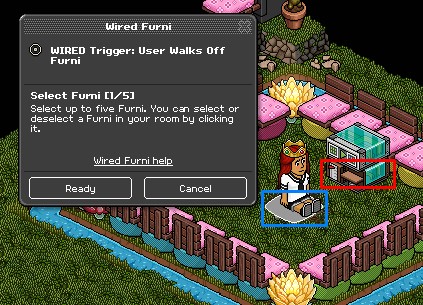
Next click on the Wired Effect: Match Furni To Position & State, select the pillow but make sure it is placed out of the game area. Select 'current position in room.’
Please Note: A delay is optional!
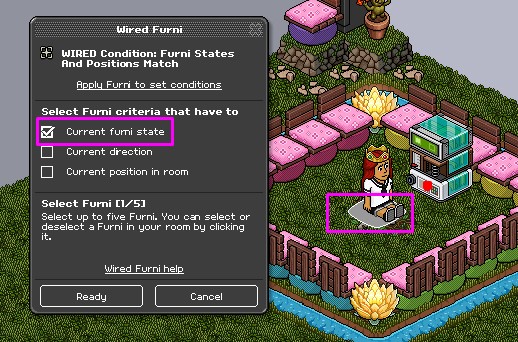
In this step I will show you how to set it up so if the pillow is on the colour where the player loses they will automatically exit. For this you will need 1x Wired Condition: Furni States & Position Match, 1x Wired Trigger: User Walks On Furni & 1x Wired Effect: Teleport To Furni, set up as shown below.
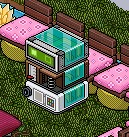
Firstly take the Wired Condition: Furni States & Position Match and select the pillow. Select 'current furni state.’
Please Note: Make sure it is on the colour you will use for lose. In this case, I used red!
Next, take the Wired Trigger: User Walks On Furni and select the pillow.
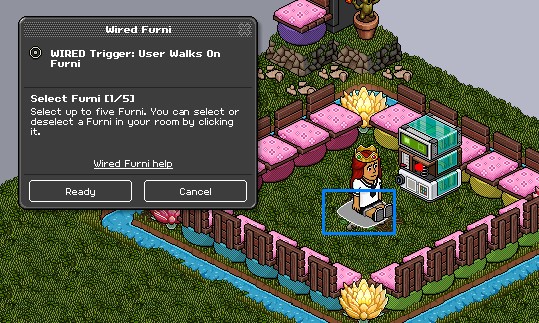
Lastly take the Wired Effect: Teleport To furni and select an area outside of the game area.
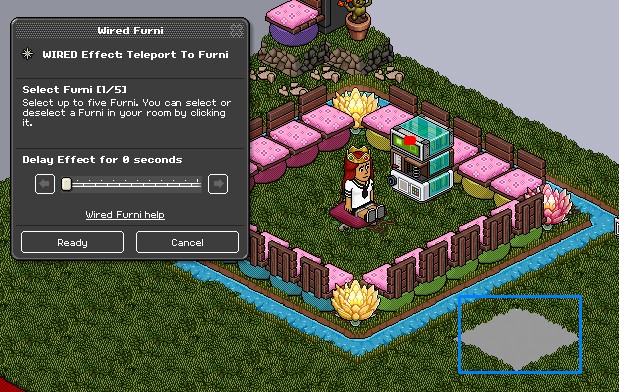
Finally you will need to have it set up so you can say a word to reset the game. For this you will need 1x Wired Trigger: User Says Keyword & 1x Wired Effect: Match Furni To Position & State, as shown below.

Take the Wired Trigger: User Says Keyword and set it to a word you will remember to reset the game.
Please Note: Make sure it is set to only you unless you are using Wired Condition: Group Member!
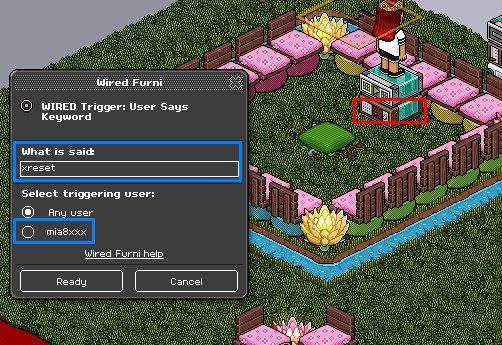
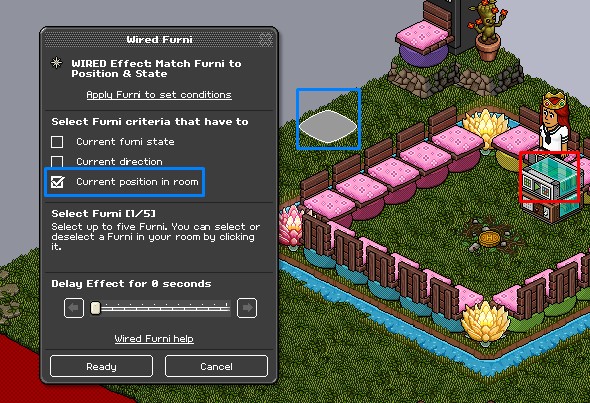
Lastly take the Wired Effect: Match Furni To Position & State and select the pillow. Select 'current position in room.’
Please Note: Make sure the pillow is out of the game area!
If you have any questions please don’t hesitate to ask in the comments below!
What You Need
1x Wired Trigger: User Walks Off Furni
1x Wired Trigger: User Walks On Furni
2x Wired Trigger: User Says Keyword
1x Wired Effect: Teleport To Furni
6x Wired Effect: Match Furni To Position & State
1x Wired Condition: Furni States And Positions Match
1x Wired Add-On: Random Effect
Room Layout
This is an example of a room layout for this particular game. It is like the nervous game set up, your game area must have a section of its own.
Step 1
In this step, I will show you to set up the pillow that comes into the middle. For this you will need 1x Wired Trigger: User Says Keyword, 5x Wired Effect: Match Furni To Position & State & 1x Wired: Add-on: Random Effect, set up as shown below.
Firstly take the Wired Trigger: User Says Keyword and set it to a word you will remember to start the round.
Please Note: Make sure it is set to only you unless you are using Wired Condition: Group Member!
Select the first Wired Effect: Match Furni To Position & State then click the pillow. Make sure the pillow is placed in the centre and is set to the colour green. Select 'current furni state’ & 'current position in room.’
Select the second Wired Effect: Match Furni To Position & State then click the pillow. Make sure the pillow is placed in the centre and is set to the colour red. Select 'current furni state’ & 'current position in room.’
Select the third Wired Effect: Match Furni To Position & State then click the pillow. Make sure the pillow is placed in the centre and is set to the colour blue. Select 'current furni state' & 'current position in room.’
Select the final Wired Effect: Match Furni To Position & State then click the pillow. Make sure the pillow is placed in the centre and is ser to the colour orange. Select 'current furni state’ & 'current position in room.’
Add the Wired Add-on: Random Effect on to the top of the Wired Effect: Match Furni To Position & State’s.
Step 2
For this step you will need 1x Wired Trigger: User Walks Off Furni & 1x Wired Effect: Match Furni To Position & State, set up as shown below.
Firstly click on the Wired Trigger: User Walks Off Furni and select the pillow.
Next click on the Wired Effect: Match Furni To Position & State, select the pillow but make sure it is placed out of the game area. Select 'current position in room.’
Please Note: A delay is optional!
Step 3
In this step I will show you how to set it up so if the pillow is on the colour where the player loses they will automatically exit. For this you will need 1x Wired Condition: Furni States & Position Match, 1x Wired Trigger: User Walks On Furni & 1x Wired Effect: Teleport To Furni, set up as shown below.
Firstly take the Wired Condition: Furni States & Position Match and select the pillow. Select 'current furni state.’
Please Note: Make sure it is on the colour you will use for lose. In this case, I used red!
Next, take the Wired Trigger: User Walks On Furni and select the pillow.
Lastly take the Wired Effect: Teleport To furni and select an area outside of the game area.
Step 4
Finally you will need to have it set up so you can say a word to reset the game. For this you will need 1x Wired Trigger: User Says Keyword & 1x Wired Effect: Match Furni To Position & State, as shown below.
Take the Wired Trigger: User Says Keyword and set it to a word you will remember to reset the game.
Please Note: Make sure it is set to only you unless you are using Wired Condition: Group Member!
Lastly take the Wired Effect: Match Furni To Position & State and select the pillow. Select 'current position in room.’
Please Note: Make sure the pillow is out of the game area!
If you have any questions please don’t hesitate to ask in the comments below!
Eevee7 years ago