
Ever wanted to learn how to wire this amazing colourful game? Well, find out in this wired tutorial! It will show you step by step what you need to do
3x Wired Trigger: User Says Keyword.
2x Wired Trigger: Furni State Is Changed
2x Wired Trigger: Repeat Effect
30x Wired Effect: Match Furni To Position & State
2x Wired Effect: Move Furni Towards Nearest User
1x Wired Effect: Teleport To Furni
8x Wired Condition: Triggering User Is On Furni
1x Wired Condition: Has Furni On
1x 1x1 Magic Stack Tile
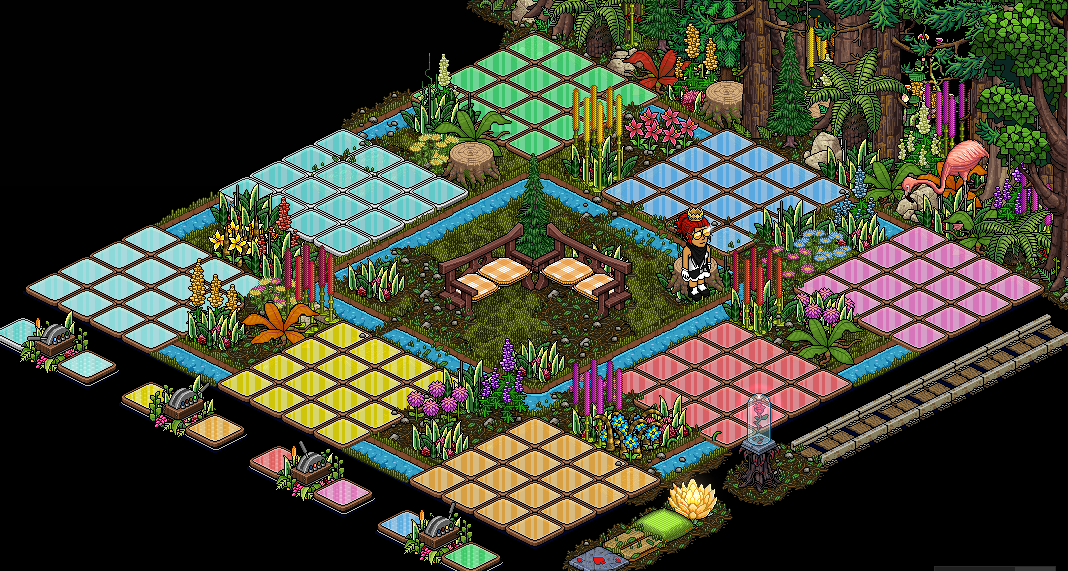
The first thing you need to do is set up the wired to open all the gates. For this you will need 1x Wired Trigger: User Says Keyword & 3x Wired Effect: Match Furni To Position & State as shown below.
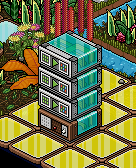
Click on the Wired Trigger: User Says Keyword and use a word you will remember that opens all the gates for example; 'xopen’.
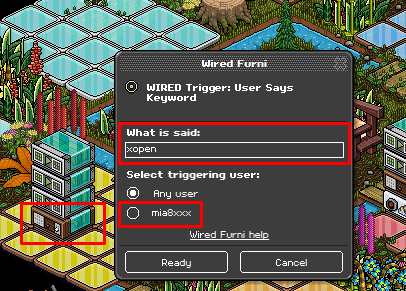
Click on each of the Wired Effect: Match Furni To Position & State and select the ditches around the colour tiles. Make sure the ditches are all open and select current furni state.
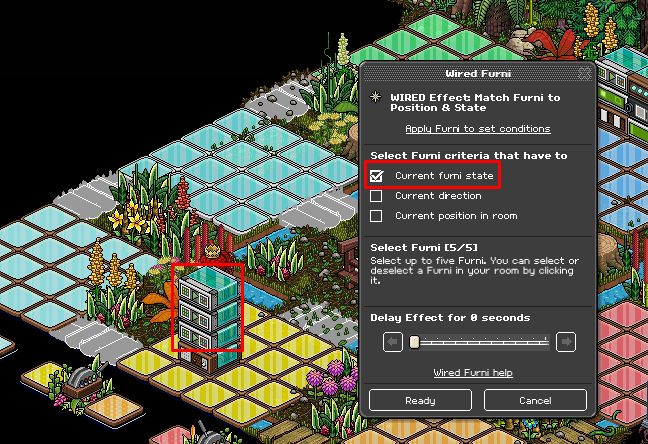
The second thing to set up is your timer. For this you will need 1x Wired Trigger: User Says Keyword & 2x Wired Effect: Match Furni To Position & State as shown below.
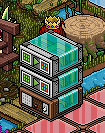
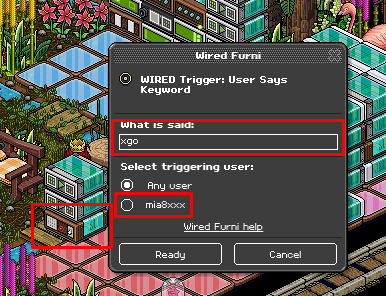
Click on the Wired Trigger: User Says Keyword and use a word you will remember that will start the timer for example; 'xgo’.
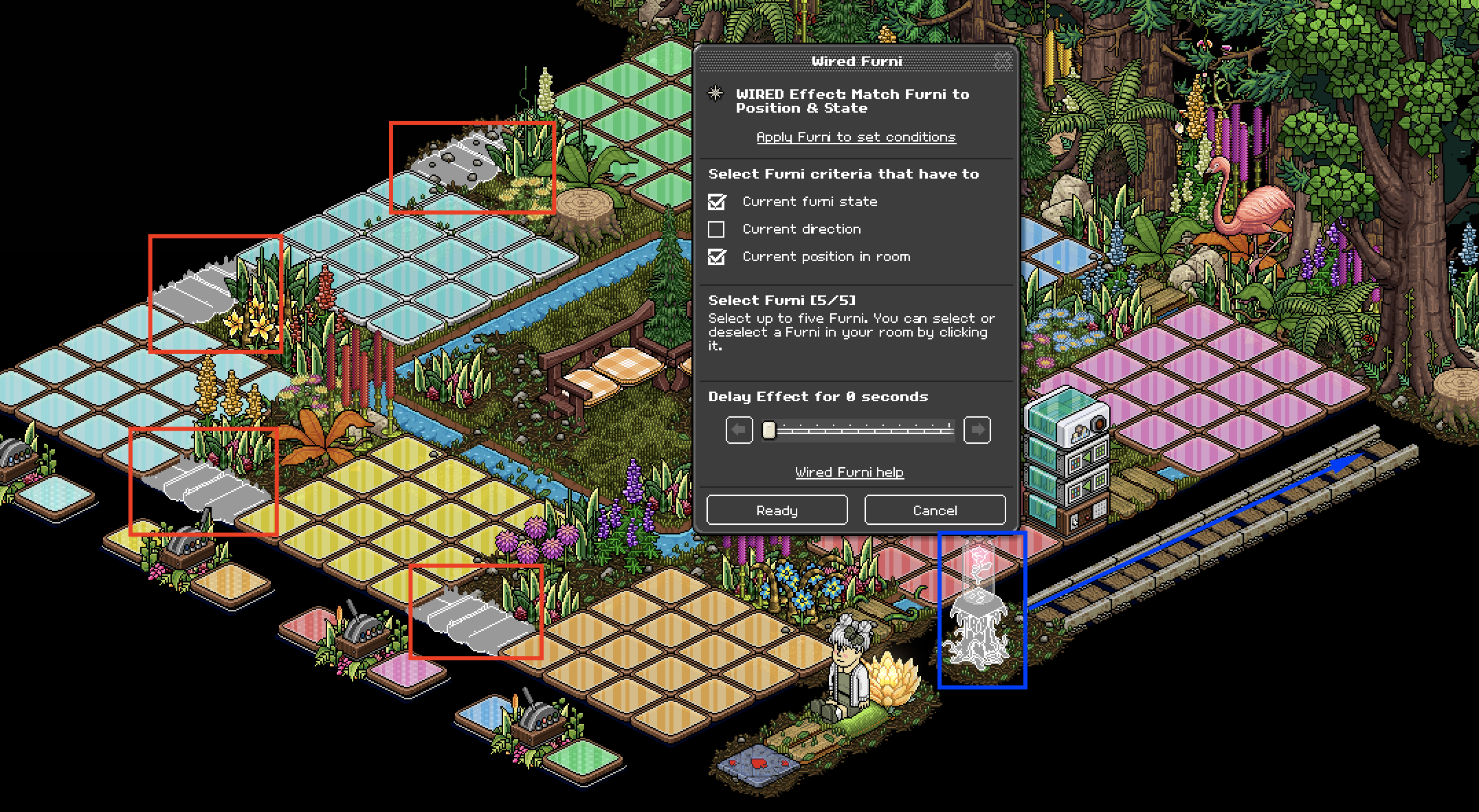
Click on the first Wired Effect: Match Furni To Position & State and select your item you will be using on the timer (in this case it is the Wilting Rose) and put it on the first roller. Make sure that all your gates are open (in-game) and select the ditches around the colour tiles. Make sure to select current position & current furni state in room on the first Wired Effect: Match Furni To Position & State and select only current furni state on the second Wired Effect: Match Furni To Position & State.
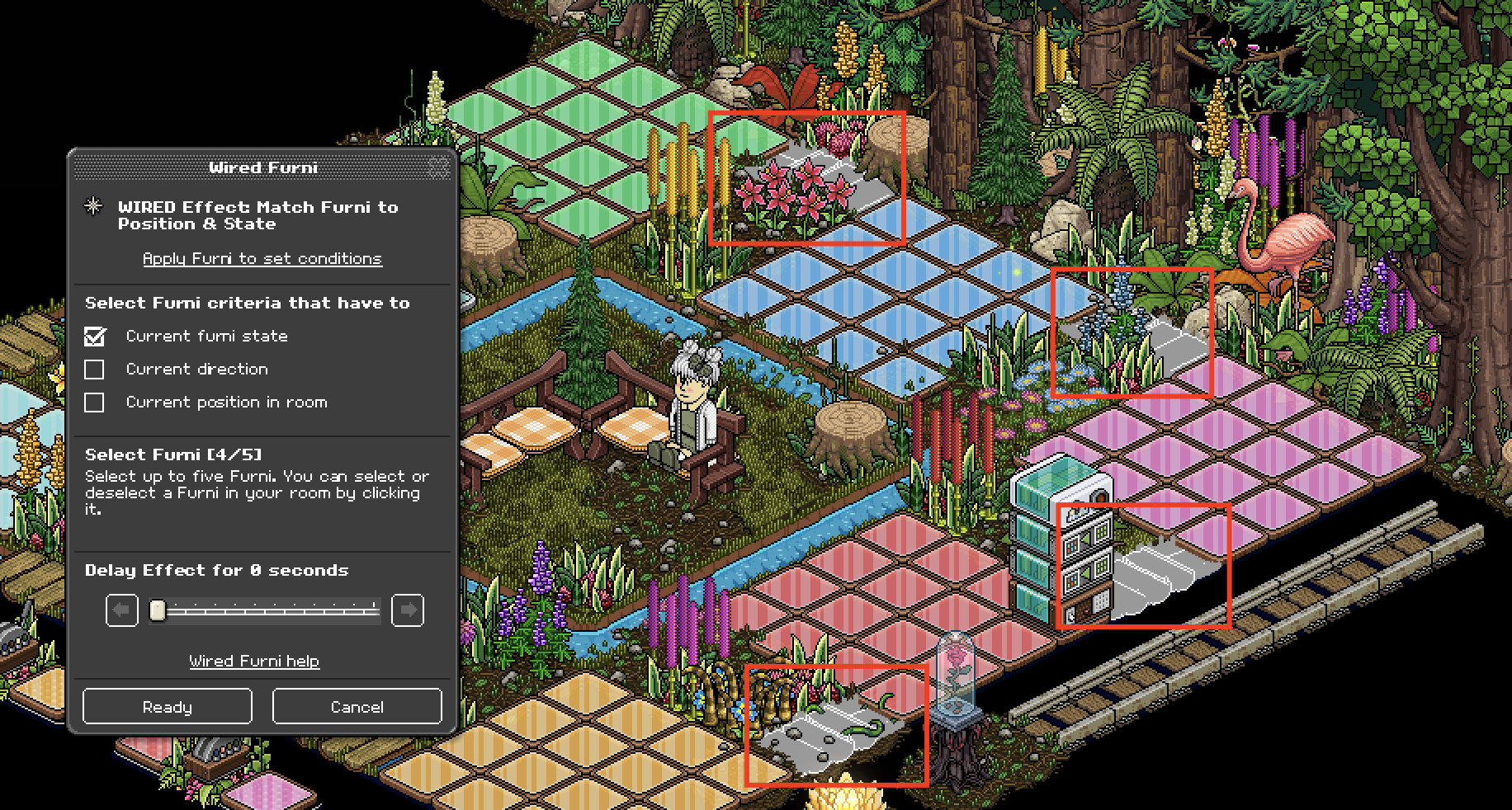
Click on the second Wired Effect: Match Furni To Position & State and select the remaining ditches. Make sure they are all closed and select current furni state.
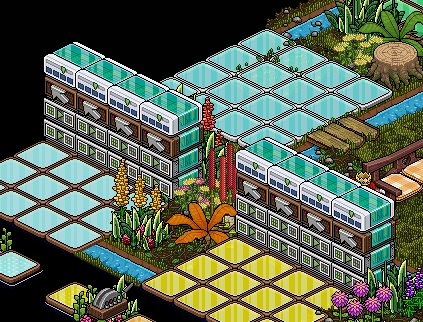
This step is the longest, you now need to set up your switches so that when you land on a colour and flick the switch, kicker objects will come out to exit everyone from the colour. For this you will need 8x Wired Trigger: Furni State Is Changed, 16x Wired Effect: Match Furni To State & Position & 8x Wired Condition: Triggering User Is On Furni as shown below.
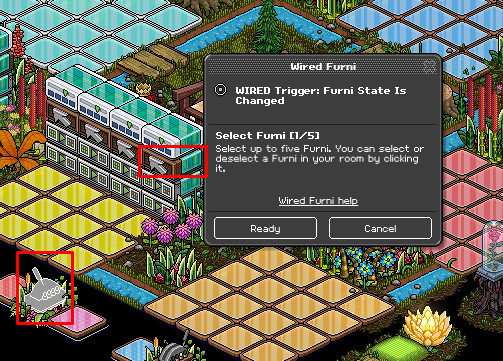
Click on each of the Wired Trigger: Furni State Is Changed and select a switch for each stack.
NOTE: YOU HAVE TO DO THIS FOR EACH STACK!
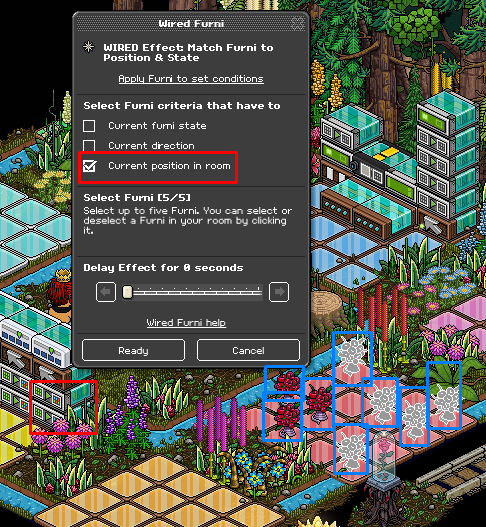
Place your kicker Items (in this case Roses) and place them on one set of coloured tiles at a time. Select each of the Wired Effect: Match Furni To Position & State and select all the kicker Items then select current position in the room.
NOTE: YOU HAVE TO DO THIS FOR EACH STACK!
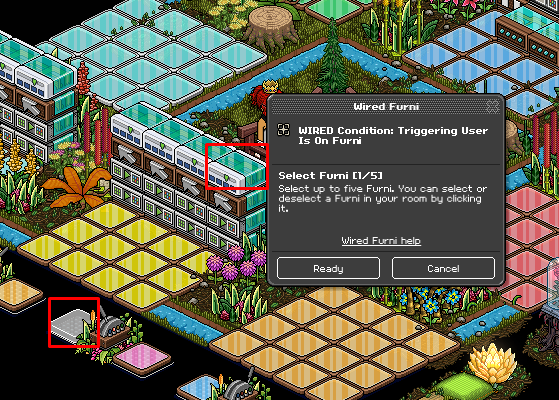
Click on each of the Wired Condition: Triggering User Is On Furni and select the colour tile for that section as shown below.
NOTE: YOU HAVE TO DO THIS FOR EACH STACK!
The next step is to make the ditches automatically close once the timer has finished. For this you will need: 1x Wired Trigger: Repeat Effect, 2x Wired Effect: Match Furni To Position & State & 1x Wired Condition: Has Furni on as shown below.
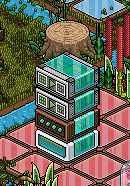
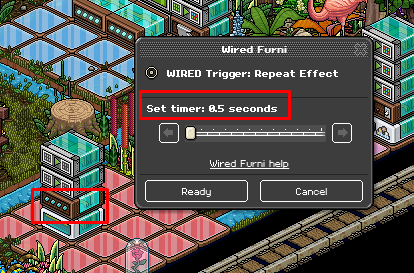
Click on the Wired Trigger: Repeat Effect and set it to 0.5 seconds.
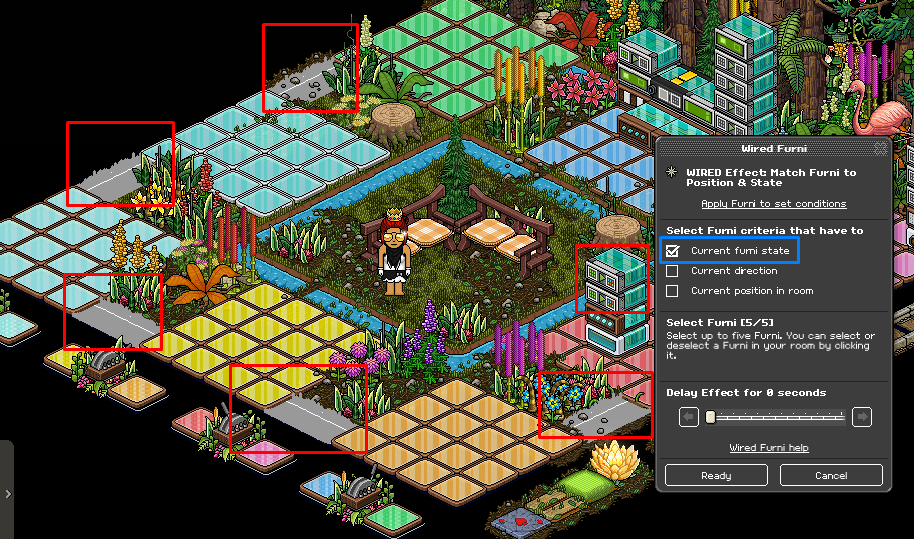
Click on each of the Wired Effect: Match Furni To Position & State and select the ditches. Make sure they are all closed before selecting them and click the current furni state on each.
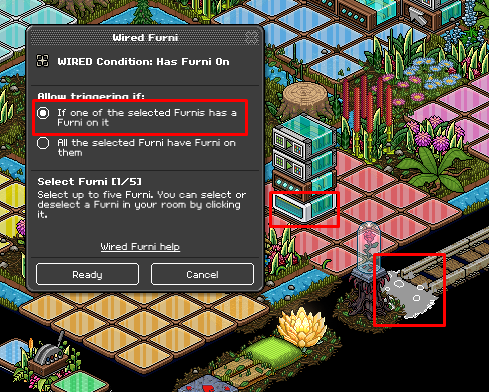
Click on the Wired Condition: Has Furni On and select the flooring or tile at the end of the rollers as shown below. Select If one of the selected Furnis has a Furni on it.
In this step, you are going to learn how to close all the gates using a keyword. For this, you will need: 1x Wired Trigger: User Says Keyword & 3x Wired Effect: Match Furni To Position & State as shown below.
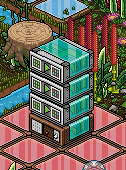
Click on the Wired Trigger: User Says Keyword and set it to a word you will remember that closes that gates, for example; 'xclose’.
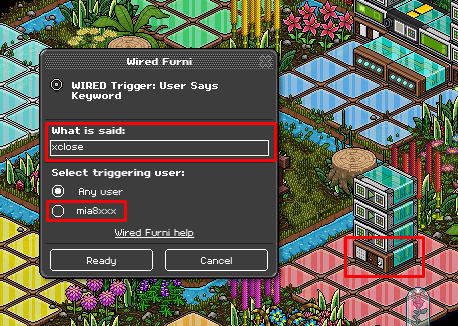
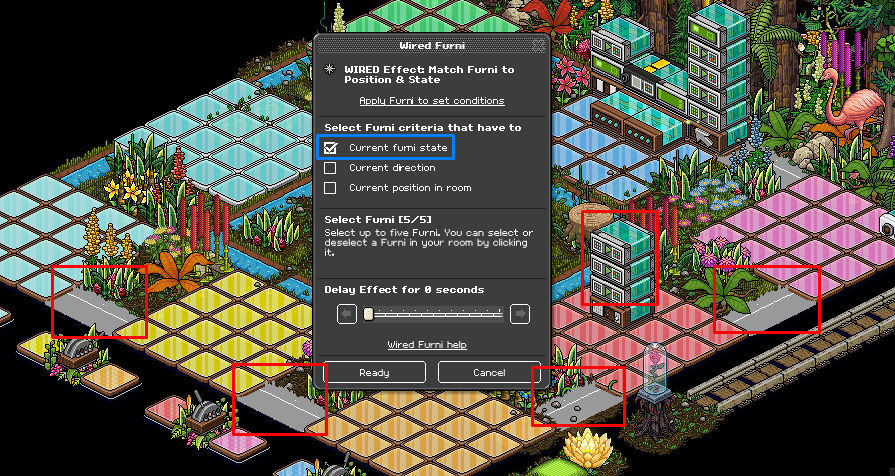
Click on each of the Wired Effect: Match Furni To Position & State and select all the ditches. Make sure they are closed and select current furni state.
[notice]Step 6
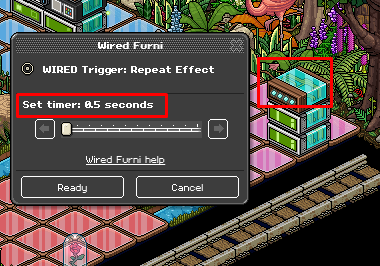
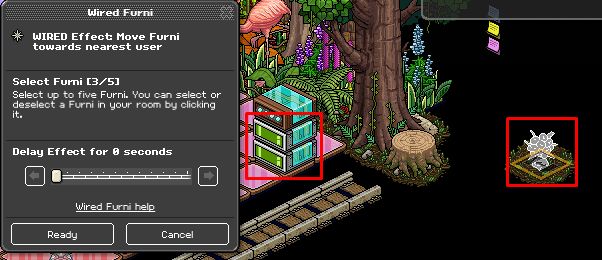
The next step is to make your kicker items for this you will need: 1x Wired Trigger: Repeat Effect & 2x Wired Effect: Move Furni Towards Nearest User as shown below.
Click on the Wired Trigger: Repeat Effect and set it to 0.5 seconds.
Click on each other Wired Effect: Move Furni Towards Nearest User and select your kicker item. In this case, it is the roses. Make sure all the kicker items are hidden away.
[notice]Step 7
Lastly, you will need to set it up so that when you flick the switch the kicker items will clear and you will teleport back to your seat to start the next round. For this you will need: 1x Wired Trigger: Furni State Is Changed, 4x Wired Effect: Match Furni To Position & State & 1x Wired Effect: Teleport To Furni as shown below.
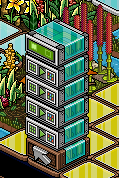
Click on the Wired Trigger: Furni State Is Changed and select all the switches.
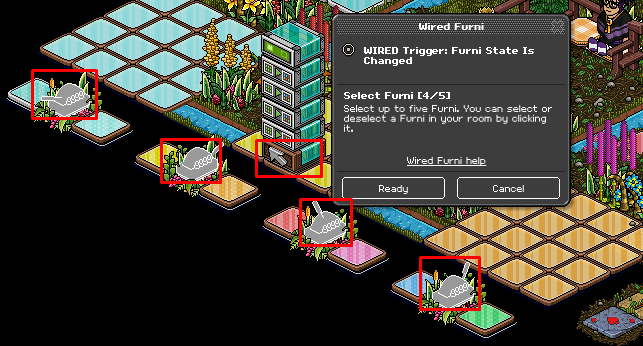
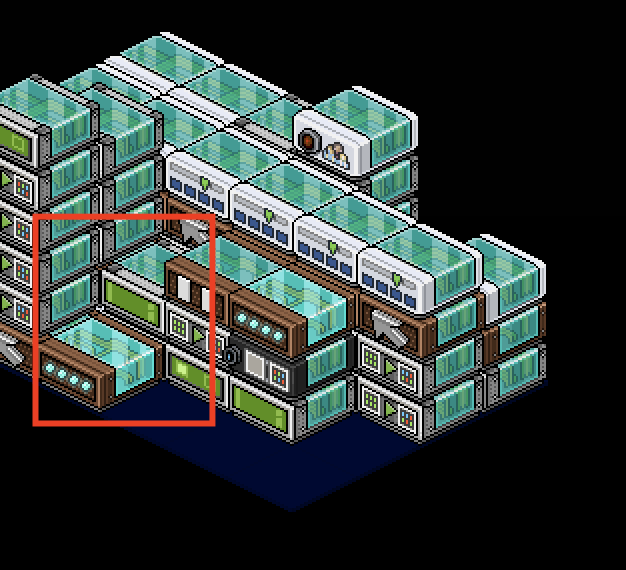
Click on the first two Wired Effect: Match Furni To Position & State and select the Wired Trigger: Repeat Effect from the previous step. Make sure the wired has been hidden (in your wide area) to where you want it before doing this step, and select current position in the room. Make sure to place the repeat effect wired by itself and not on top of any other wired. Like this:
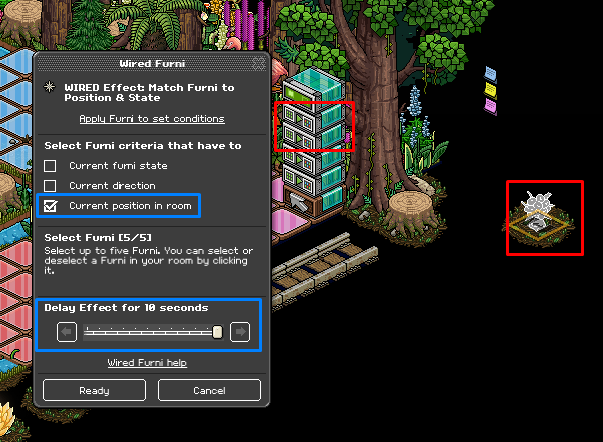
Click on the second two pieces of Wired Effect: Match Furni To Position & State and select your kicker items. Make sure they are hidden away on a square where they cannot move, either created with floorplan or blocked off area, then select current position in a room and set the delay time to 10 seconds.
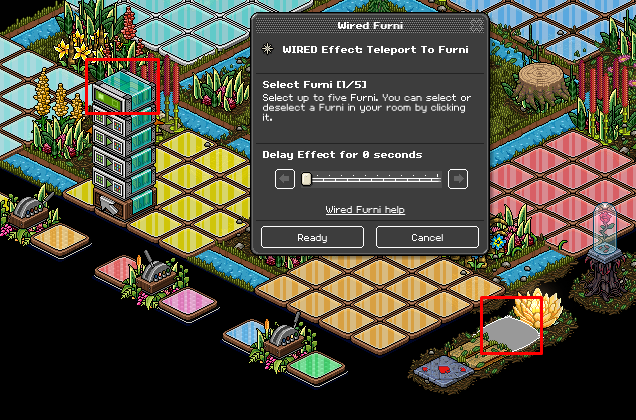
Click on the Wired Effect: Teleport To Furni and select the seat you are using to host with, in this case, it is the green pillow.
You now have your very own Colour Roulette game!
What You Will Need
3x Wired Trigger: User Says Keyword.
2x Wired Trigger: Furni State Is Changed
2x Wired Trigger: Repeat Effect
30x Wired Effect: Match Furni To Position & State
2x Wired Effect: Move Furni Towards Nearest User
1x Wired Effect: Teleport To Furni
8x Wired Condition: Triggering User Is On Furni
1x Wired Condition: Has Furni On
1x 1x1 Magic Stack Tile
Room Layout
Step 1
The first thing you need to do is set up the wired to open all the gates. For this you will need 1x Wired Trigger: User Says Keyword & 3x Wired Effect: Match Furni To Position & State as shown below.
Click on the Wired Trigger: User Says Keyword and use a word you will remember that opens all the gates for example; 'xopen’.
Click on each of the Wired Effect: Match Furni To Position & State and select the ditches around the colour tiles. Make sure the ditches are all open and select current furni state.
Step 2
The second thing to set up is your timer. For this you will need 1x Wired Trigger: User Says Keyword & 2x Wired Effect: Match Furni To Position & State as shown below.
Click on the Wired Trigger: User Says Keyword and use a word you will remember that will start the timer for example; 'xgo’.
Click on the first Wired Effect: Match Furni To Position & State and select your item you will be using on the timer (in this case it is the Wilting Rose) and put it on the first roller. Make sure that all your gates are open (in-game) and select the ditches around the colour tiles. Make sure to select current position & current furni state in room on the first Wired Effect: Match Furni To Position & State and select only current furni state on the second Wired Effect: Match Furni To Position & State.
Click on the second Wired Effect: Match Furni To Position & State and select the remaining ditches. Make sure they are all closed and select current furni state.
Step 3
This step is the longest, you now need to set up your switches so that when you land on a colour and flick the switch, kicker objects will come out to exit everyone from the colour. For this you will need 8x Wired Trigger: Furni State Is Changed, 16x Wired Effect: Match Furni To State & Position & 8x Wired Condition: Triggering User Is On Furni as shown below.
Click on each of the Wired Trigger: Furni State Is Changed and select a switch for each stack.
NOTE: YOU HAVE TO DO THIS FOR EACH STACK!
Place your kicker Items (in this case Roses) and place them on one set of coloured tiles at a time. Select each of the Wired Effect: Match Furni To Position & State and select all the kicker Items then select current position in the room.
NOTE: YOU HAVE TO DO THIS FOR EACH STACK!
Click on each of the Wired Condition: Triggering User Is On Furni and select the colour tile for that section as shown below.
NOTE: YOU HAVE TO DO THIS FOR EACH STACK!
Step 4
The next step is to make the ditches automatically close once the timer has finished. For this you will need: 1x Wired Trigger: Repeat Effect, 2x Wired Effect: Match Furni To Position & State & 1x Wired Condition: Has Furni on as shown below.
Click on the Wired Trigger: Repeat Effect and set it to 0.5 seconds.
Click on each of the Wired Effect: Match Furni To Position & State and select the ditches. Make sure they are all closed before selecting them and click the current furni state on each.
Click on the Wired Condition: Has Furni On and select the flooring or tile at the end of the rollers as shown below. Select If one of the selected Furnis has a Furni on it.
Step 5
In this step, you are going to learn how to close all the gates using a keyword. For this, you will need: 1x Wired Trigger: User Says Keyword & 3x Wired Effect: Match Furni To Position & State as shown below.
Click on the Wired Trigger: User Says Keyword and set it to a word you will remember that closes that gates, for example; 'xclose’.
Click on each of the Wired Effect: Match Furni To Position & State and select all the ditches. Make sure they are closed and select current furni state.
[notice]Step 6
The next step is to make your kicker items for this you will need: 1x Wired Trigger: Repeat Effect & 2x Wired Effect: Move Furni Towards Nearest User as shown below.
Click on the Wired Trigger: Repeat Effect and set it to 0.5 seconds.
Click on each other Wired Effect: Move Furni Towards Nearest User and select your kicker item. In this case, it is the roses. Make sure all the kicker items are hidden away.
[notice]Step 7
Lastly, you will need to set it up so that when you flick the switch the kicker items will clear and you will teleport back to your seat to start the next round. For this you will need: 1x Wired Trigger: Furni State Is Changed, 4x Wired Effect: Match Furni To Position & State & 1x Wired Effect: Teleport To Furni as shown below.
Click on the Wired Trigger: Furni State Is Changed and select all the switches.
Click on the first two Wired Effect: Match Furni To Position & State and select the Wired Trigger: Repeat Effect from the previous step. Make sure the wired has been hidden (in your wide area) to where you want it before doing this step, and select current position in the room. Make sure to place the repeat effect wired by itself and not on top of any other wired. Like this:
Click on the second two pieces of Wired Effect: Match Furni To Position & State and select your kicker items. Make sure they are hidden away on a square where they cannot move, either created with floorplan or blocked off area, then select current position in a room and set the delay time to 10 seconds.
Click on the Wired Effect: Teleport To Furni and select the seat you are using to host with, in this case, it is the green pillow.
You now have your very own Colour Roulette game!
Eevee7 years ago