
In this tutorial, I am going to show you how to wire the game Jumpman.
1 Wired Trigger: Furni State Is Changed
1 Wired Trigger: User Walks On Furni
1 Wired Trigger: Repeat Effect
1 Wired Trigger: User Stuff Collision
12 Wired Trigger: User Says Keyword
1 Wired Effect: Change Furni Direction
1 Wired Effect: Toggle Furni State
9 Wired Effect: Match Furni To Position & State
16 Wired Effect: Teleport To Furni
10 Wired Condition: Triggering User Is On Furni
1 Counter
2 Switches
5 Attack Objects
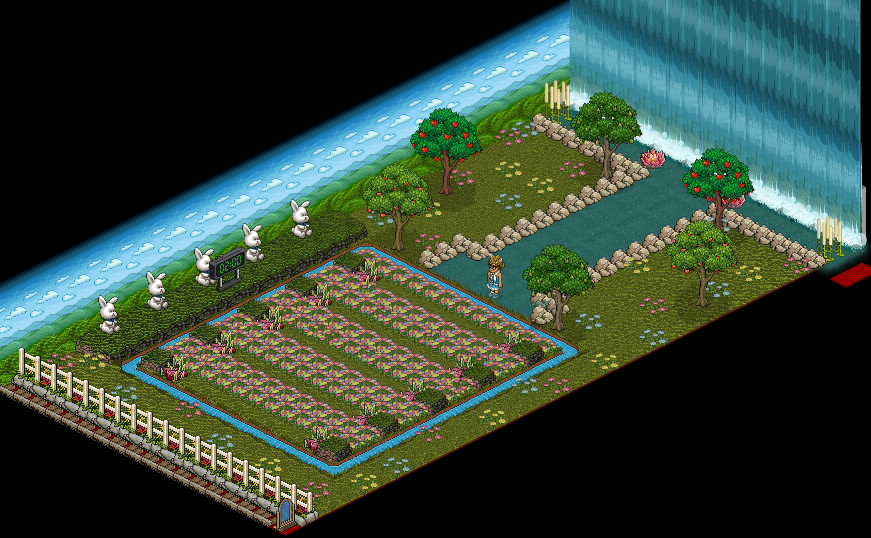
The first part is to allow people to get into the line. For this you will need
1 Wired Trigger: Furni State Is Changed
1 Wired Effect: Teleport To Furni

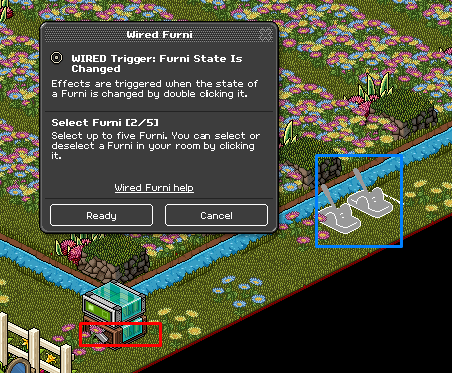
Double click your Wired Trigger: Furni State Is Changed and select the item your using in this case I have used switches.
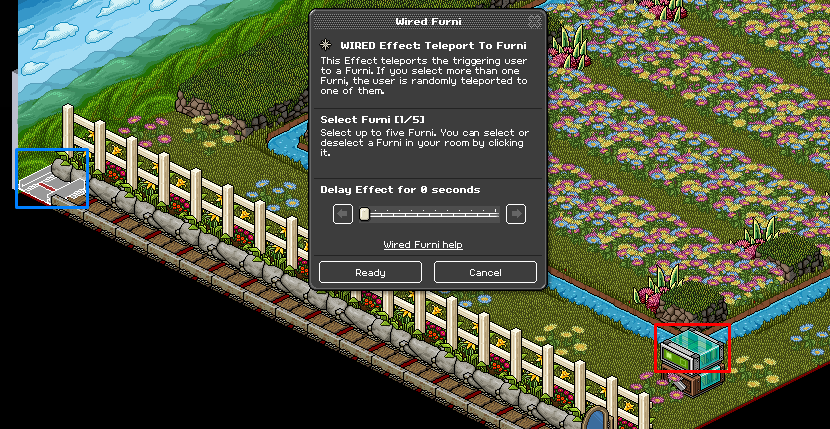
Double click your Wired Effect: Teleport To Furni and select the last roller in the line.
I am now going to show you how to set up the automatic queue wired. I am going to show you how to set it up for 5 players, for this you will need
1 Wired Trigger: User Walks On Furni,
5 Wired Effect: Teleport To Furni
5 Wired Effect: Match Furni To Position & State

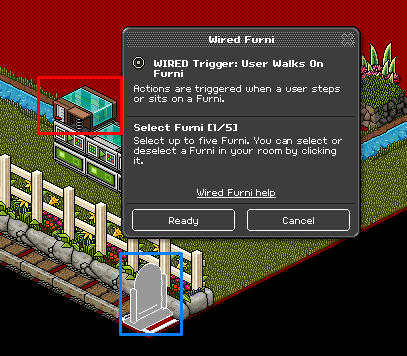
Double click the 1x Wired Trigger: User Walks On Furni and select the gate people will need to walk on to get into the game.
Double click the first Wired Effect: Teleport To Furni and select the first stage and continue to click the next Wired Effect: Teleport To Furni and select the second stage and so on.
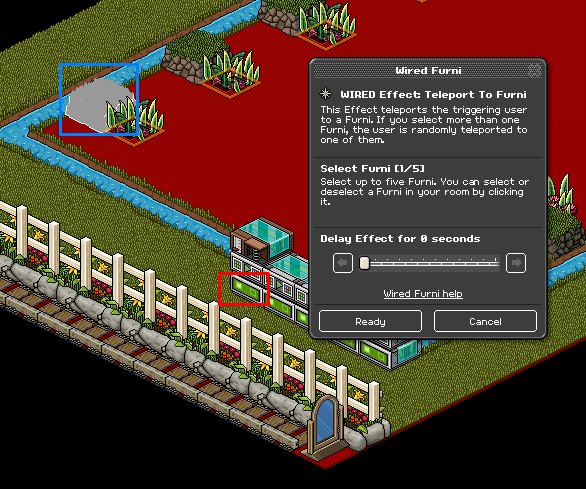
Double click the first Wired Effect: Match Furni To Position & State and place the Wired Trigger: User Walks On Furni and put it on the next row of wired as shown below, continue to do this until the last one make sure you select current position in room.
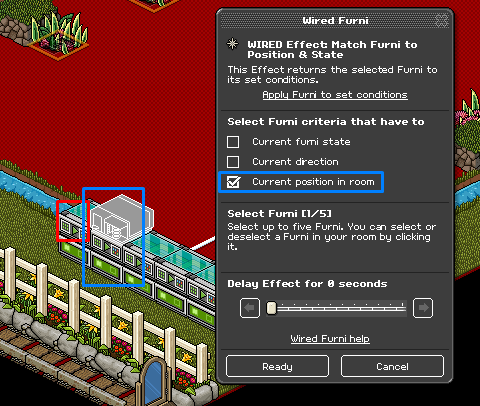
On the last Wired Effect: Match Furni To Position & State move the Wired Trigger: User Walks On Furni back to the start as shown below, select the gate and make sure it is closed. Make sure you select current position in room & current furni state.
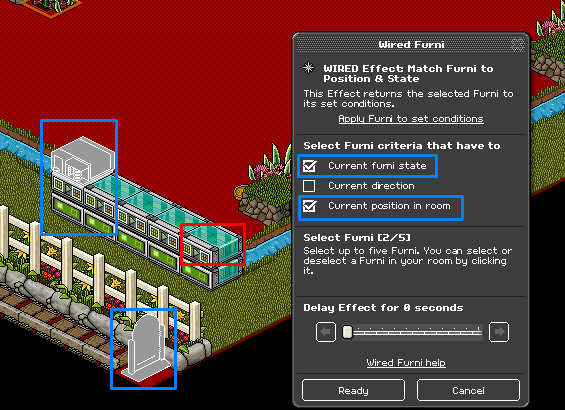
To set up the stages you are going to need:
10 Wired Trigger: User Says Keyword
10 Wired Effect: Teleport To Furni
10 Wired Condition: Triggering User Is On Furni
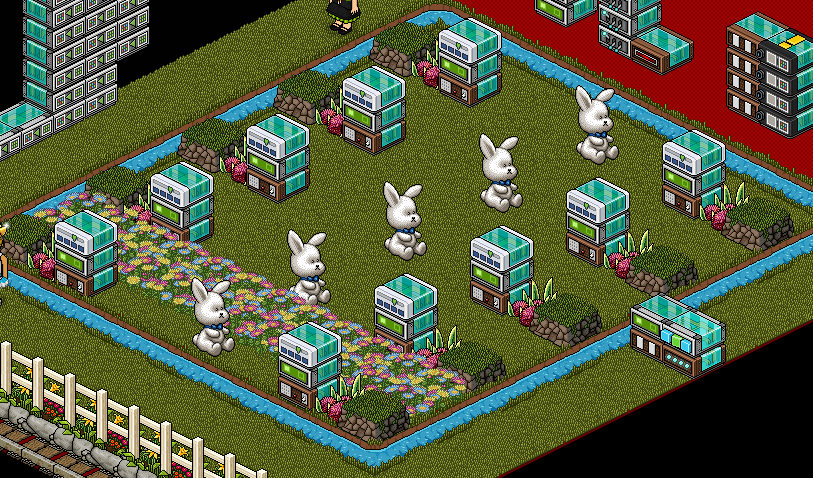
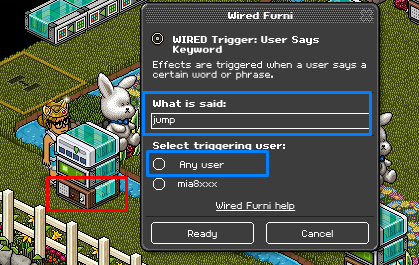
Double click the first Wired Trigger: User Says Keyword and type in 'Jump’ and set it to any user, do this with all the Wired Trigger: User Says Keyword.
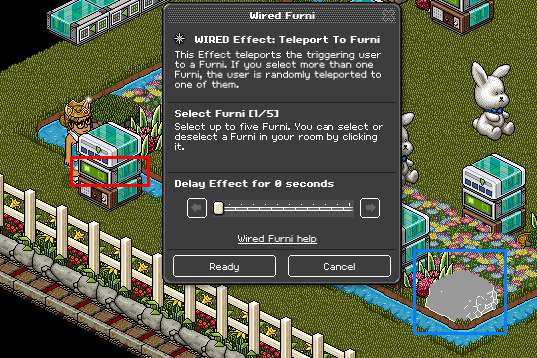
Double click the Wired Effect: Teleport To Furni and select the small lost tribe stage opposite the Wired Trigger: User Says Keyword.
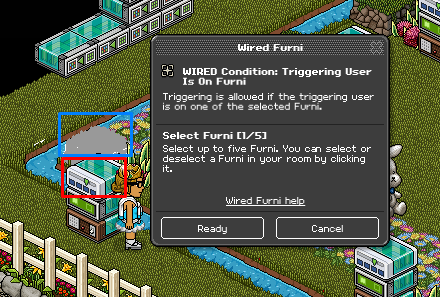
Double click the Wired Condition: Triggering User Is On Furni and select the lost tribe stage that the wired stack is next to as shown below.
Continue to do this for all the other stacks.
We are now going to wire the attack objects for this you will need:
1 Wired Trigger: User Stuff Collision
1 Wired Trigger: Repeat Effect
1 Wired Effect: Teleport To Furni
1 Wired Effect: Change Furni Direction
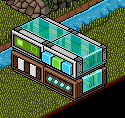
Double click the Wired Effect: Teleport To Furni and select an item or area outside of the playing area.
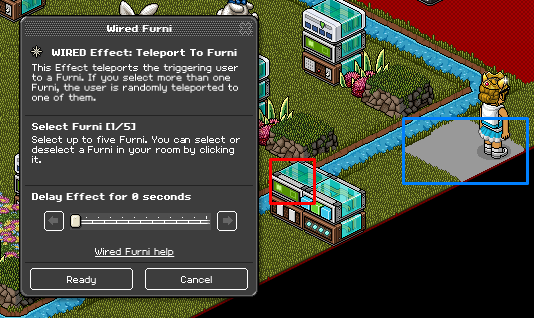
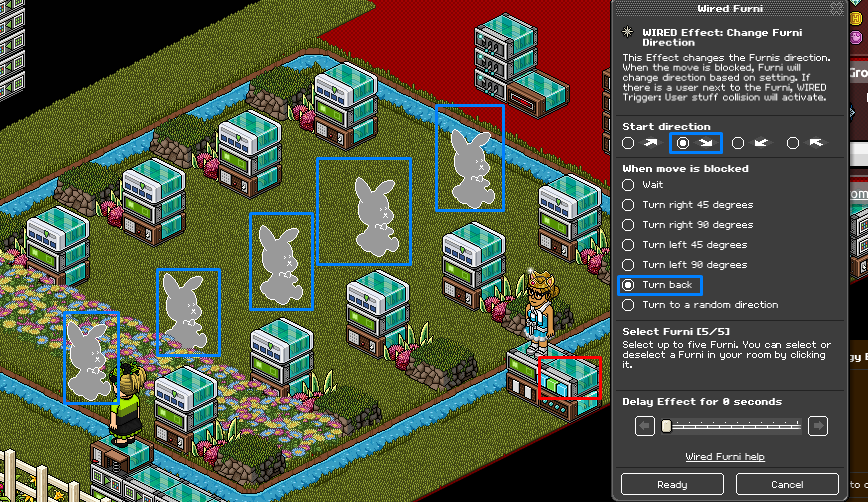
Double click the Wired Effect: Change Furni Direction and select the attack items, in this case, I used bunnies. Make sure to select the opposite arrow and back as shown below.
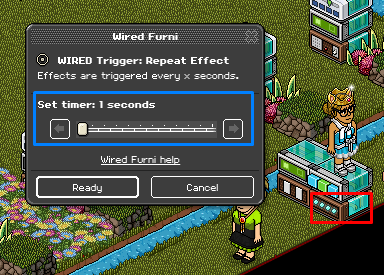
Double click the Wired Trigger: Repeat Effect and set it to 1 second (this can be changed as the rounds go on).
To start the game you will need:
1 Wired Trigger: User Says Keyword
2 Wired Effect: Match Furni To Position State
1 Wired Effect: Toggle Furni State
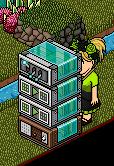
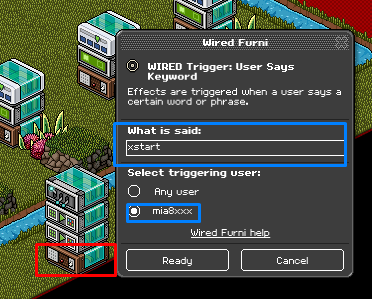
Double click the Wired Trigger: User Says Keyword and set it to a word you will remember to start the game. Make sure it is set to only you.
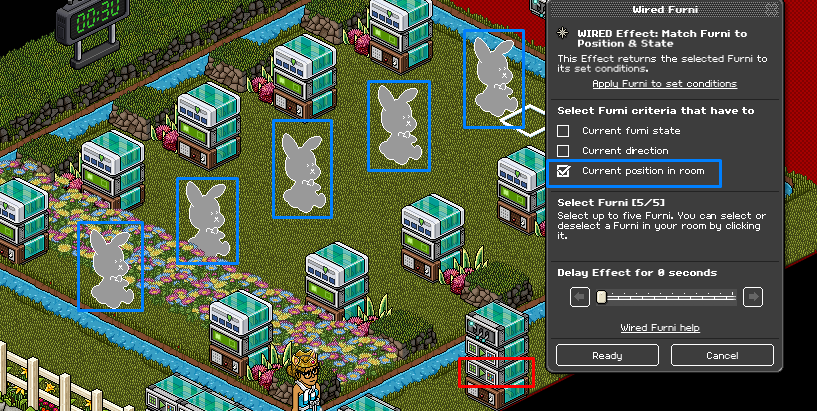
Double click the first Wired Effect: Match Furni To Position & State and select the 5 attack items, make sure they are placed where you want to them to start and select current position in room.
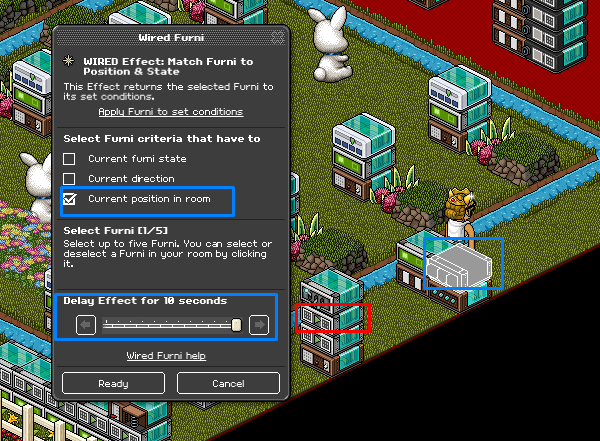
Double click the second Wired Effect: Match Furni To Position & State and place the Wired Effect: Change Furni Direction from the previous stop on top of the Wired Trigger: Repeat Effect and select current position in room.
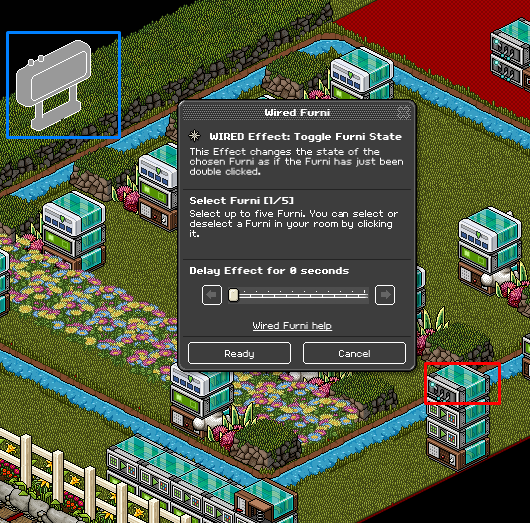
Double click the Wired Effect: Toggle Furni State and select the counter.
Finally, to reset the whole game to begin a new game you will need:
1 Wired Trigger: User Says Keyword
2 Wired Effect: Match Furni To Position & State
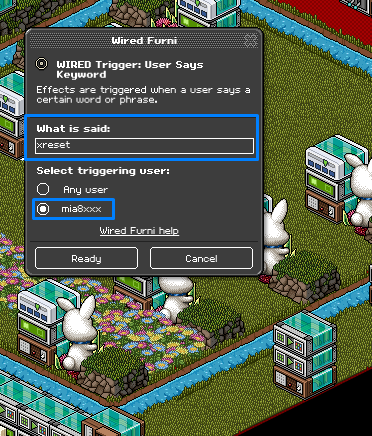
Double click the Wired Trigger: User Says Keyword and set it to a word you will remember to reset the game and make sure it is set to only you.
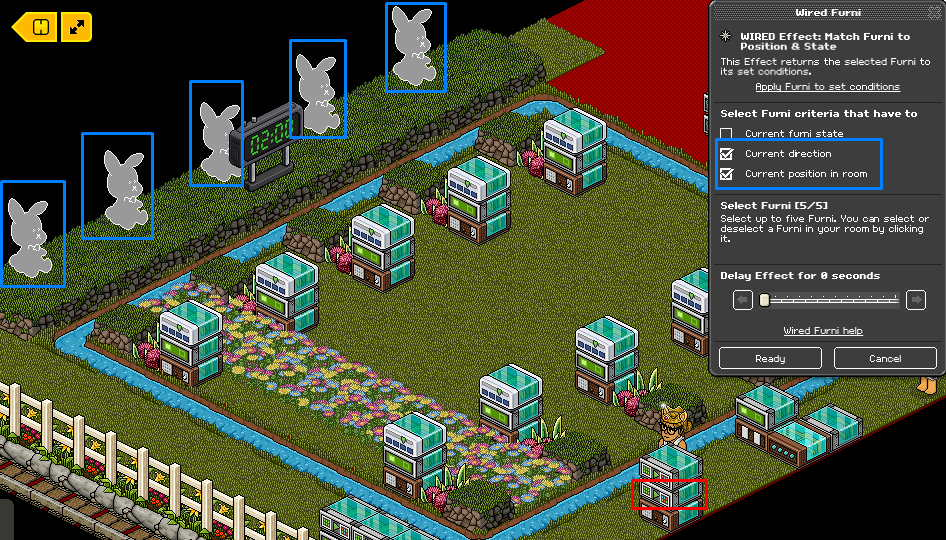
Double click the first Wired Effect: Match Furni To Position & State and select all the attack objects make sure they are out of the playing area.
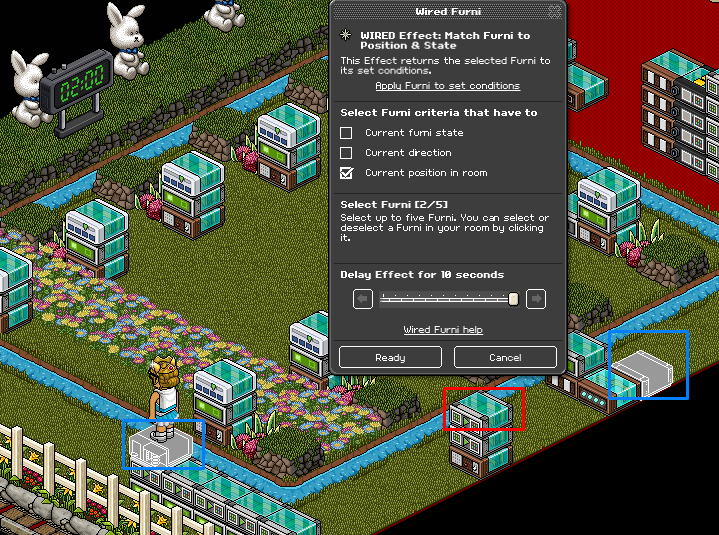
Double click the second Wired Effect: Match Furni To Position & State and select the Wired Trigger: User Walks On Furni from the second step and put it back to the first stack and also select the Wired Effect: Change Furni Direction and move it off the Wired Trigger: Repeat Effect as shown below. Make sure to select current position in room.
Note: When you hide the wired make sure all the Wired Effect: Match Furni To Position & State that has current position in room selected is also saved again when you have hid them all.
What You Need
1 Wired Trigger: Furni State Is Changed
1 Wired Trigger: User Walks On Furni
1 Wired Trigger: Repeat Effect
1 Wired Trigger: User Stuff Collision
12 Wired Trigger: User Says Keyword
1 Wired Effect: Change Furni Direction
1 Wired Effect: Toggle Furni State
9 Wired Effect: Match Furni To Position & State
16 Wired Effect: Teleport To Furni
10 Wired Condition: Triggering User Is On Furni
1 Counter
2 Switches
5 Attack Objects
Room Layout
Step 1
The first part is to allow people to get into the line. For this you will need
1 Wired Trigger: Furni State Is Changed
1 Wired Effect: Teleport To Furni
Double click your Wired Trigger: Furni State Is Changed and select the item your using in this case I have used switches.
Double click your Wired Effect: Teleport To Furni and select the last roller in the line.
Step 2
I am now going to show you how to set up the automatic queue wired. I am going to show you how to set it up for 5 players, for this you will need
1 Wired Trigger: User Walks On Furni,
5 Wired Effect: Teleport To Furni
5 Wired Effect: Match Furni To Position & State
Double click the 1x Wired Trigger: User Walks On Furni and select the gate people will need to walk on to get into the game.
Double click the first Wired Effect: Teleport To Furni and select the first stage and continue to click the next Wired Effect: Teleport To Furni and select the second stage and so on.
Double click the first Wired Effect: Match Furni To Position & State and place the Wired Trigger: User Walks On Furni and put it on the next row of wired as shown below, continue to do this until the last one make sure you select current position in room.
On the last Wired Effect: Match Furni To Position & State move the Wired Trigger: User Walks On Furni back to the start as shown below, select the gate and make sure it is closed. Make sure you select current position in room & current furni state.
Step 3
To set up the stages you are going to need:
10 Wired Trigger: User Says Keyword
10 Wired Effect: Teleport To Furni
10 Wired Condition: Triggering User Is On Furni
Double click the first Wired Trigger: User Says Keyword and type in 'Jump’ and set it to any user, do this with all the Wired Trigger: User Says Keyword.
Double click the Wired Effect: Teleport To Furni and select the small lost tribe stage opposite the Wired Trigger: User Says Keyword.
Double click the Wired Condition: Triggering User Is On Furni and select the lost tribe stage that the wired stack is next to as shown below.
Continue to do this for all the other stacks.
Step 4
We are now going to wire the attack objects for this you will need:
1 Wired Trigger: User Stuff Collision
1 Wired Trigger: Repeat Effect
1 Wired Effect: Teleport To Furni
1 Wired Effect: Change Furni Direction
Double click the Wired Effect: Teleport To Furni and select an item or area outside of the playing area.
Double click the Wired Effect: Change Furni Direction and select the attack items, in this case, I used bunnies. Make sure to select the opposite arrow and back as shown below.
Double click the Wired Trigger: Repeat Effect and set it to 1 second (this can be changed as the rounds go on).
Step 5
To start the game you will need:
1 Wired Trigger: User Says Keyword
2 Wired Effect: Match Furni To Position State
1 Wired Effect: Toggle Furni State
Double click the Wired Trigger: User Says Keyword and set it to a word you will remember to start the game. Make sure it is set to only you.
Double click the first Wired Effect: Match Furni To Position & State and select the 5 attack items, make sure they are placed where you want to them to start and select current position in room.
Double click the second Wired Effect: Match Furni To Position & State and place the Wired Effect: Change Furni Direction from the previous stop on top of the Wired Trigger: Repeat Effect and select current position in room.
Double click the Wired Effect: Toggle Furni State and select the counter.
Step 6
Finally, to reset the whole game to begin a new game you will need:
1 Wired Trigger: User Says Keyword
2 Wired Effect: Match Furni To Position & State
Double click the Wired Trigger: User Says Keyword and set it to a word you will remember to reset the game and make sure it is set to only you.
Double click the first Wired Effect: Match Furni To Position & State and select all the attack objects make sure they are out of the playing area.
Double click the second Wired Effect: Match Furni To Position & State and select the Wired Trigger: User Walks On Furni from the second step and put it back to the first stack and also select the Wired Effect: Change Furni Direction and move it off the Wired Trigger: Repeat Effect as shown below. Make sure to select current position in room.
Note: When you hide the wired make sure all the Wired Effect: Match Furni To Position & State that has current position in room selected is also saved again when you have hid them all.
Eevee7 years ago