
You may be familiar with the Tile Game, usually used in Badge Events. Here is how you can create your very own!
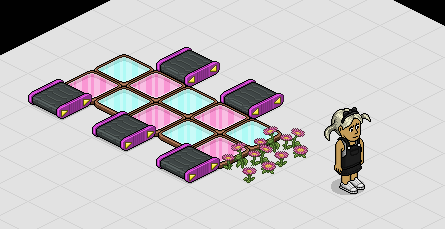
Set out your game area like shown below with your Colour Tiles, Habbo Rollers and Start Items. I am using Pink Pandemics as my start items but you can use whatever you want. I also recommend that you use two different colours for your Colour tiles. You will also want to make sure your Rollers are facing the correct direction.
Drop your two Walks On Furni Triggers. Wire the first Walks on Trigger and select five of your colour tiles.
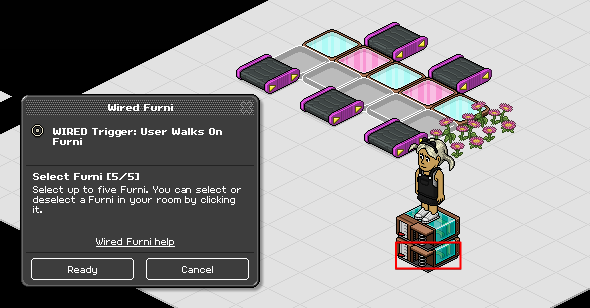
Wire the second Walks on Trigger and select the other five colour tiles. All your colour tiles should be selected now.
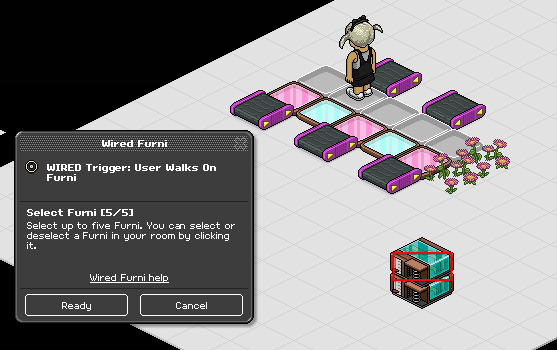
Add your Teleport to Furni Effect to your stack. Wire the Teleport to Furni Effect and select your items where you want the players to start. Players will also teleport back to these items when they walk on the tiles and lose. I'm using two Pink Pandemics but you can use any other furni e.g tiles or seats.
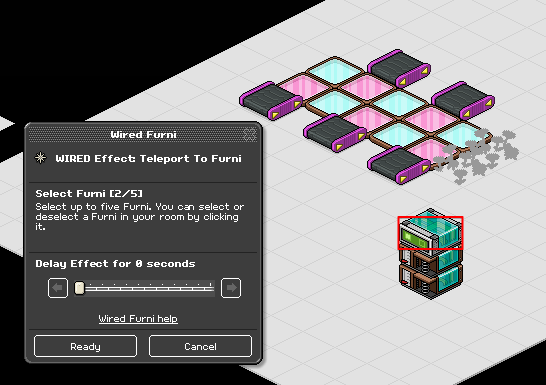
Drop your last Walk on Trigger. Wire it and select your five Habbo Rollers.
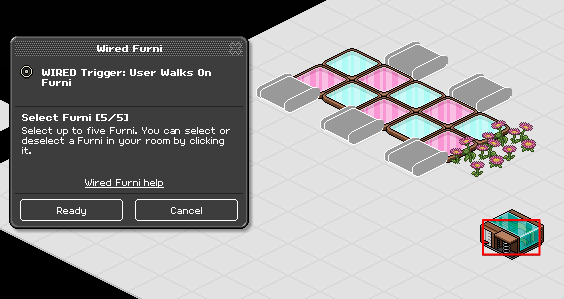
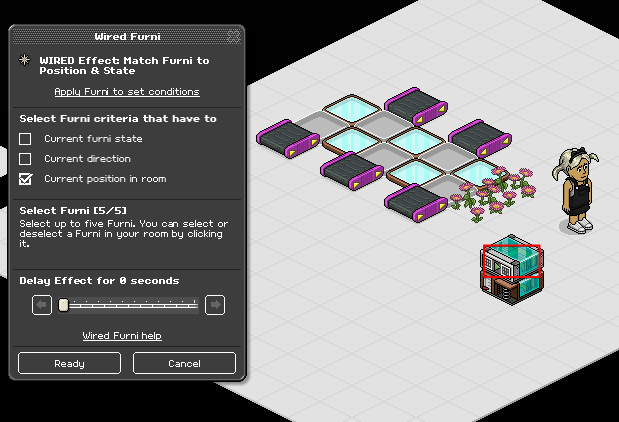
Add your Match Furni to Position & State Effect to the stack. Wire it and select five colour tiles of the same colour. I'm selecting my pink colour tiles. Ensure you select Current position in room before continuing.
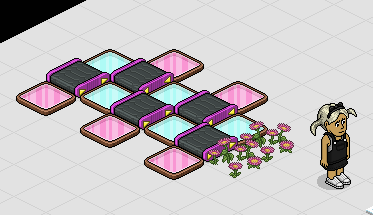
Swap around your Colour Tiles and Habbo Rollers so they are arranged like shown below.
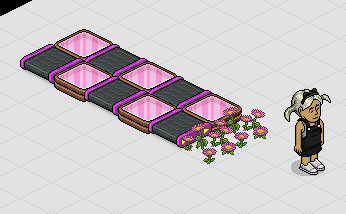
Walk onto your rollers to set up the game. Alternatively you can place the pink tiles on top of the other colour tiles manually. Your game should now be ready and look like mine shown below.
Note: There is a possibility that your game will glitch once you test it. Not to worry, leave your room for a minute and ensure it shows no one is in the room. Once done, enter your room again and your Colour Tiles should be in position.
That's it! All done and ready to be decorated. Your game should work like mine shown below.

What you'll need
- 10x Colour Tiles
- 5x Habbo Rollers
- 3x Wired Trigger: User Walks on Furni
- 1x Wired Effect: Teleport to Furni
- 1x Wired Effect: Match Furni to Position & State
- 2x Start Items (I am using Pink Pandemics)
Game Layout
Set out your game area like shown below with your Colour Tiles, Habbo Rollers and Start Items. I am using Pink Pandemics as my start items but you can use whatever you want. I also recommend that you use two different colours for your Colour tiles. You will also want to make sure your Rollers are facing the correct direction.
Step 1
Drop your two Walks On Furni Triggers. Wire the first Walks on Trigger and select five of your colour tiles.
Wire the second Walks on Trigger and select the other five colour tiles. All your colour tiles should be selected now.
Step 2
Add your Teleport to Furni Effect to your stack. Wire the Teleport to Furni Effect and select your items where you want the players to start. Players will also teleport back to these items when they walk on the tiles and lose. I'm using two Pink Pandemics but you can use any other furni e.g tiles or seats.
Step 3
Drop your last Walk on Trigger. Wire it and select your five Habbo Rollers.
Step 4
Add your Match Furni to Position & State Effect to the stack. Wire it and select five colour tiles of the same colour. I'm selecting my pink colour tiles. Ensure you select Current position in room before continuing.
Step 5
Swap around your Colour Tiles and Habbo Rollers so they are arranged like shown below.
Step 6
Walk onto your rollers to set up the game. Alternatively you can place the pink tiles on top of the other colour tiles manually. Your game should now be ready and look like mine shown below.
Note: There is a possibility that your game will glitch once you test it. Not to worry, leave your room for a minute and ensure it shows no one is in the room. Once done, enter your room again and your Colour Tiles should be in position.
Tile Game
That's it! All done and ready to be decorated. Your game should work like mine shown below.
Eevee7 years ago