[HabboQuests] Habmong Us
by  Rel · 5 years ago

It's time for the hit game, Among Us, to make its grand debut brought to you by HabboQuests!
Room Name: [HabboQuests] Fansite Lounge
Room Owner: kalesalad
Or you can click the room icon at the top of this guide to be taken directly there.
Note: Step 13 may be difficult for Habbo App users because of how close the switches are together!
Walk towards the green alien to teleport.
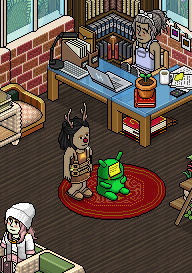
Enter the teleporter shown below.
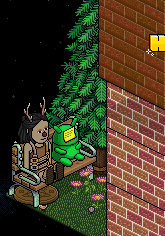
Flick the switch shown below to teleport and receive your first badge.


Enter the teleporter shown below.

Walk on the moving paper balls to collect them.
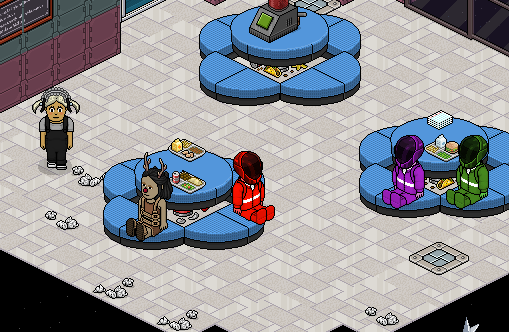
Once they've all been collected, use the switch shown below to teleport.
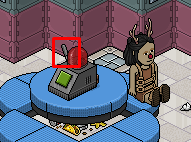
Note: This resets every 10 seconds.
Enter the teleporter shown below.

Wait patiently in the queue.

Stand on the correct colour tile when the Flaming Comet is on the corresponding tile. Once the game ends, wait to be teleported.


Note: You must survive for 1 minute.
Enter the teleporter shown below.

These colour tiles will change colour every 6 seconds you're stood on them. The aim of the game is to get them to the green state without being seen by the white imposter. When the white imposter appears, make sure you're off the colour tile, it appears in various parts of the room.
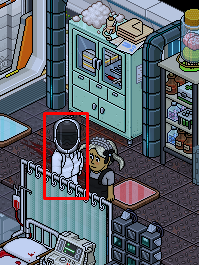
Once any of the tiles are green, stand on it and say done to teleport.

Note: Not all tiles need to be green, you only need 1.
Example

Enter the teleporter shown below.

Wait patiently in the queue.

Each round the numbers will change their place but the game is the same, flick the switch to match the corresponding numbers in order from 1 to 9.
Example
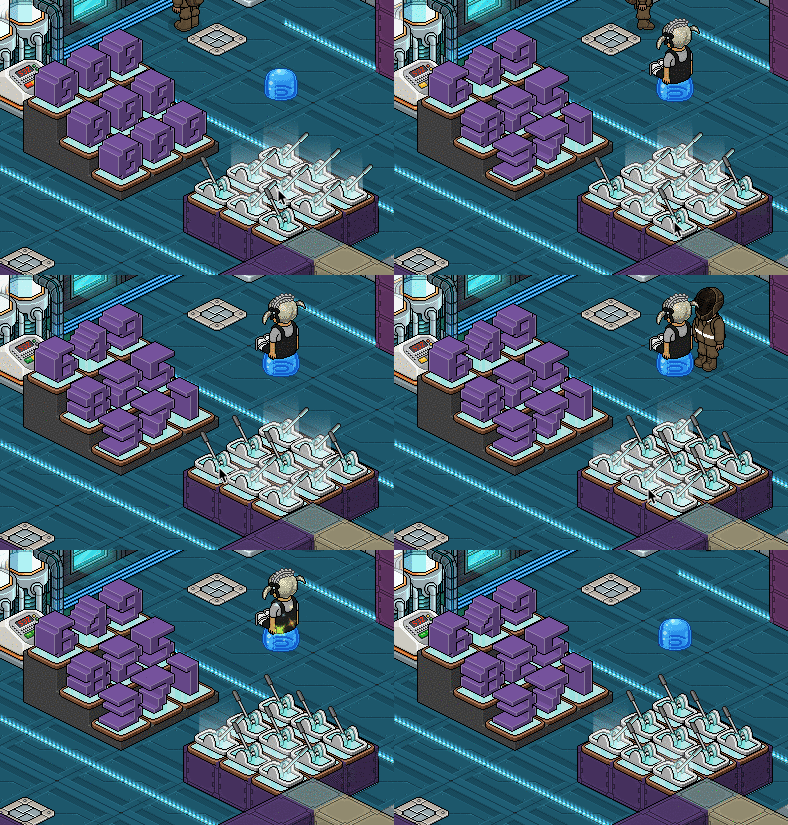
Note: You have 12 seconds to complete this.
Enter the teleporter shown below.

Wait patiently to be given your badge.


For the chance to win 50 credits, take a screenshot of yourself in the badge room and post it on our competition thread by clicking here. Do not post your screenshot in the comments, use the link provided!
If you're viewing this guide as a guest, register an account and ref; Rel

Let us know in the comments section below what your thoughts on this badge quest! Did you enjoy the event?
Room Information
Room Name: [HabboQuests] Fansite Lounge
Room Owner: kalesalad
Or you can click the room icon at the top of this guide to be taken directly there.
Note: Step 13 may be difficult for Habbo App users because of how close the switches are together!
Step 1
Walk towards the green alien to teleport.
Step 2
Enter the teleporter shown below.
Step 3
Flick the switch shown below to teleport and receive your first badge.
Step 4
Enter the teleporter shown below.
Step 5
Walk on the moving paper balls to collect them.
Once they've all been collected, use the switch shown below to teleport.
Note: This resets every 10 seconds.
Step 6
Enter the teleporter shown below.
Step 7
Wait patiently in the queue.
Step 8
Stand on the correct colour tile when the Flaming Comet is on the corresponding tile. Once the game ends, wait to be teleported.
Note: You must survive for 1 minute.
Step 9
Enter the teleporter shown below.
Step 10
These colour tiles will change colour every 6 seconds you're stood on them. The aim of the game is to get them to the green state without being seen by the white imposter. When the white imposter appears, make sure you're off the colour tile, it appears in various parts of the room.
Once any of the tiles are green, stand on it and say done to teleport.
Note: Not all tiles need to be green, you only need 1.
Example
Step 11
Enter the teleporter shown below.
Step 12
Wait patiently in the queue.
Step 13
Each round the numbers will change their place but the game is the same, flick the switch to match the corresponding numbers in order from 1 to 9.
Example
Note: You have 12 seconds to complete this.
Step 14
Enter the teleporter shown below.
Step 15
Wait patiently to be given your badge.
Competition!
For the chance to win 50 credits, take a screenshot of yourself in the badge room and post it on our competition thread by clicking here. Do not post your screenshot in the comments, use the link provided!
If you're viewing this guide as a guest, register an account and ref; Rel
Let us know in the comments section below what your thoughts on this badge quest! Did you enjoy the event?
Shrekreplied 5 years agoShrek5 years ago