
Read this article below for a guide on how to wire a basic automatic single-player Pacman ♥
Wired Stack One
WIRED Trigger: User walks On Furni
WIRED Effect: Teleport To Furni
WIRED Effect: Match Furni to Position & State
WIRED Effect: Toggle Furni State
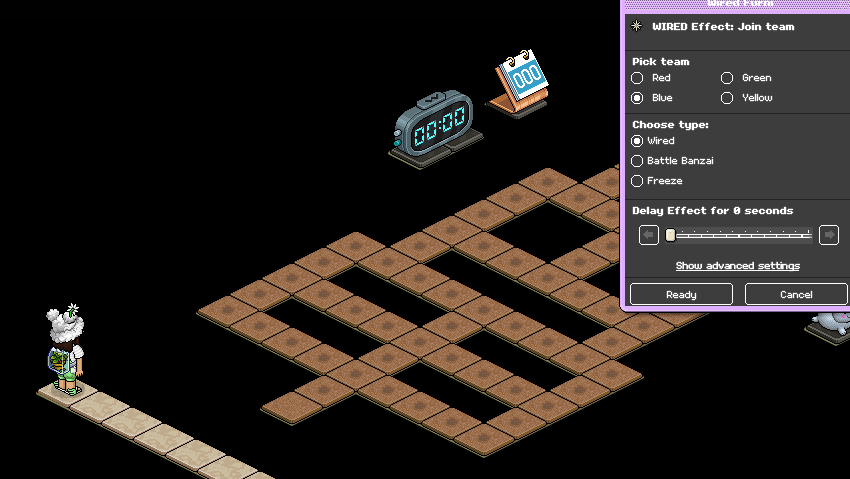
WIRED Effect: Join Team
Wired Stack Two
WIRED Effect: Move Furni towards nearest user
WIRED Trigger: Repeat Effect
Wired Stack Three
WIRED Trigger: Game Starts
WIRED Effect: Match Furni to Position & State x2
WIRED Selector: Furni by Type
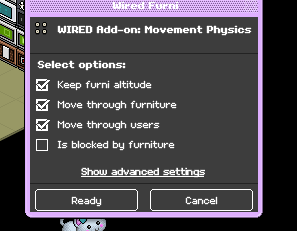
WIRED Add-on: Movement Physics
Wired Stack Four
WIRED Trigger: User Stuff Collision
WIRED Effect: Teleport To Furni
WIRED Condition: Furni Matches
WIRED Effect: Control Counter
WIRED Effect: Leave team
Wired Stack Five
Wired Trigger: Game Ends
WIRED Effect: Teleport To Furni
WIRED Selector: Users in Area (May need multiple)
WIRED Effect: Match Furni to Position & State x3
WIRED Effect: Leave Team
Wired Stack Six
WIRED Effect: Control Counter
WIRED Trigger: Counter Reaches set time
Furni
WIRED Game: Blob (However many you need for your Pacman layout)
Wired Game Counter
Gate to enter the game
Scoreboard (Either freeze or banzai) - Recommended
Highscore Classic leaderboard
Kickers for the game
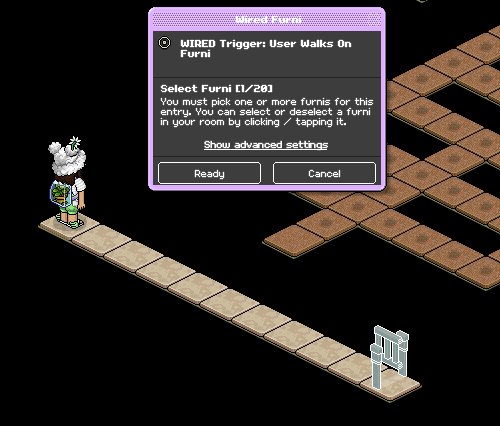
Set your WIRED Trigger: User walks on furni to the gate you use for players to enter the game.
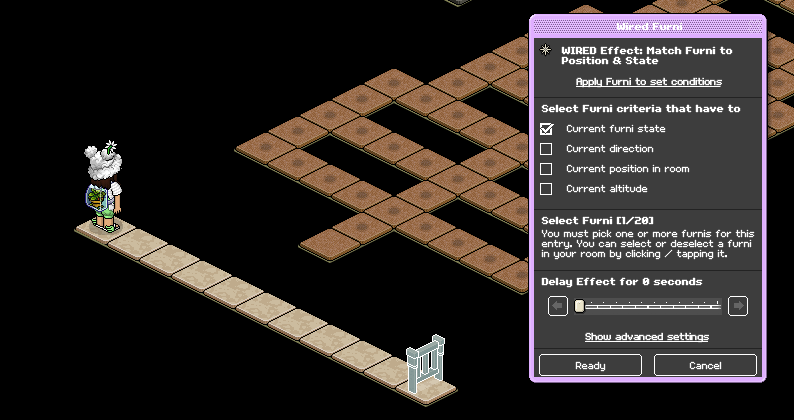
Set your WIRED Effect: Match Furni to Position & State to your gate, making sure it's in a shut state and tick off "Current furni state"
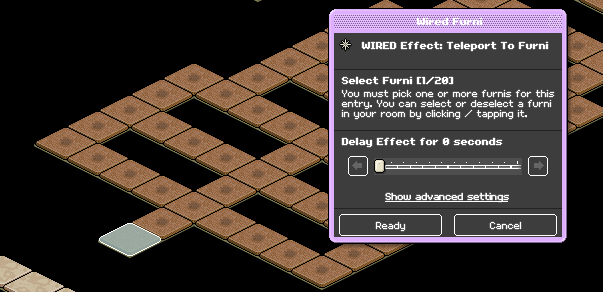
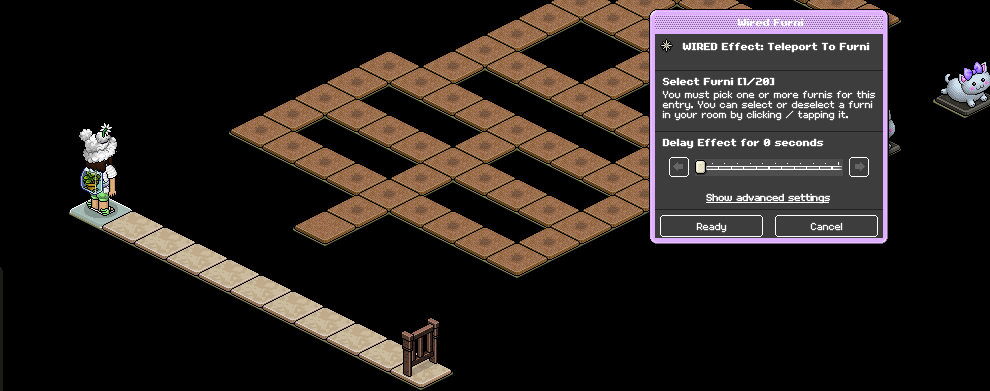
Set your WIRED Effect: Teleport To Furni to where you want users to teleport when they enter the game.
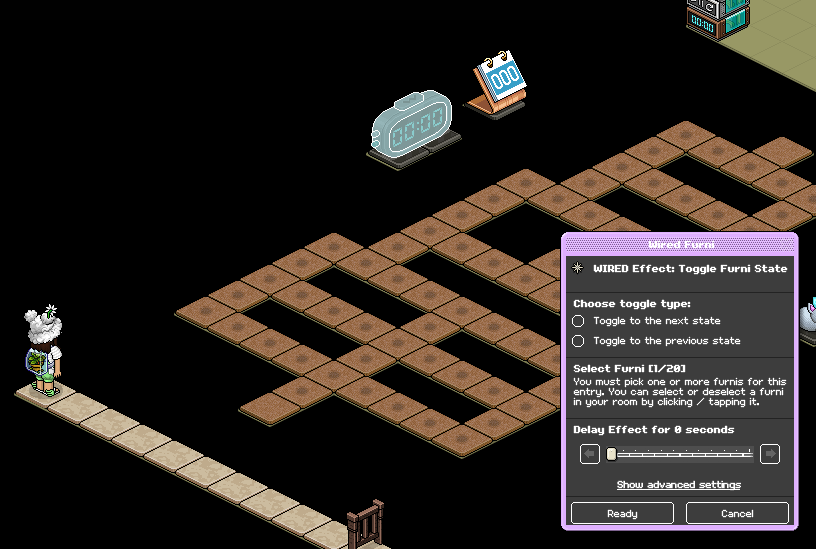
Set your WIRED Effect: Toggle Furni state to the timer you're using for your game.
Make sure the color of the team you select with your WIRED Effect: Join Team is the same as the scoreboards you decide to use to allow users to see their score.
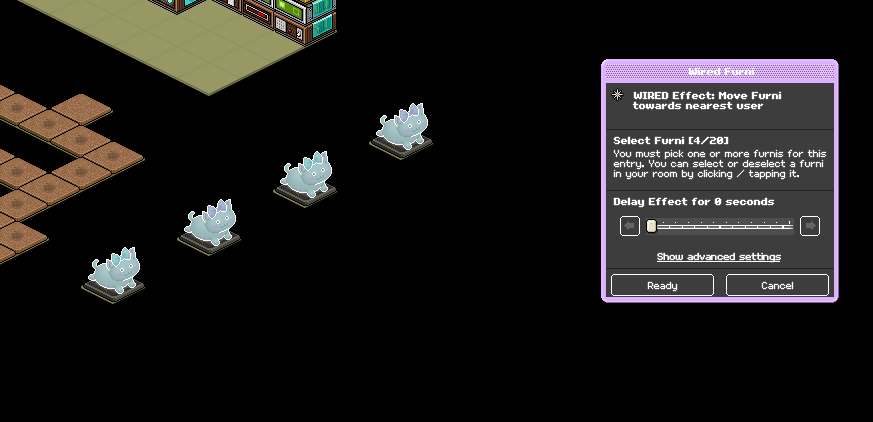
Set your WIRED Effect: Move Furni Towards nearest user to all kickers you're using for your game
Add your WIRED Trigger: Repeat Effect, make sure it is set at 0.5 second speed.
a. Place your WIRED Trigger: Game starts, no adjustments are needed.
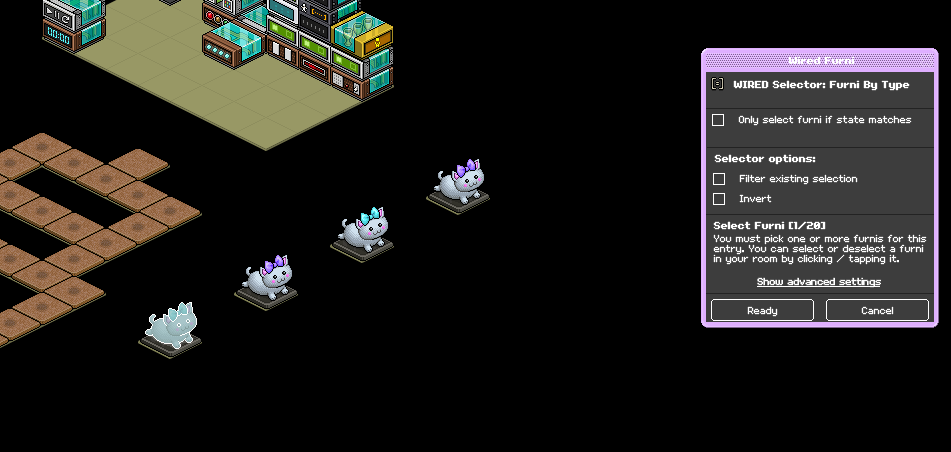
b. Set your WIRED Selector: Furni by type to one of your kickers.
Note: If there are more of the sort of furni you're using for your kickers outside of your game, you will need to select them all and tick off "Filter existing selection"
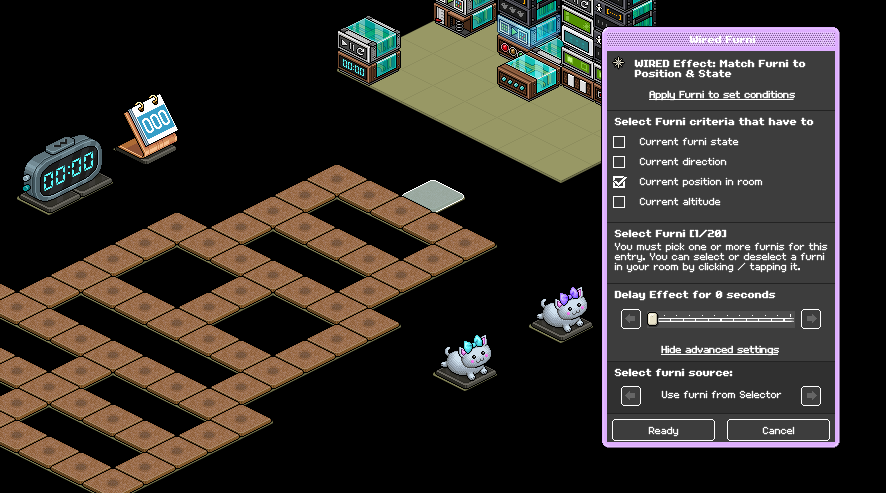
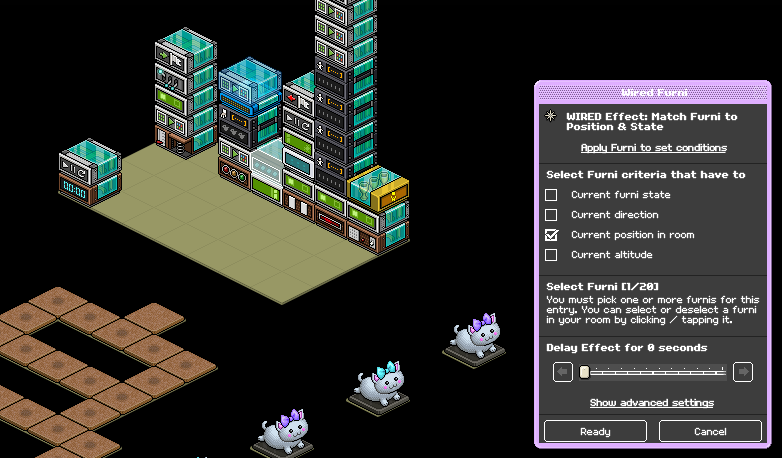
Using your first WIRED Effect: Match Furni to Position & state, set it to the tile your kickers will spawn on, tick off "Current position in room" and make sure you select "Furni From Selector" under advanced settings and select furni source
Using your WIRED Add-On: Movement physics, tick off these three settings and then click ready
Using your second WIRED Effect: Match Furni to Position & State, referencing stack two make sure your WIRED Trigger: Repeat Effect is on top of the move furni wired and then tick off "Current position in room"
a. Place your WIRED Trigger: User Stuff Collision, no adjustments are needed.
b. Set your WIRED Effect: Teleport to Furni to where you want users to teleport when they land outside of the game.
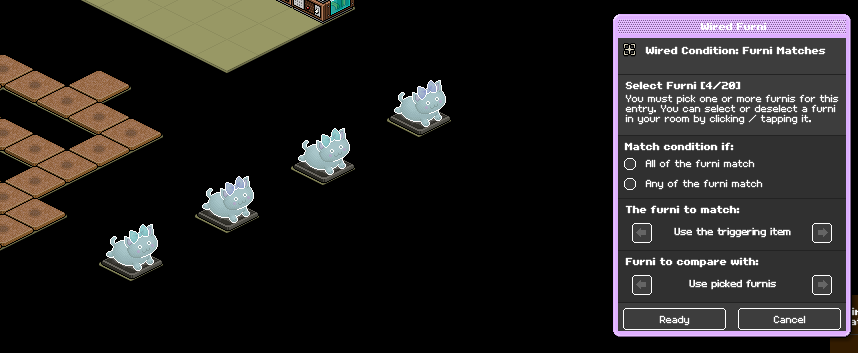
Set your WIRED Condition: Furni Matches to all of your kickers
Using your WIRED Effect: Freeze user, make sure "Unfreeze when teleporting" is ticked
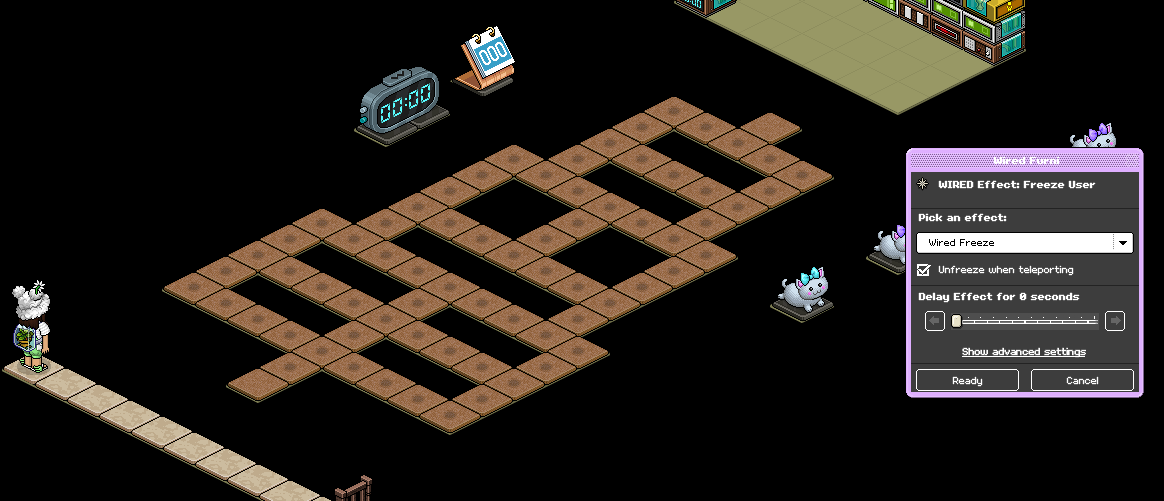
Using your WIRED Effect: Control Counter, set it to your timer and then select "reset"
This stack is so the game automatically resets when a player loses
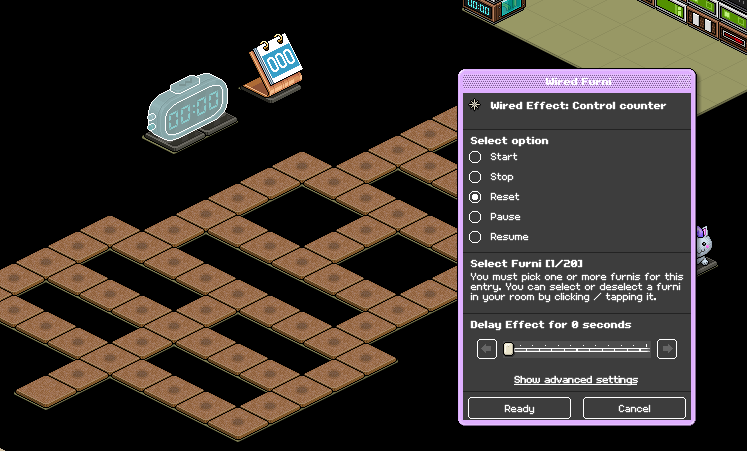
Place your WIRED Effect: Leave team on your stack to finish it, no adjustments are needed.
a. Place your WIRED Trigger: Game ends, no adjustments are needed.
b. Using your WIRED Selector: Users in Area, make sure your game area is all covered, this may require multiple of these wired. Example on how to set it below, make sure you select "ready" afterward.
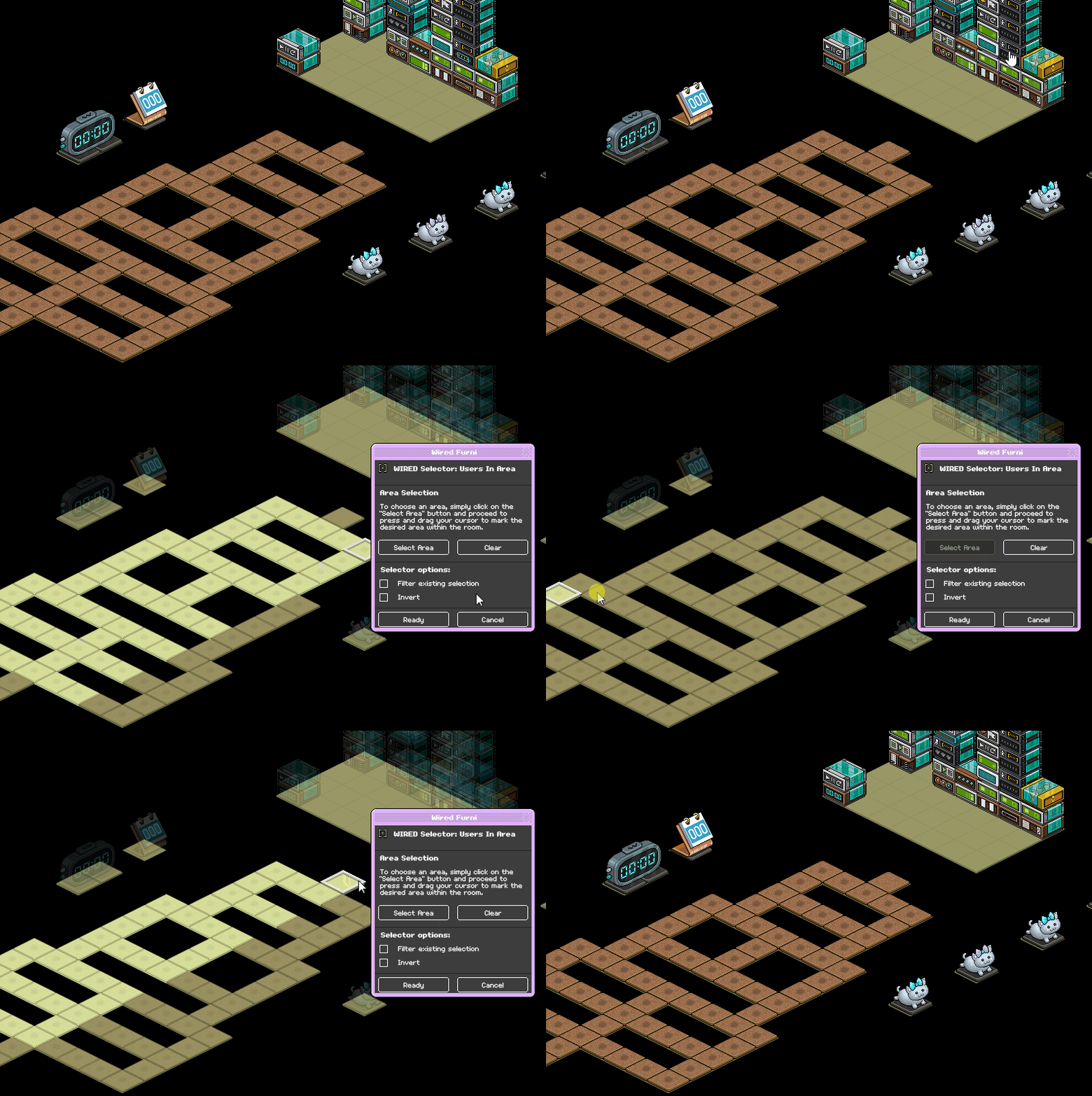
Set your WIRED Effect: Teleport to Furni to where you want users to teleport after the game ends. Under advanced settings make sure it's set to "Users from selector" under furni source.
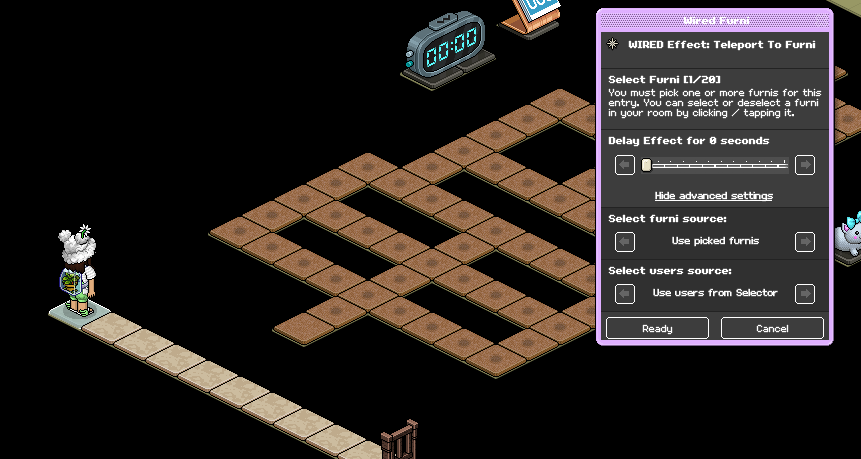
Referencing stack two, using your first WIRED Effect: Match Furni to position & state set your WIRED Trigger: Repeat effect to an area away from the move furni wired.
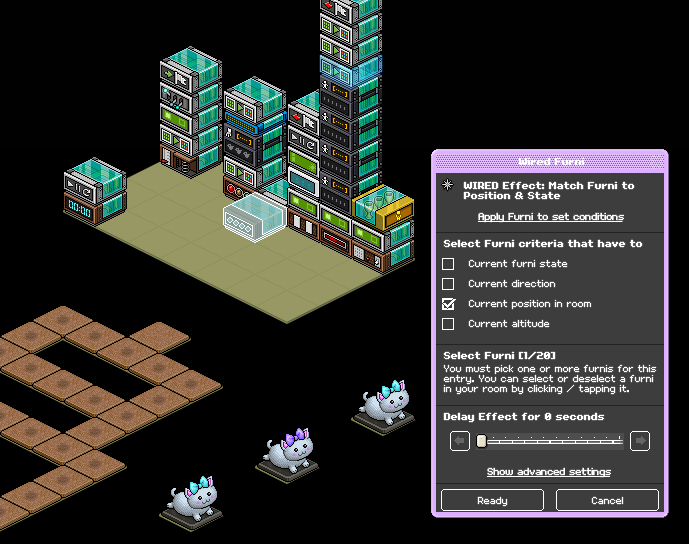
Using your second WIRED Effect: Match Furni to position & state to your kickers, making sure they're placed where you want them to be when the game isn't active. Tick "Current position in room"
Delay effect by 0.5 seconds
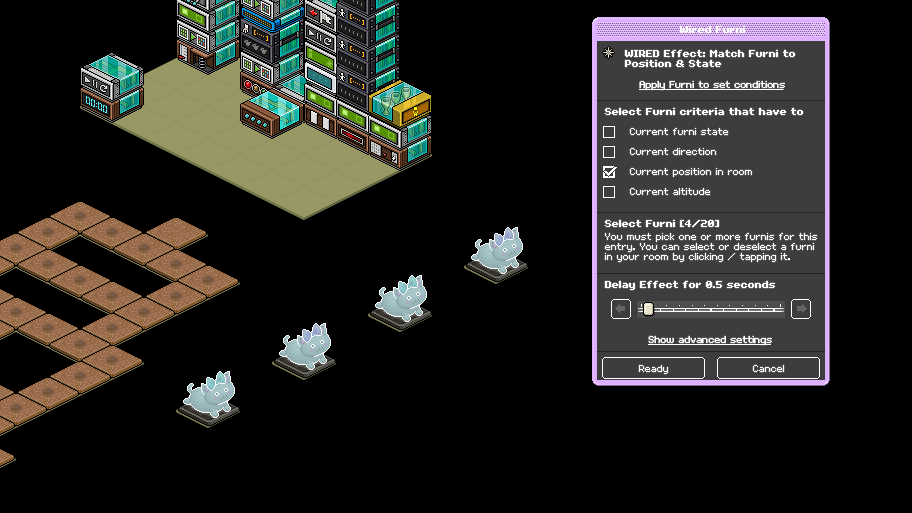
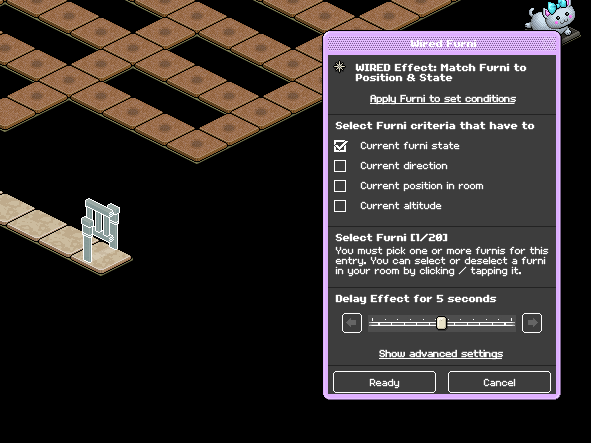
Using your third WIRED Effect: Match Furni to position & state set it to your entrance gate making sure it's in a closed state and tick off "Current furni state" with a 4 or 5-second delay.
Place your WIRED Effect: Leave team. No adjustments are needed.
Set your WIRED Effect: Control Counter to your timer and then select "reset"
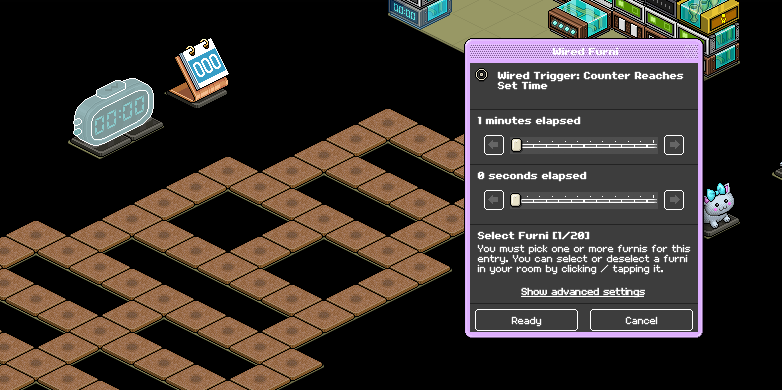
Set your WIRED Trigger: Counter Reaches set time, select your counter and adjust your sliders to however long you want your game to last at a maximum. Below is an example of one minute.
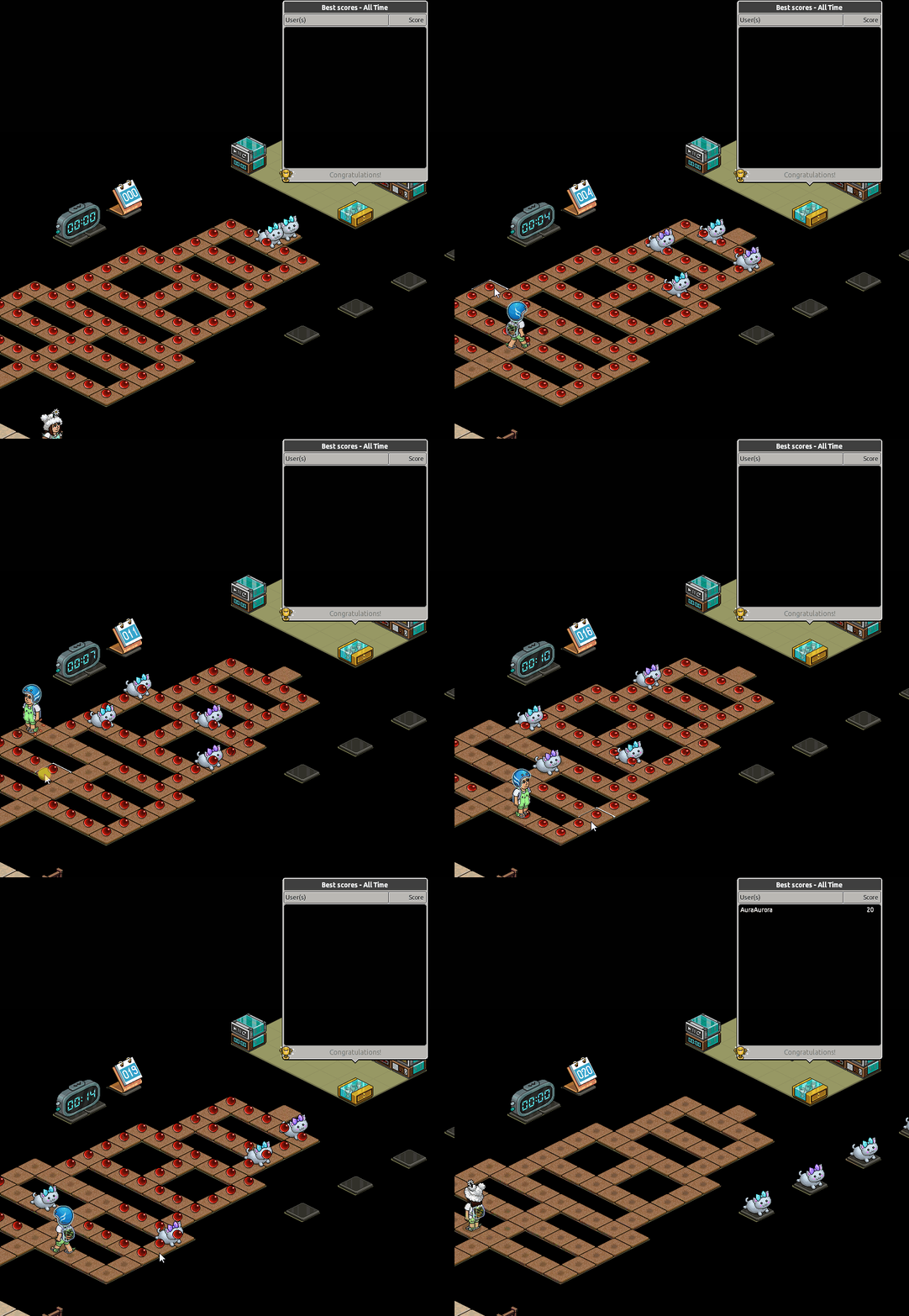
Your game should now be ready! If you want players points logged on a scoreboard, no adjustments are needed. Just make sure you're using any of the highscore classic scoreboards. Use a scoreboard set off to the side so players can see their score as they're playing.
Example:
Reference for stacks:
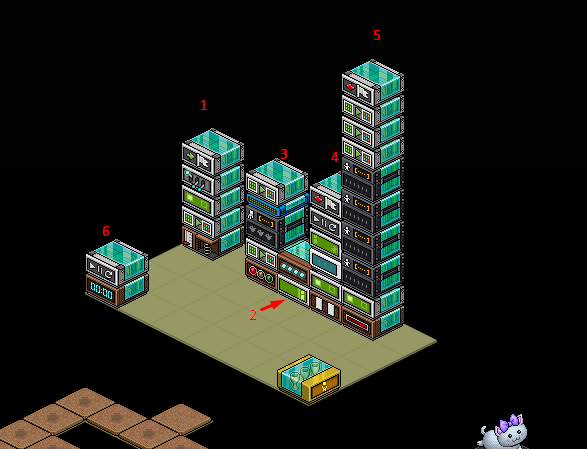
Wired Stack One
WIRED Trigger: User walks On Furni
WIRED Effect: Teleport To Furni
WIRED Effect: Match Furni to Position & State
WIRED Effect: Toggle Furni State
WIRED Effect: Join Team
Wired Stack Two
WIRED Effect: Move Furni towards nearest user
WIRED Trigger: Repeat Effect
Wired Stack Three
WIRED Trigger: Game Starts
WIRED Effect: Match Furni to Position & State x2
WIRED Selector: Furni by Type
WIRED Add-on: Movement Physics
Wired Stack Four
WIRED Trigger: User Stuff Collision
WIRED Effect: Teleport To Furni
WIRED Condition: Furni Matches
WIRED Effect: Control Counter
WIRED Effect: Leave team
Wired Stack Five
Wired Trigger: Game Ends
WIRED Effect: Teleport To Furni
WIRED Selector: Users in Area (May need multiple)
WIRED Effect: Match Furni to Position & State x3
WIRED Effect: Leave Team
Wired Stack Six
WIRED Effect: Control Counter
WIRED Trigger: Counter Reaches set time
Furni
WIRED Game: Blob (However many you need for your Pacman layout)
Wired Game Counter
Gate to enter the game
Scoreboard (Either freeze or banzai) - Recommended
Highscore Classic leaderboard
Kickers for the game
Step One - Stack one
Set your WIRED Trigger: User walks on furni to the gate you use for players to enter the game.
Step Two - Stack one
Set your WIRED Effect: Match Furni to Position & State to your gate, making sure it's in a shut state and tick off "Current furni state"
Step Three - Stack one
Set your WIRED Effect: Teleport To Furni to where you want users to teleport when they enter the game.
Step Four - Stack one
Set your WIRED Effect: Toggle Furni state to the timer you're using for your game.
Step Five - Stack one
Make sure the color of the team you select with your WIRED Effect: Join Team is the same as the scoreboards you decide to use to allow users to see their score.
Step One - Stack two
Set your WIRED Effect: Move Furni Towards nearest user to all kickers you're using for your game
Step Two - Stack two
Add your WIRED Trigger: Repeat Effect, make sure it is set at 0.5 second speed.
Step One - Stack three
a. Place your WIRED Trigger: Game starts, no adjustments are needed.
b. Set your WIRED Selector: Furni by type to one of your kickers.
Note: If there are more of the sort of furni you're using for your kickers outside of your game, you will need to select them all and tick off "Filter existing selection"
Step Two - Stack three
Using your first WIRED Effect: Match Furni to Position & state, set it to the tile your kickers will spawn on, tick off "Current position in room" and make sure you select "Furni From Selector" under advanced settings and select furni source
Step Three - Stack three
Using your WIRED Add-On: Movement physics, tick off these three settings and then click ready
Step four - Stack three
Using your second WIRED Effect: Match Furni to Position & State, referencing stack two make sure your WIRED Trigger: Repeat Effect is on top of the move furni wired and then tick off "Current position in room"
Step One - Stack four
a. Place your WIRED Trigger: User Stuff Collision, no adjustments are needed.
b. Set your WIRED Effect: Teleport to Furni to where you want users to teleport when they land outside of the game.
Step Two - Stack four
Set your WIRED Condition: Furni Matches to all of your kickers
Step Three - Stack four
Using your WIRED Effect: Freeze user, make sure "Unfreeze when teleporting" is ticked
Step Four - Stack four
Using your WIRED Effect: Control Counter, set it to your timer and then select "reset"
This stack is so the game automatically resets when a player loses
Step Five - Stack four
Place your WIRED Effect: Leave team on your stack to finish it, no adjustments are needed.
Step one - Stack five
a. Place your WIRED Trigger: Game ends, no adjustments are needed.
b. Using your WIRED Selector: Users in Area, make sure your game area is all covered, this may require multiple of these wired. Example on how to set it below, make sure you select "ready" afterward.
Step Two - Stack five
Set your WIRED Effect: Teleport to Furni to where you want users to teleport after the game ends. Under advanced settings make sure it's set to "Users from selector" under furni source.
Step Three - Stack five
Referencing stack two, using your first WIRED Effect: Match Furni to position & state set your WIRED Trigger: Repeat effect to an area away from the move furni wired.
Step Four - Stack five
Using your second WIRED Effect: Match Furni to position & state to your kickers, making sure they're placed where you want them to be when the game isn't active. Tick "Current position in room"
Delay effect by 0.5 seconds
Step Five - Stack five
Using your third WIRED Effect: Match Furni to position & state set it to your entrance gate making sure it's in a closed state and tick off "Current furni state" with a 4 or 5-second delay.
Step Six - Stack five
Place your WIRED Effect: Leave team. No adjustments are needed.
Step One - Stack six
Set your WIRED Effect: Control Counter to your timer and then select "reset"
Step two - Stack six
Set your WIRED Trigger: Counter Reaches set time, select your counter and adjust your sliders to however long you want your game to last at a maximum. Below is an example of one minute.
Your game should now be ready! If you want players points logged on a scoreboard, no adjustments are needed. Just make sure you're using any of the highscore classic scoreboards. Use a scoreboard set off to the side so players can see their score as they're playing.
Example:
Reference for stacks:
 Lush 2 years ago
 Rainbow 2 years ago
 Rotating 2 years ago