
Read the guide below for a tutorial on how to wire a 1v1 step on it!
Wired Stack One
WIRED Trigger: User walks on Furni
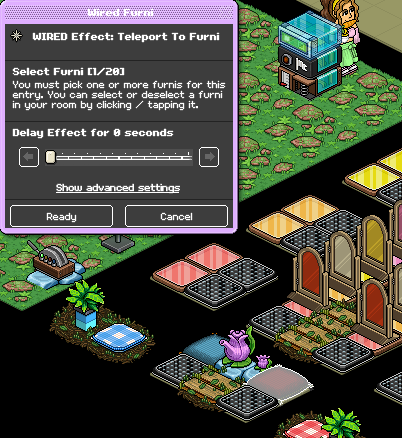
WIRED Effect: Timer Reset
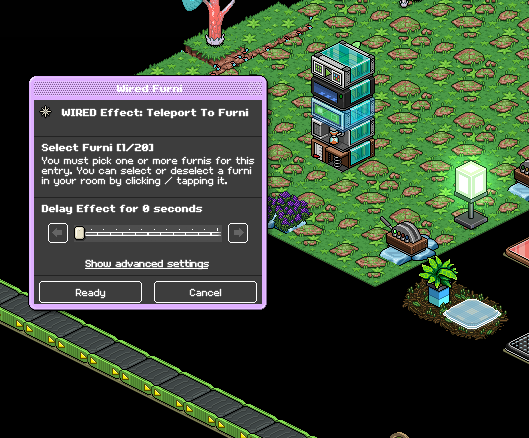
WIRED Effect: Teleport to Furni
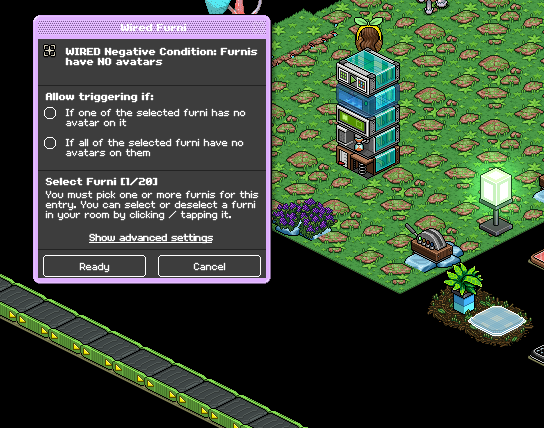
WIRED Negative Condition: Furnis have NO avatars
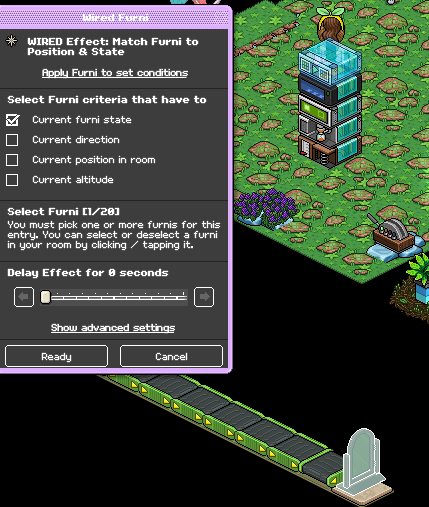
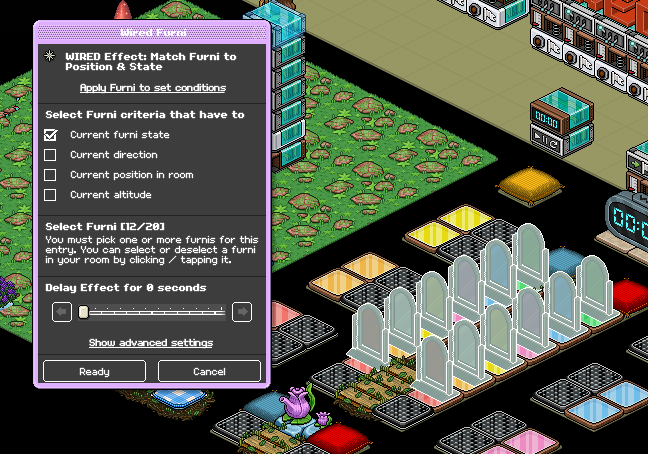
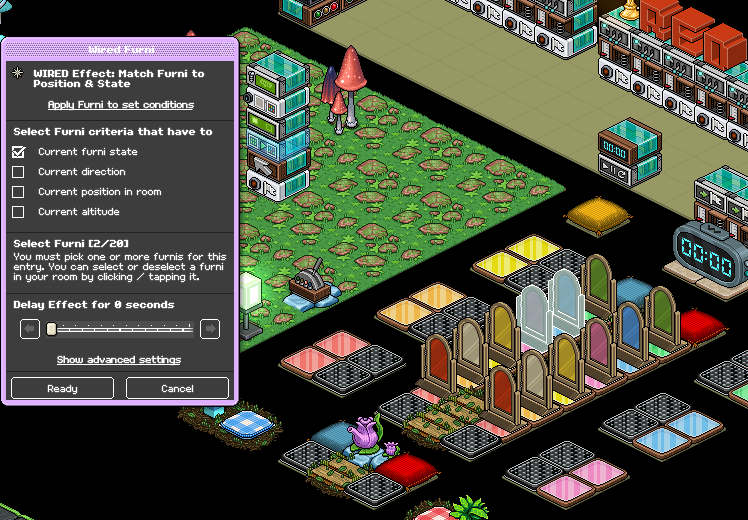
WIRED Effect: Match Furni to Position & State
Wired Stack Two
WIRED Trigger: User walks on Furni
WIRED Effect: Timer Reset
WIRED Effect: Teleport to Furni
WIRED Negative Condition: Furnis have NO avatars
WIRED Effect: Match Furni to Position & State
Wired Stack Three
WIRED Trigger: At Set Time
WIRED Negative Condition: Furnis have NO avatars
WIRED Effect: Match Furni to Position & State
Wired Stack Four
WIRED Trigger: At Set Time
WIRED Condition: Furni has users
WIRED Effect: Toggle Furni state
Wired Stack Five (Two identical stacks - one for each team)
WIRED Trigger: User walks on furni (x2 - one for each team)
WIRED Effect: Join Team (x2 - one for each team)
Wired Stack Six
WIRED Condition: User is on team X (12 of these - six for each of the two teams)
WIRED Trigger: User walks on Furni (12 of these - six for each of the two teams)
WIRED Effect: Toggle Furni State (12 of these - six for each of the two teams)
Wired Stack Seven
WIRED Trigger: Game Starts
WIRED Selector: Users in Area
WIRED Effect: Teleport to Furni
Wired Stack Eight
WIRED Trigger: Game Starts
WIRED Selector: Users in Area
WIRED Effect: Teleport to Furni
WIRED Effect: Match Furni to Position & State
Wired Stack Nine (Two identical stacks - one for each team)
Wired Trigger: User Walks on Furni (x2 - one for each team)
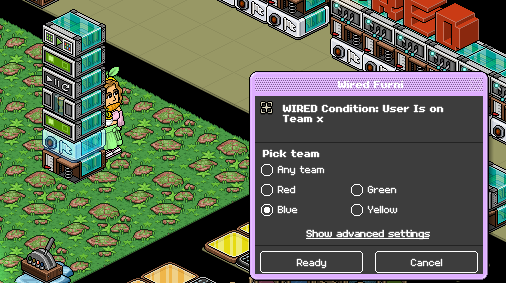
WIRED Condition: Users is on team X (x2 - one for each team)
WIRED Effect: Teleport to Furni (x4 - two for each team)
WIRED Effect: Give Points (x2 - one for each team)
WIRED Effect: Control Counter (x2 - one for each team)
WIRED Effect: Match Furni to Position & State (x2 - one for each team)
Wired Stack Ten (RECOMMENDED - Two identical stacks - one for each team)
WIRED Trigger: User Walks on Furni (x2 - one for each team)
WIRED Negative Condition: NOT team member (x2 - one for each team)
WIRED Effect: Teleport to Furni (x2 - one for each team)
Wired Stack Eleven (Two identical stacks - one for each team)
WIRED Condition: User is on team X (x2 - one for each team)
WIRED Trigger: Furni is Used (x2 - one for each team)
WIRED Effect: Match Furni to Position & State (x2 - one for each team)
WIRED Effect: Teleport to Furni (x2 - one for each team)
WIRED Condition: Furni States & Position match (x2 - one for each team)
WIRED Effect: Bot Talks to All Users (Not necessary but used for a lot of games)
Wired Stack Twelve
WIRED Trigger: Counter Reaches set time
WIRED Effect: Control Counter
Wired Stack Thirteen
WIRED Trigger: Game Ends
WIRED Selector: Users in Area
WIRED Effect: Freeze User
WIRED Effect: Teleport to Furni
WIRED Effect: Unfreeze User
WIRED Effect: Leave team
WIRED Effect: Match Furni to Position & State (x3)
Furni
Game Counter
Color tiles x12
Banzai x17 (For this layout)
Lamp
Gates (x12, 2 for each color used)
Switch
Gate to enter game
Set your user walks on furni to the gate you use to enter the game
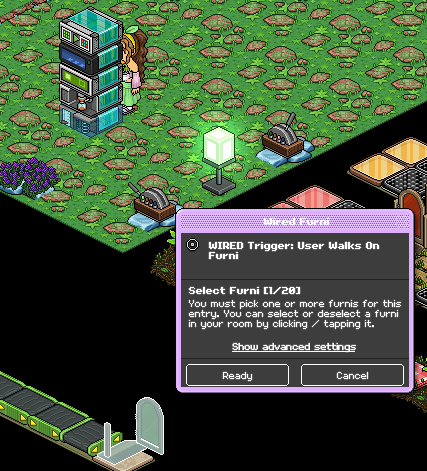
Place your WIRED Effect: Timer Reset, no adjustments are needed.
Set your teleport to furni effect to where you want users of team 1 (blue in this case) to teleport. For this guide I will demonstrate red/blue team colors.
Set your wired negative condition: furnis have no avatars to the where you will have users of team 1 teleport when they enter.
(Same seat/tile as the previous step) No selections are needed on this wired as only one furni should be selected
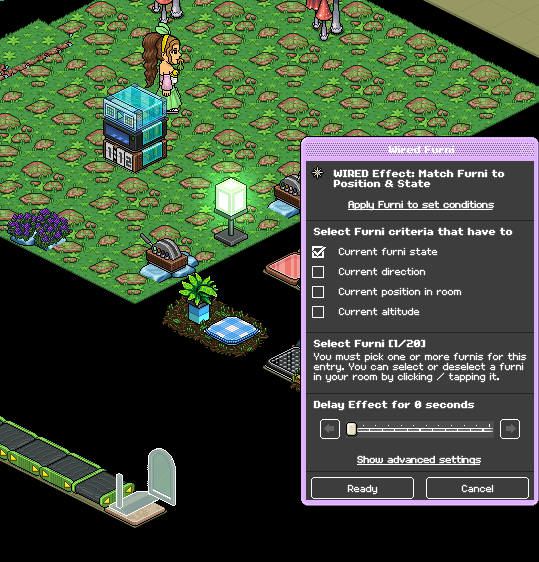
Set your WIRED Effect: Match furni to position and state to the gate you use to enter. Make sure it's in a CLOSED state and then click "Current furni state"
Refer to steps 1 and 2 for your walks on and timer reset. This stack is the same as the previous except that it's for the other team.
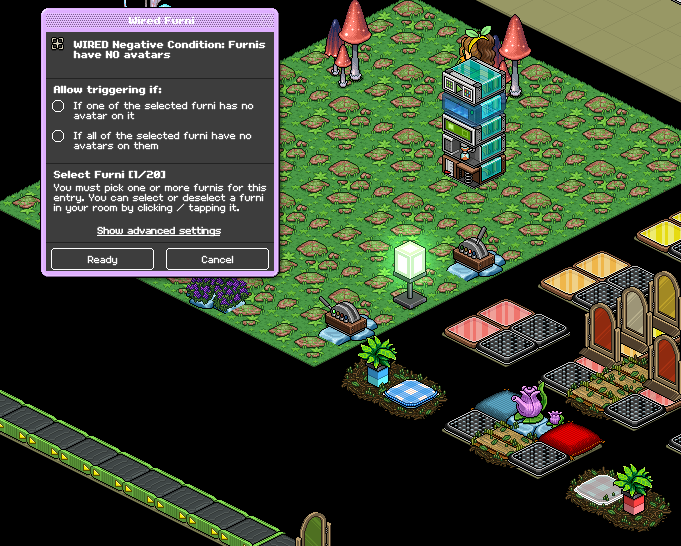
For this stack you will set your WIRED Negative Condition: Furnis have no avatars to the pre-game starting tile/seat of the opposite team from the previous step. (In this case red)
Set your WIRED Effect: Teleport to Furni to the same tile as the previous step. (Pre-game starting point for team 2)
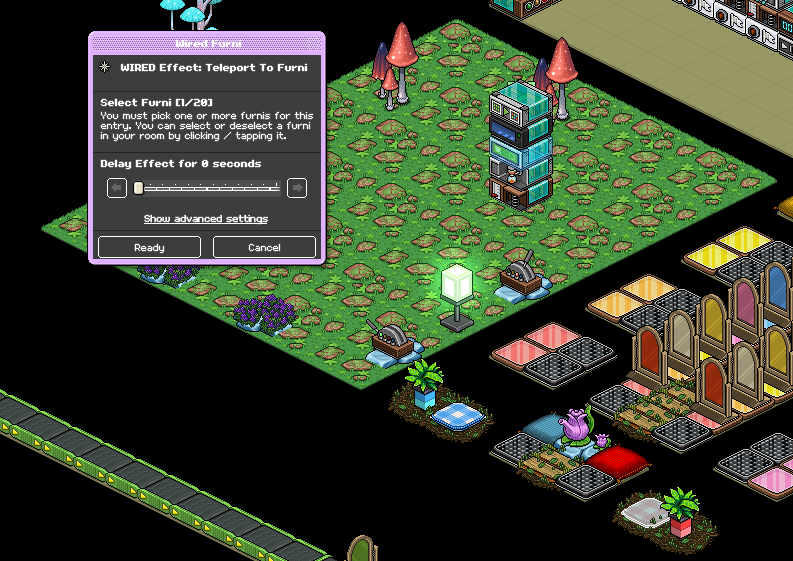
Refer to step 5 - stack one and repeat the same task in this stack as well for your WIRED Effect: Match Furni to Position & State.
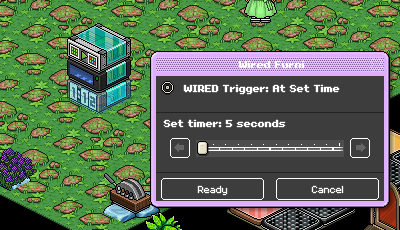
Set your WIRED Trigger: At Set Time to 5 seconds
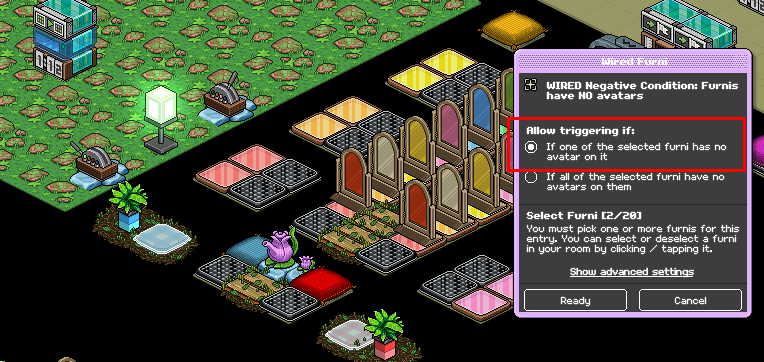
Set your WIRED Negative Condition: Furnis have no avatars to BOTH starting points for each of the two teams. Make sure you select "If one of the selected furni has no avatar on it"
Set your WIRED Effect: Match Furni to Position & State to the gate you use to enter the game and make sure it's in an OPEN state. Tick "Current Furni state"
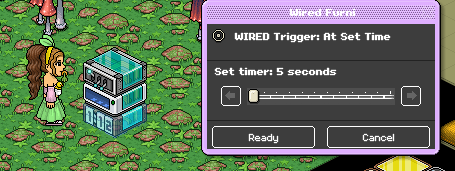
Set your WIRED Trigger: At Set time to 5 seconds
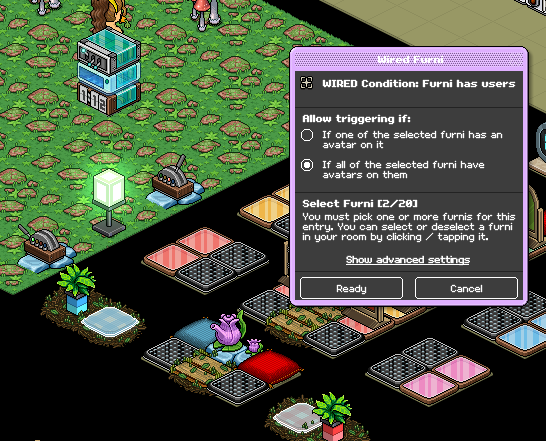
Set your WIRED Condition: Furni has users to BOTH starting points for each of the two teams. Make sure you select "If all of the selected furnis have avatars on them"
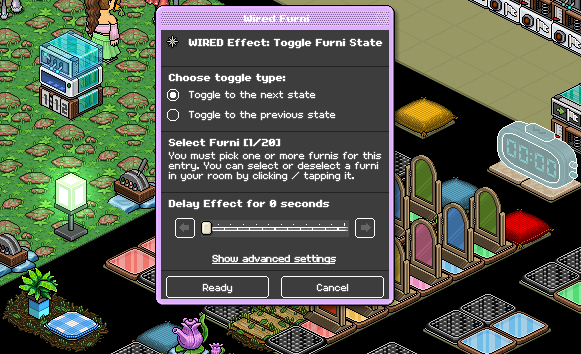
Set your WIRED Effect: Toggle Furni State to your counter for your game.
Set your WIRED Trigger: User walks on Furni to your starting tile/seat for team 1.
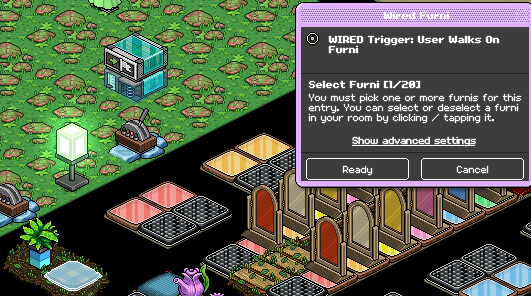
Set your WIRED Effect: Join team to the color that you want for team 1.
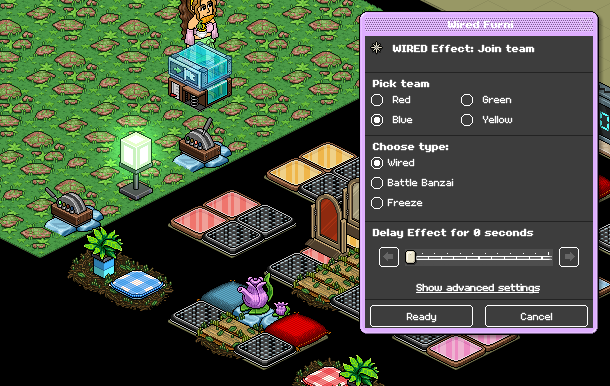
Repeat the same task except for team two. Here is a gif example of how you'd set it, using the red team as an example.
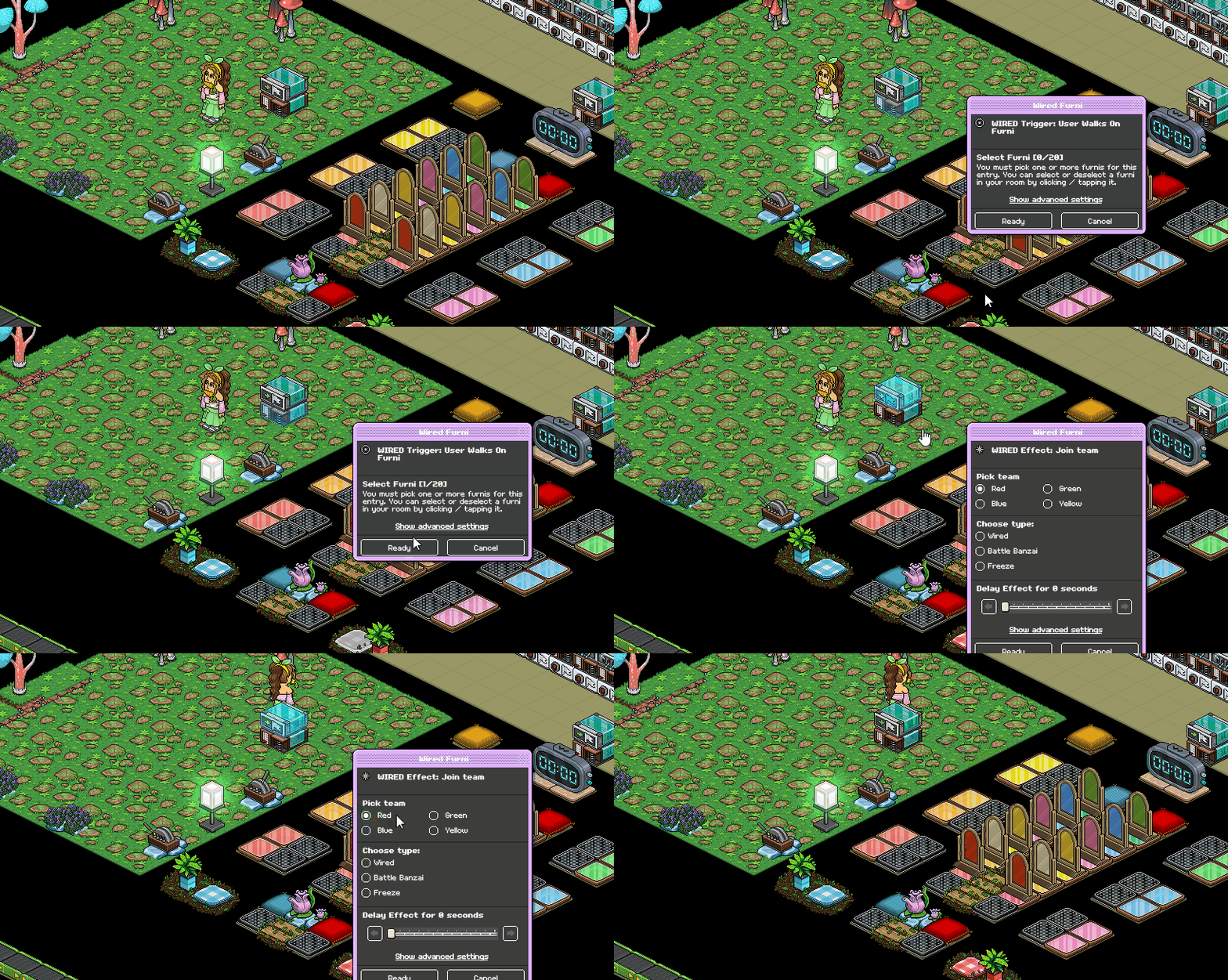
Set your WIRED Condition: User is on Team X to the color you want for team 1
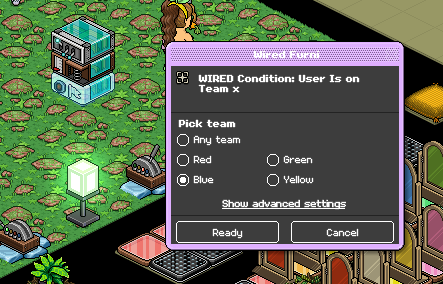
Set your WIRED Trigger: User Walks on Furni to one set of matching color tiles
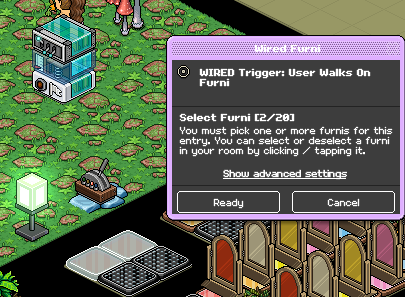
Set your WIRED Effect: Toggle Furni State to the matching color of gate that matches team one's lane.
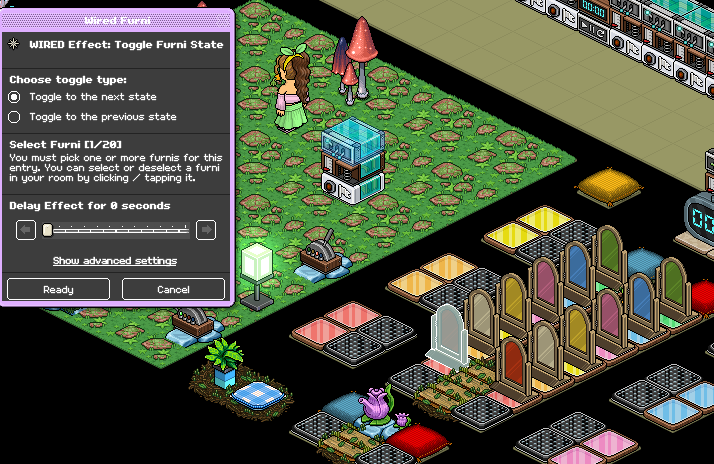
Repeat this with each of the six different color tiles/gates, make sure you only select the one gate that matches the team's lane per stack.
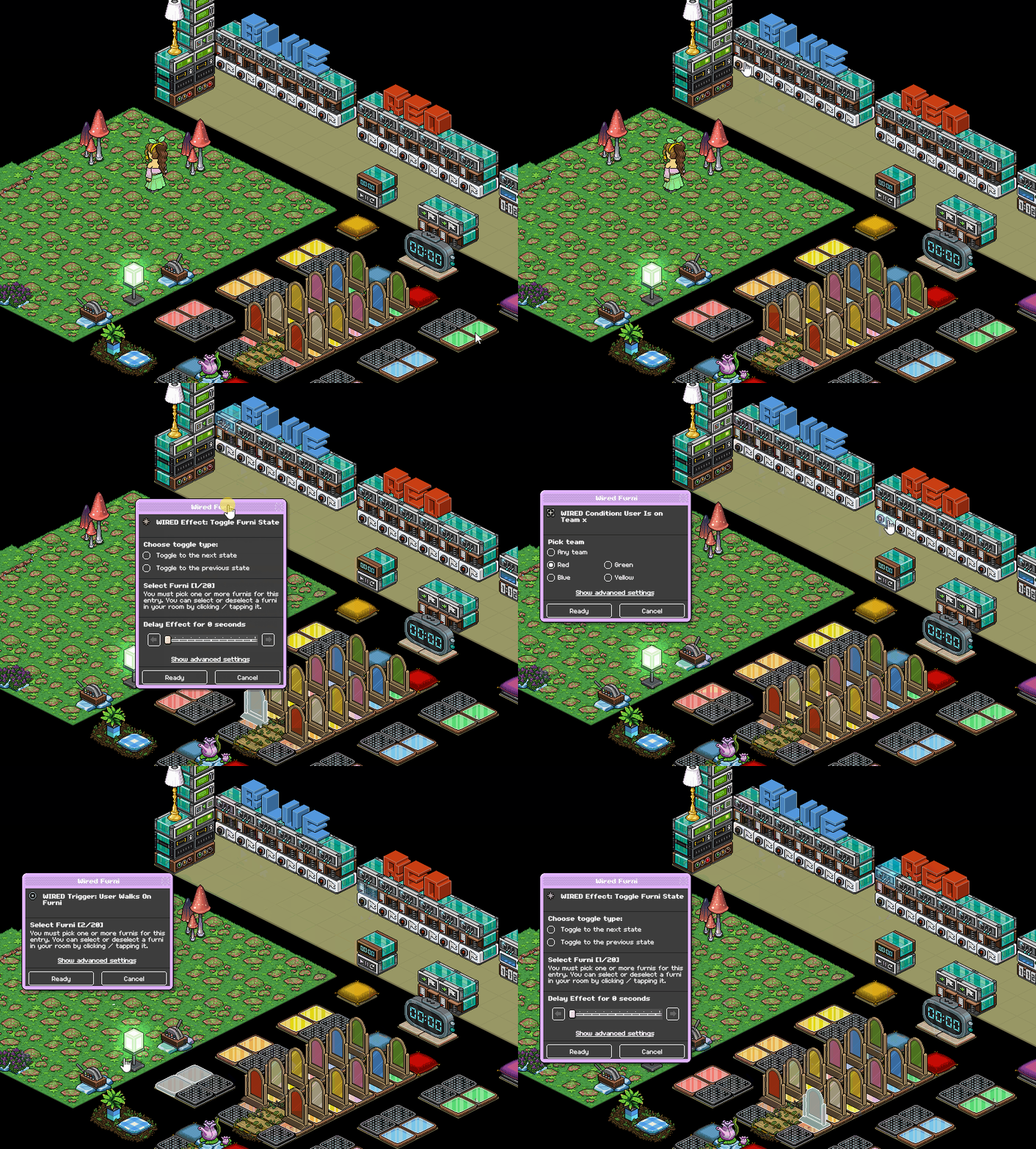
Repeat this with team two. making sure your WIRED Condition: User is on team X's are all set to the color you want for team two and that you only select the gates in that teams lane. Here is an example of how different team stacks should look.
Place your WIRED Trigger: Game Starts, no adjustments are needed.
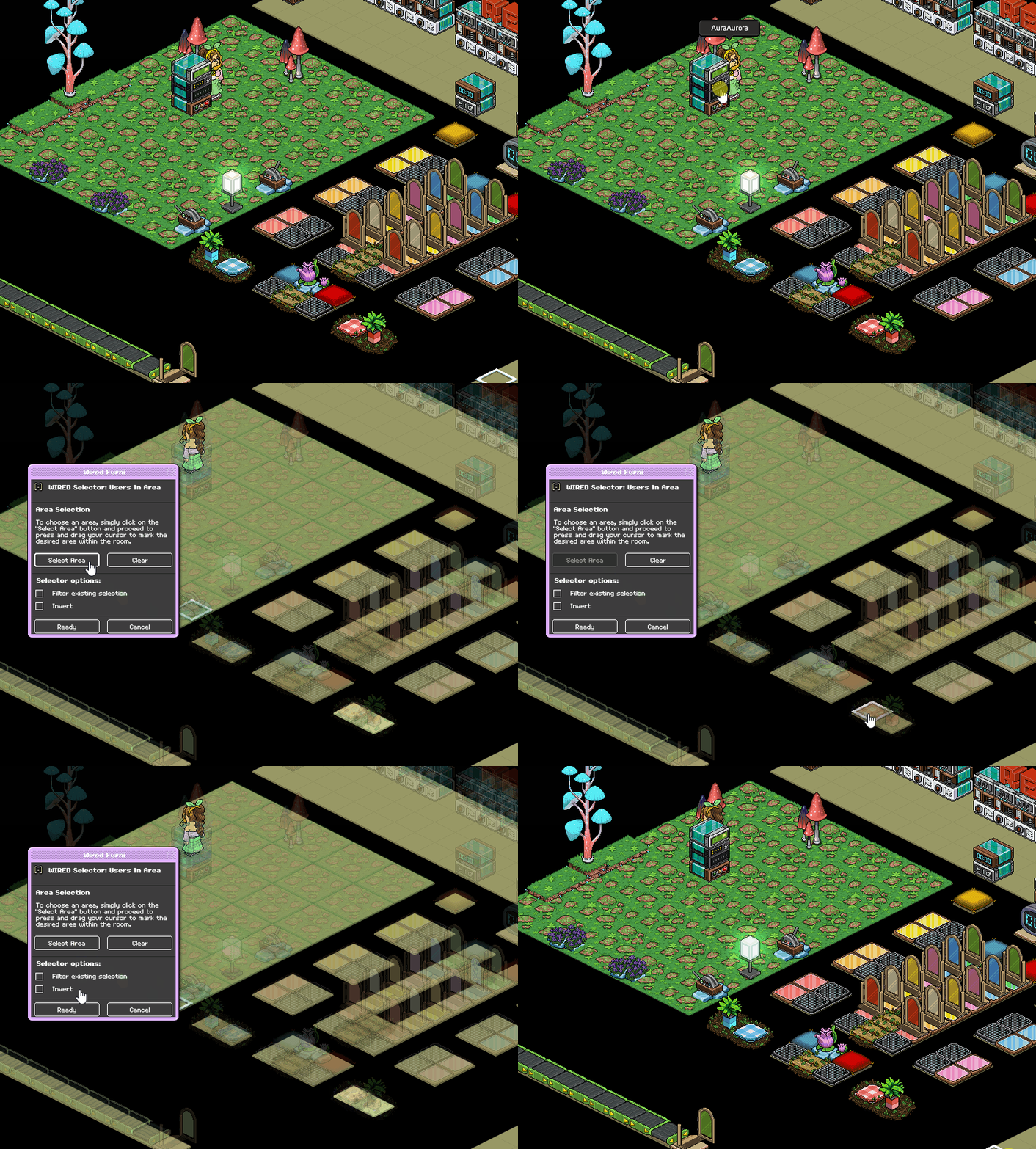
Set your WIRED Selector: Users in Area to where team 1 spawns when they enter. Example gif below.
Set your WIRED Effect: Teleport To Furni to where you want users on team 1 to teleport when the game starts, make sure under advanced settings and then "Select users source" you pick "Users from selector"
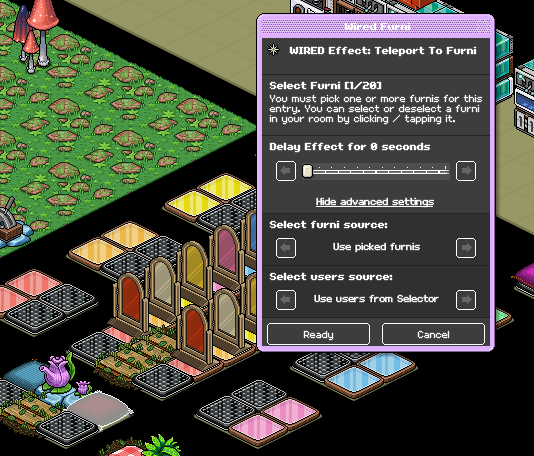
Place your WIRED Trigger: Game Ends, no adjustments are needed.
Set your WIRED Selector: Users in Area to where users spawn when they enter team 2. Refer to step 2 - Stack seven for how to do this. Make sure you select the team opposite the prior stack.
Use the same settings as Step 3 - Stack seven for your WIRED Effect: Teleport to Furni, making sure you select where you want users of team 2 to teleport when they enter.
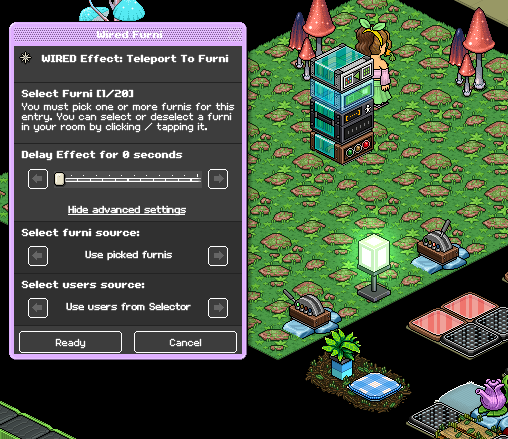
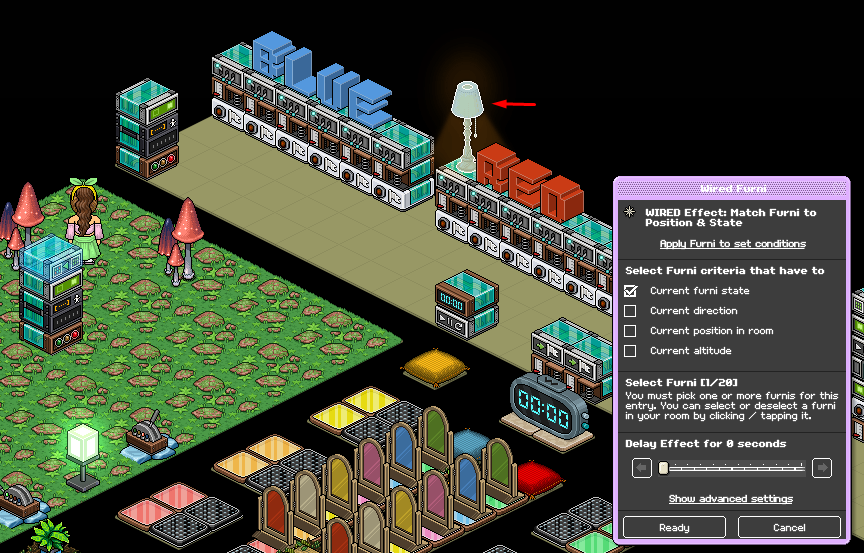
Set your WIRED Effect: Match Furni to Position & State to your lamp, making sure it's in an ON state. Select "Current furni state"
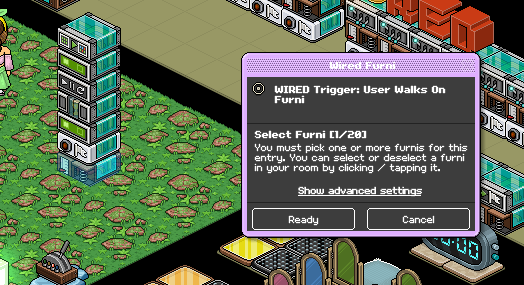
Set your WIRED Trigger: User Walks on Furni to team 1's winning seat/tile. This will be what they walk on after all of their gates are open.
Set your WIRED Condition: User is on team X to the color that matches team 1.
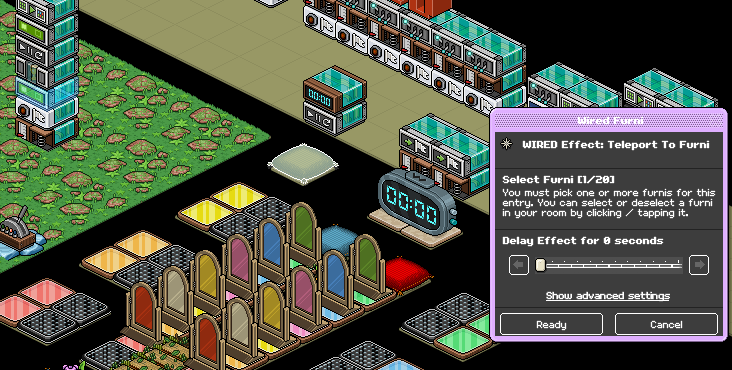
Set your first WIRED Effect: Teleport to Furni to the winning seat/tile with no adjustments.
Place your WIRED Effect: Give Points, no adjustments are necessary.
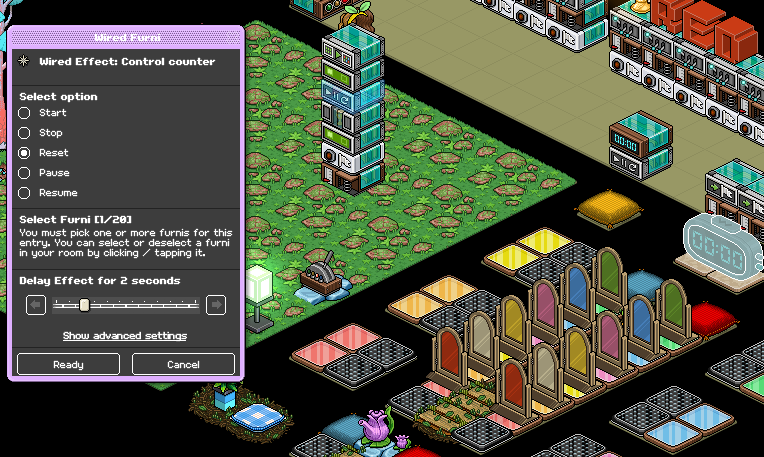
Set your WIRED Effect: Control Counter to your counter and select "Reset" making sure you select a 2-second delay.
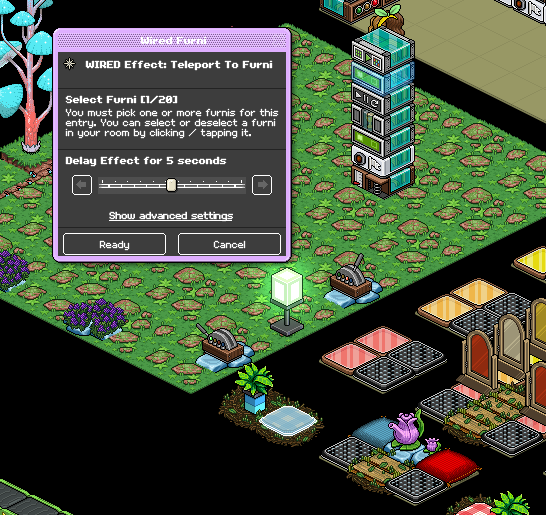
Set your second WIRED Effect: Teleport To Furni to the original pre-game starting point that matches team 1. Make sure you select a 5-second delay on this wired.
Using your WIRED Effect: Match Furni to Position & State, make sure all 12 gates in the game area are in a CLOSED state. Select them and then tick off "Current Furni State" with no delay.
Repeat steps 1-7 except with the opposite team. Gif provided below shows how it should look. Make sure you select the spawning point that matches team 2.
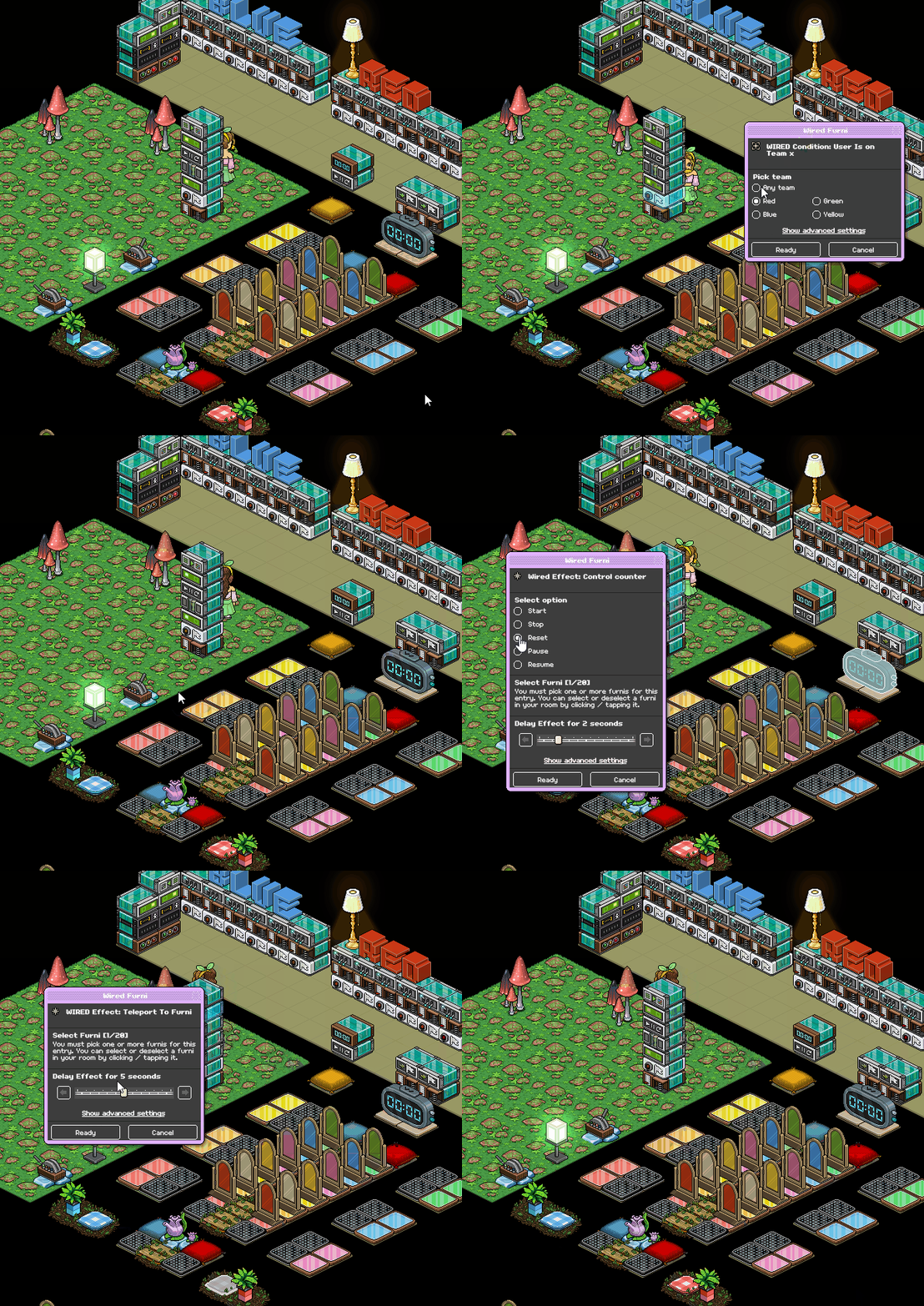
This wired is to prevent trolls in the opposite team from blocking their opponent from scoring their win.
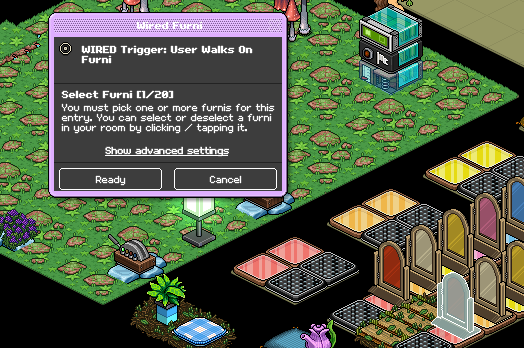
Set your WIRED Trigger: User Walks on Furni to the first gate that matches team 1
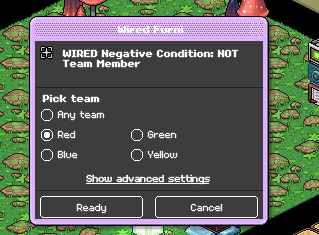
Set your WIRED Negative Condition: NOT Team member to the matching team from the previous step. For example, if you selected the first gate of the red lane, select "Red"
Set your WIRED Effect: Teleport To Furni to where users teleport for their team when the game starts.
Repeat steps 1-3 for the opposite team. Below is a gif of how it should look for a specific team.
This is for the switches that sabotage their opponent's gates, if you do not wish to add this you do not need to follow the steps under this stack.
Set your WIRED Condition: User is on Team X to the color that matches team 1
Set your WIRED Trigger: Furni is used to your switch
Set your WIRED Effect: Match Furni to Position & State to two of the opposite team's gates. (These are recommended)
Make sure they're set to an OFF state and select "Current furni state"
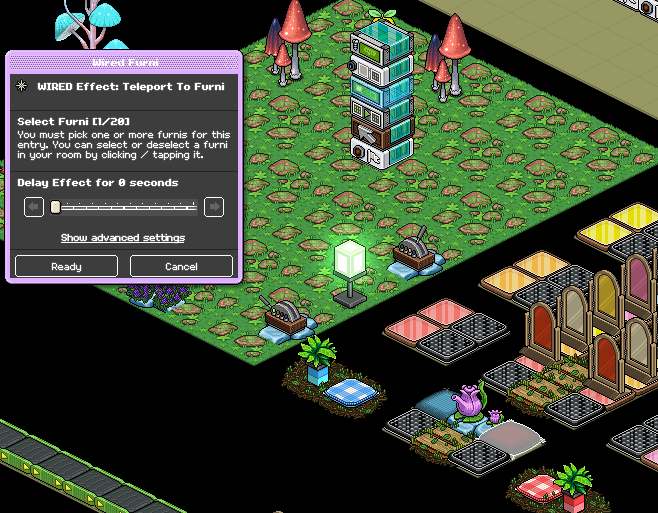
Set your WIRED Effect: Teleport to Furni and select team 1's starting point when they enter the game.
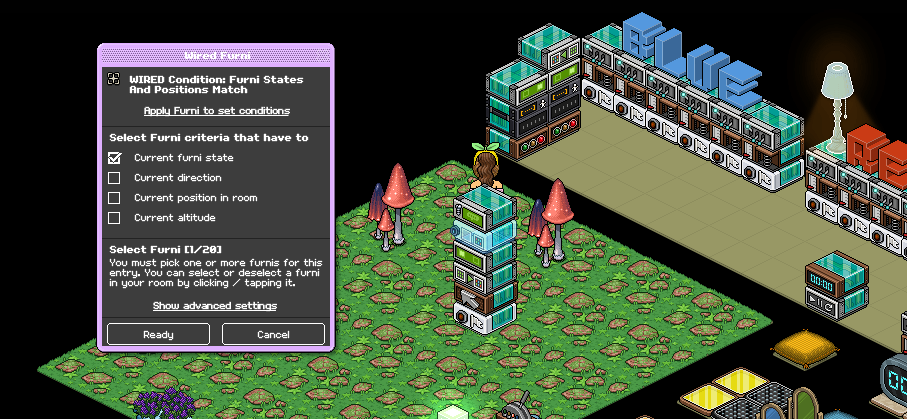
Set your WIRED Condition: Furni States & Position match to your lamp, making sure it's set to an ON state and tick "Current furni state"
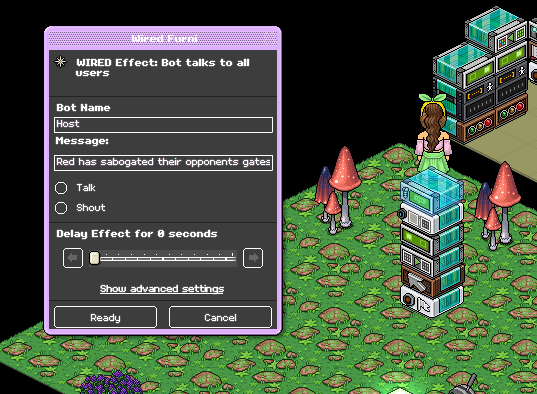
Many games will have a bot that announces when someone has sabotaged gates, if you wish to include this add a "WIRED Effect: Bot Talks to all Users" below is an example of what you'd put in the wired. Make sure you have a bot and that the name matches what you put in the wired if you wish to include this.
Repeat steps 1-5 (6 optional) except with the opposite team. Below is an example of what it should look like.
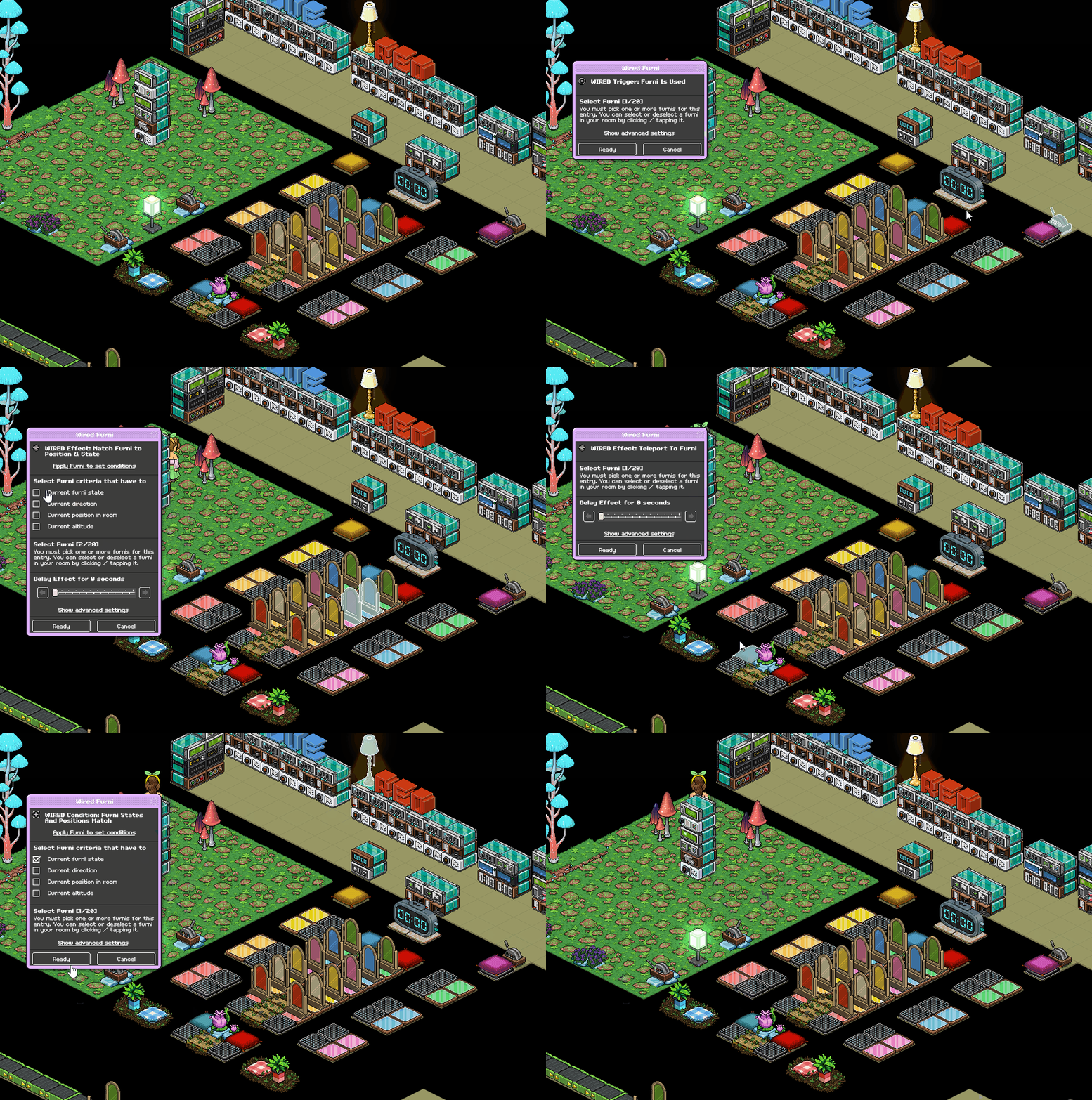
Place your WIRED Trigger: Game Ends, no adjustments are needed.
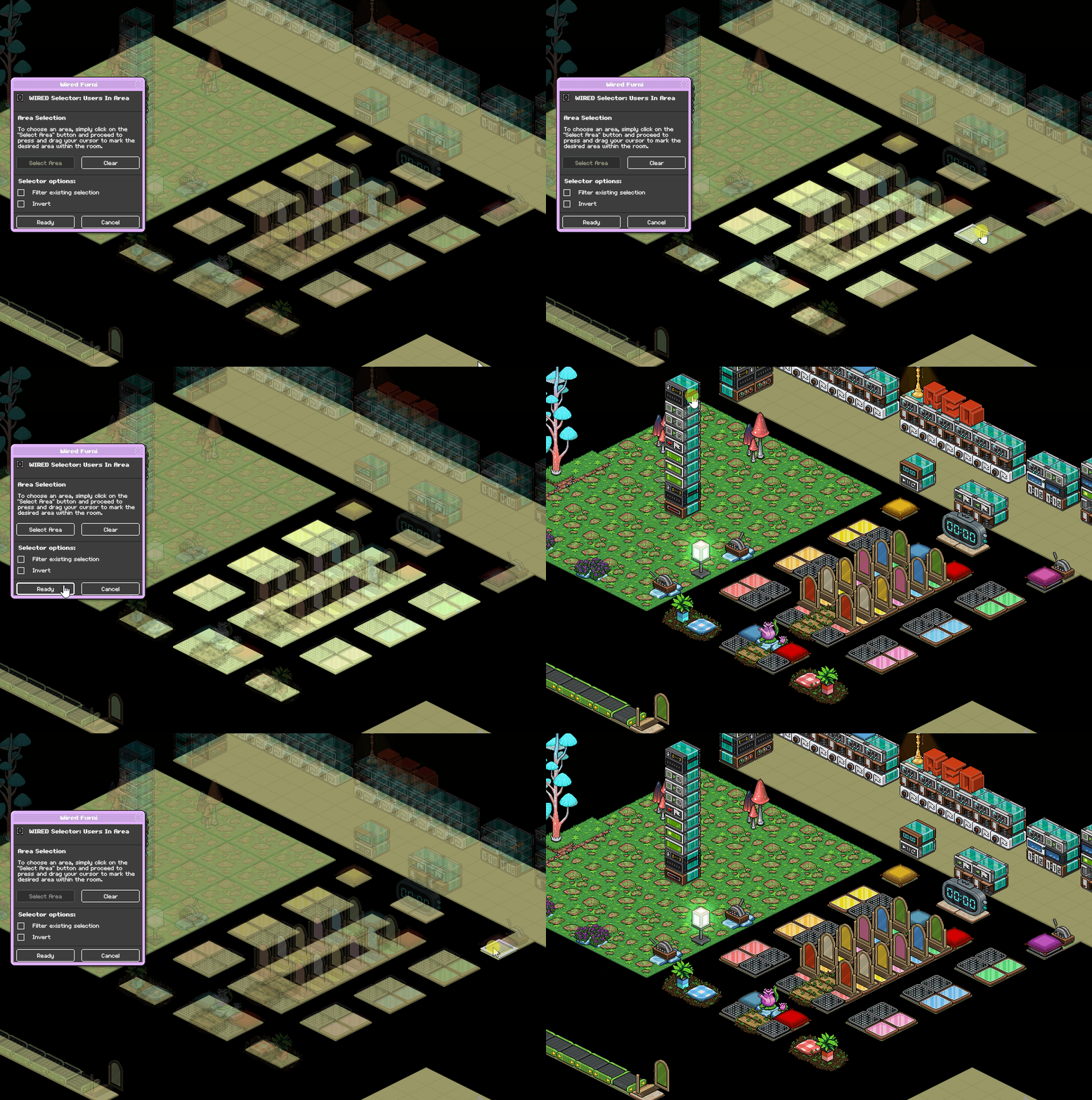
Set your WIRED Selector: Users in Area to the game area. Make sure you get all tiles in the game, don't select the winning pillow/area. Example below, depending on your layout you may need multiple of these. For this example, two was needed to select the switch area as well.
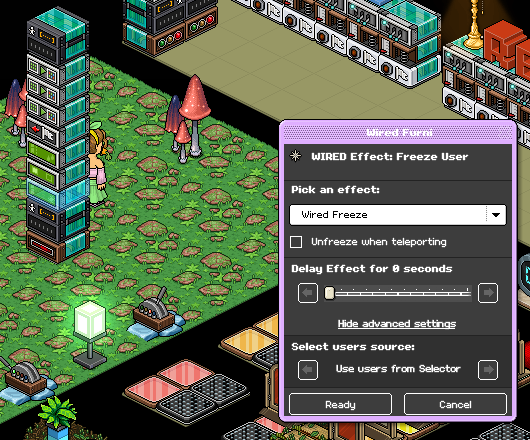
Set your WIRED Effect: Freeze User under advanced settings to "Users from Selector" under select users source.
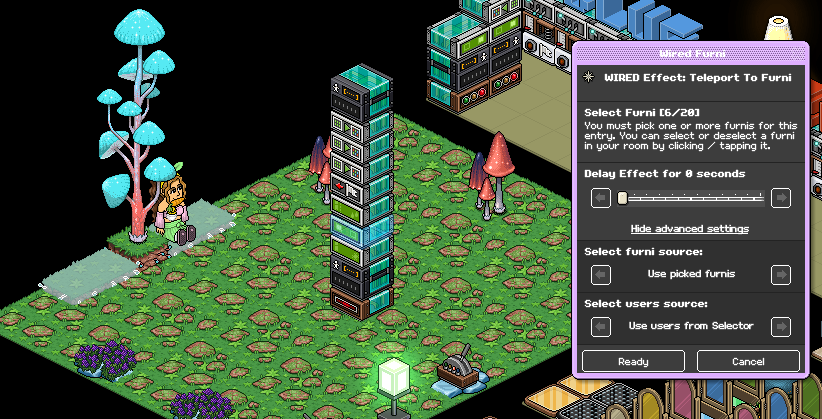
Using your WIRED Effect: Teleport to Furni, set it to where you want users to teleport when they lose the game. Make sure under advanced settings that it's set to "Users from Selector" under select users source.
Set your WIRED Effect: Unfreeze Users with a 2-second delay. Make sure under advanced settings that it's set to "Users from Selector" under select users source.
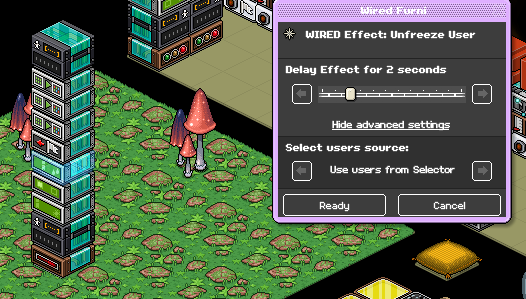
Set your WIRED Effect: Leave Team to "Users from selector" under advanced settings and select user source.
Set your first WIRED Effect: Match Furni to Position & State to the game used to enter your game. Make sure it's set to an OPEN state, select "Current Furni State" and then set a 7.5-second delay.
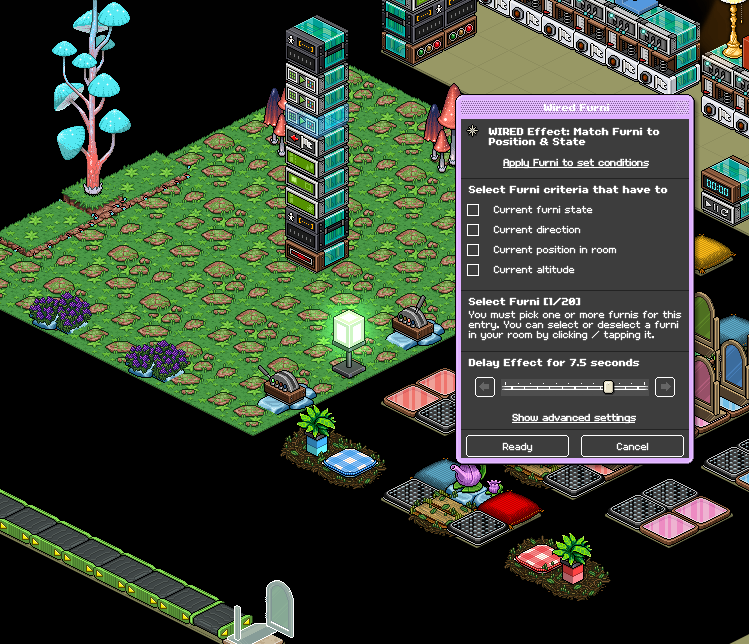
Set your second WIRED Effect: Match Furni to Position & State to your lamp, make sure it's an on OFF state and select "Current furni state"
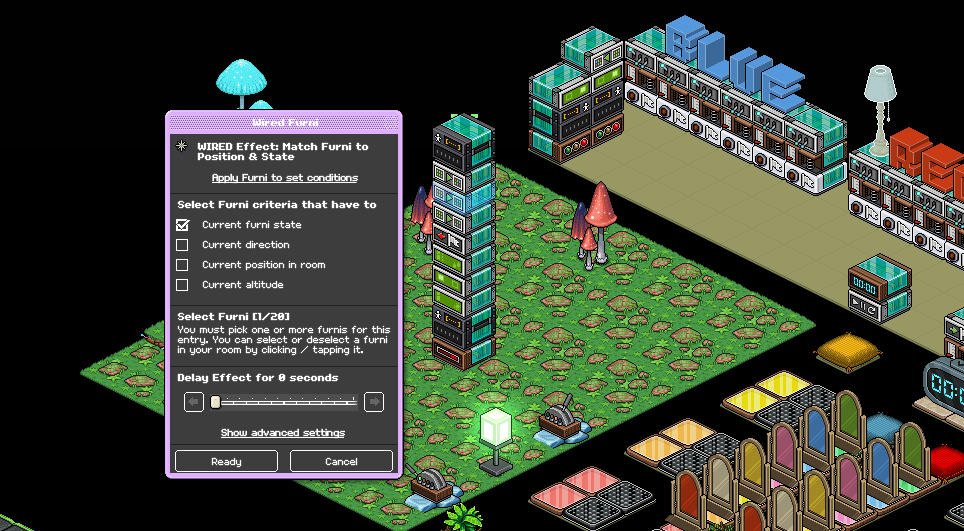
Select all gates in the game area, and make sure they're all in a CLOSED state. Tick off "Current furni state" and then add a 3-second delay.
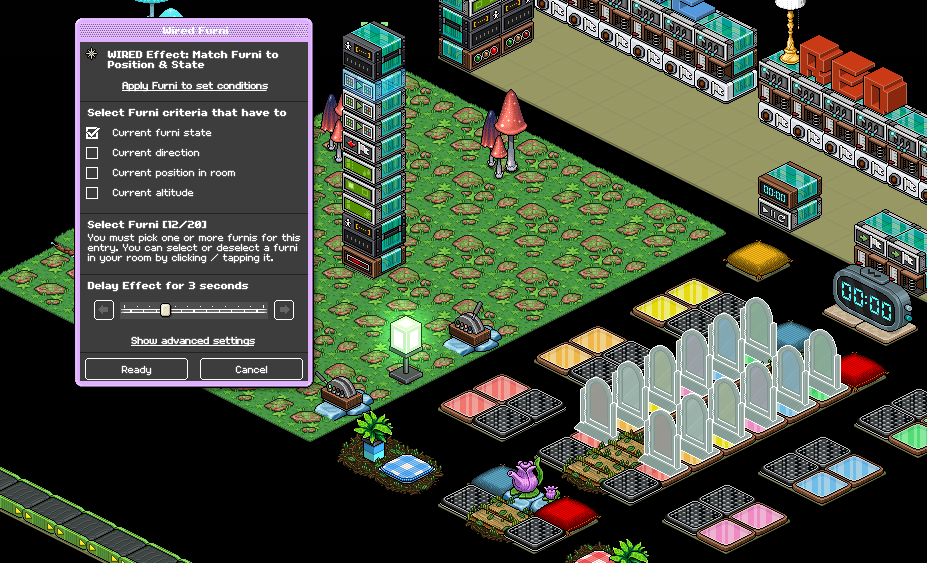
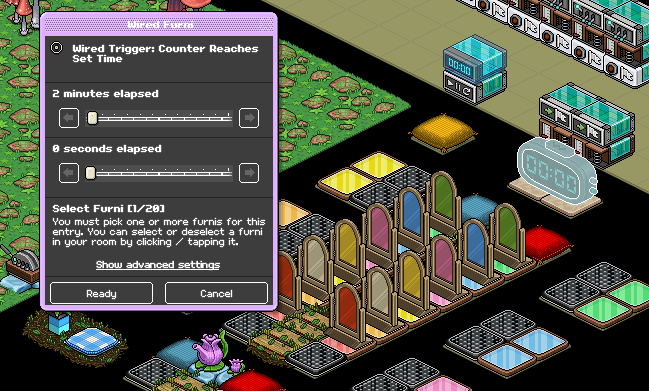
Set your WIRED Trigger: Counter Reaches set time to how long you'd like your game to be. The standard is anywhere from 2-3 minutes.
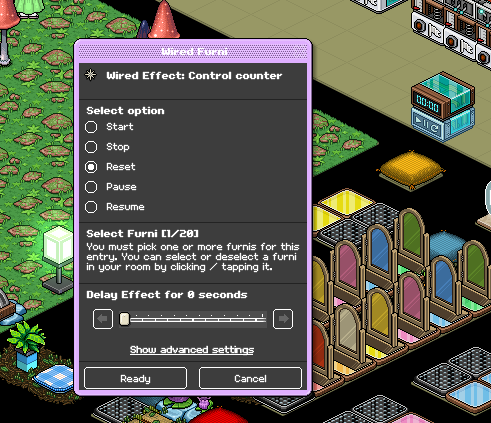
Set your WIRED Effect: Control Counter to your timer and select "reset"
Note: If you're using a leaderboard and keeping track of points, make sure that you use a "Most wins" leaderboard of any type!
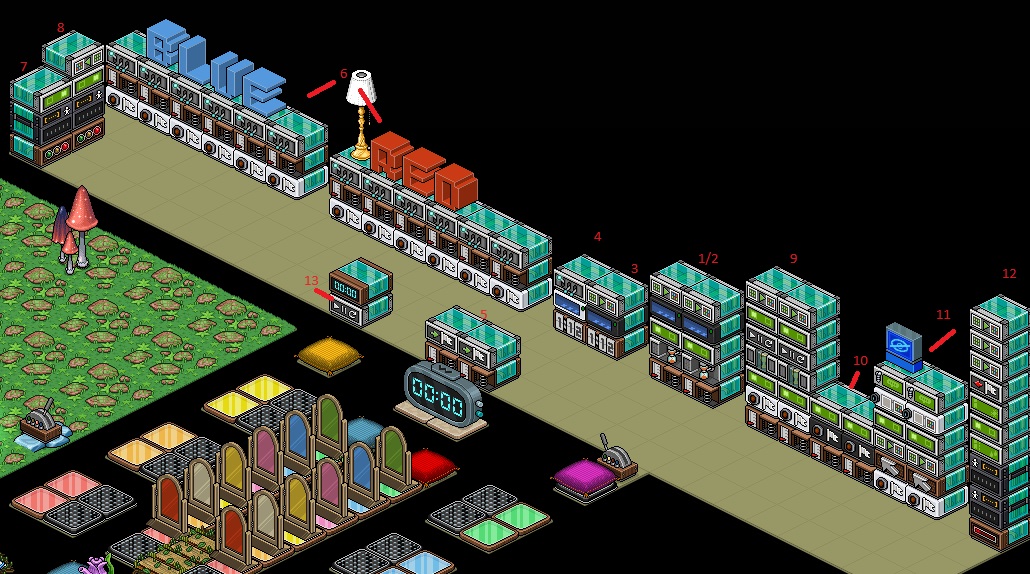
Use the photo below for references to stacks!
Wired Stack One
WIRED Trigger: User walks on Furni
WIRED Effect: Timer Reset
WIRED Effect: Teleport to Furni
WIRED Negative Condition: Furnis have NO avatars
WIRED Effect: Match Furni to Position & State
Wired Stack Two
WIRED Trigger: User walks on Furni
WIRED Effect: Timer Reset
WIRED Effect: Teleport to Furni
WIRED Negative Condition: Furnis have NO avatars
WIRED Effect: Match Furni to Position & State
Wired Stack Three
WIRED Trigger: At Set Time
WIRED Negative Condition: Furnis have NO avatars
WIRED Effect: Match Furni to Position & State
Wired Stack Four
WIRED Trigger: At Set Time
WIRED Condition: Furni has users
WIRED Effect: Toggle Furni state
Wired Stack Five (Two identical stacks - one for each team)
WIRED Trigger: User walks on furni (x2 - one for each team)
WIRED Effect: Join Team (x2 - one for each team)
Wired Stack Six
WIRED Condition: User is on team X (12 of these - six for each of the two teams)
WIRED Trigger: User walks on Furni (12 of these - six for each of the two teams)
WIRED Effect: Toggle Furni State (12 of these - six for each of the two teams)
Wired Stack Seven
WIRED Trigger: Game Starts
WIRED Selector: Users in Area
WIRED Effect: Teleport to Furni
Wired Stack Eight
WIRED Trigger: Game Starts
WIRED Selector: Users in Area
WIRED Effect: Teleport to Furni
WIRED Effect: Match Furni to Position & State
Wired Stack Nine (Two identical stacks - one for each team)
Wired Trigger: User Walks on Furni (x2 - one for each team)
WIRED Condition: Users is on team X (x2 - one for each team)
WIRED Effect: Teleport to Furni (x4 - two for each team)
WIRED Effect: Give Points (x2 - one for each team)
WIRED Effect: Control Counter (x2 - one for each team)
WIRED Effect: Match Furni to Position & State (x2 - one for each team)
Wired Stack Ten (RECOMMENDED - Two identical stacks - one for each team)
WIRED Trigger: User Walks on Furni (x2 - one for each team)
WIRED Negative Condition: NOT team member (x2 - one for each team)
WIRED Effect: Teleport to Furni (x2 - one for each team)
Wired Stack Eleven (Two identical stacks - one for each team)
WIRED Condition: User is on team X (x2 - one for each team)
WIRED Trigger: Furni is Used (x2 - one for each team)
WIRED Effect: Match Furni to Position & State (x2 - one for each team)
WIRED Effect: Teleport to Furni (x2 - one for each team)
WIRED Condition: Furni States & Position match (x2 - one for each team)
WIRED Effect: Bot Talks to All Users (Not necessary but used for a lot of games)
Wired Stack Twelve
WIRED Trigger: Counter Reaches set time
WIRED Effect: Control Counter
Wired Stack Thirteen
WIRED Trigger: Game Ends
WIRED Selector: Users in Area
WIRED Effect: Freeze User
WIRED Effect: Teleport to Furni
WIRED Effect: Unfreeze User
WIRED Effect: Leave team
WIRED Effect: Match Furni to Position & State (x3)
Furni
Game Counter
Color tiles x12
Banzai x17 (For this layout)
Lamp
Gates (x12, 2 for each color used)
Switch
Gate to enter game
Step 1 - Stack one
Set your user walks on furni to the gate you use to enter the game
Step 2 - Stack one
Place your WIRED Effect: Timer Reset, no adjustments are needed.
Step 3 - Stack one
Set your teleport to furni effect to where you want users of team 1 (blue in this case) to teleport. For this guide I will demonstrate red/blue team colors.
Step 4 - Stack one
Set your wired negative condition: furnis have no avatars to the where you will have users of team 1 teleport when they enter.
(Same seat/tile as the previous step) No selections are needed on this wired as only one furni should be selected
Step 5 - Stack one
Set your WIRED Effect: Match furni to position and state to the gate you use to enter. Make sure it's in a CLOSED state and then click "Current furni state"
Step 1 - Stack two
Refer to steps 1 and 2 for your walks on and timer reset. This stack is the same as the previous except that it's for the other team.
For this stack you will set your WIRED Negative Condition: Furnis have no avatars to the pre-game starting tile/seat of the opposite team from the previous step. (In this case red)
Step 2 - Stack two
Set your WIRED Effect: Teleport to Furni to the same tile as the previous step. (Pre-game starting point for team 2)
Step 3 - Stack two
Refer to step 5 - stack one and repeat the same task in this stack as well for your WIRED Effect: Match Furni to Position & State.
Step 1 - Stack three
Set your WIRED Trigger: At Set Time to 5 seconds
Step 2 - Stack three
Set your WIRED Negative Condition: Furnis have no avatars to BOTH starting points for each of the two teams. Make sure you select "If one of the selected furni has no avatar on it"
Step 3 - Stack three
Set your WIRED Effect: Match Furni to Position & State to the gate you use to enter the game and make sure it's in an OPEN state. Tick "Current Furni state"
Step 1 - Stack four
Set your WIRED Trigger: At Set time to 5 seconds
Step 2 - Stack four
Set your WIRED Condition: Furni has users to BOTH starting points for each of the two teams. Make sure you select "If all of the selected furnis have avatars on them"
Step 3 - Stack four
Set your WIRED Effect: Toggle Furni State to your counter for your game.
Step 1 - Stack five
Set your WIRED Trigger: User walks on Furni to your starting tile/seat for team 1.
Step 2 - Stack five
Set your WIRED Effect: Join team to the color that you want for team 1.
Step 3 - Stack five (b)
Repeat the same task except for team two. Here is a gif example of how you'd set it, using the red team as an example.
Step 1 - Stack six
Set your WIRED Condition: User is on Team X to the color you want for team 1
Step 2 - Stack six
Set your WIRED Trigger: User Walks on Furni to one set of matching color tiles
Step 3 - Stack Six
Set your WIRED Effect: Toggle Furni State to the matching color of gate that matches team one's lane.
Repeat this with each of the six different color tiles/gates, make sure you only select the one gate that matches the team's lane per stack.
Step 4 - Stack six (b)
Repeat this with team two. making sure your WIRED Condition: User is on team X's are all set to the color you want for team two and that you only select the gates in that teams lane. Here is an example of how different team stacks should look.
Step 1 - Stack seven
Place your WIRED Trigger: Game Starts, no adjustments are needed.
Step 2 - Stack seven
Set your WIRED Selector: Users in Area to where team 1 spawns when they enter. Example gif below.
Step 3 - Stack seven
Set your WIRED Effect: Teleport To Furni to where you want users on team 1 to teleport when the game starts, make sure under advanced settings and then "Select users source" you pick "Users from selector"
Step 1 - Stack eight
Place your WIRED Trigger: Game Ends, no adjustments are needed.
Step 2 - Stack eight
Set your WIRED Selector: Users in Area to where users spawn when they enter team 2. Refer to step 2 - Stack seven for how to do this. Make sure you select the team opposite the prior stack.
Step 3 - Stack eight
Use the same settings as Step 3 - Stack seven for your WIRED Effect: Teleport to Furni, making sure you select where you want users of team 2 to teleport when they enter.
Step 4 - Stack eight
Set your WIRED Effect: Match Furni to Position & State to your lamp, making sure it's in an ON state. Select "Current furni state"
Step 1 - Stack nine (a)
Set your WIRED Trigger: User Walks on Furni to team 1's winning seat/tile. This will be what they walk on after all of their gates are open.
Step 2 - Stack nine
Set your WIRED Condition: User is on team X to the color that matches team 1.
Step 3 - Stack nine
Set your first WIRED Effect: Teleport to Furni to the winning seat/tile with no adjustments.
Step 4 - Stack nine
Place your WIRED Effect: Give Points, no adjustments are necessary.
Step 5 - Stack nine
Set your WIRED Effect: Control Counter to your counter and select "Reset" making sure you select a 2-second delay.
Step 6 - Stack nine
Set your second WIRED Effect: Teleport To Furni to the original pre-game starting point that matches team 1. Make sure you select a 5-second delay on this wired.
Step 7 - Stack nine
Using your WIRED Effect: Match Furni to Position & State, make sure all 12 gates in the game area are in a CLOSED state. Select them and then tick off "Current Furni State" with no delay.
Step 8 - Stack nine (b)
Repeat steps 1-7 except with the opposite team. Gif provided below shows how it should look. Make sure you select the spawning point that matches team 2.
Step 1 - Stack ten - RECOMMENDED (a)
This wired is to prevent trolls in the opposite team from blocking their opponent from scoring their win.
Set your WIRED Trigger: User Walks on Furni to the first gate that matches team 1
Step 2 - Stack ten
Set your WIRED Negative Condition: NOT Team member to the matching team from the previous step. For example, if you selected the first gate of the red lane, select "Red"
Step 3 - Stack ten
Set your WIRED Effect: Teleport To Furni to where users teleport for their team when the game starts.
Step 4 - Stack ten (b)
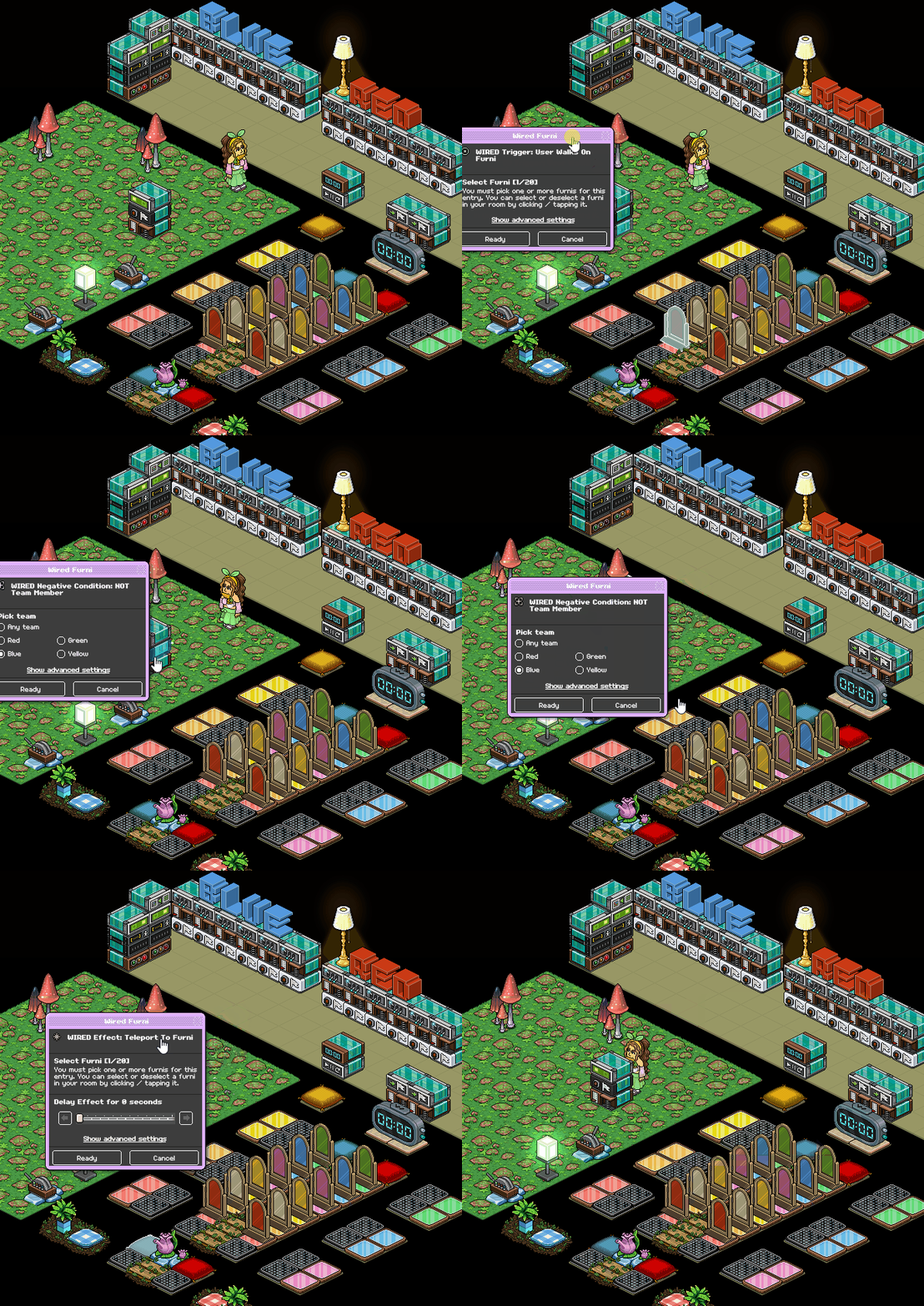
Repeat steps 1-3 for the opposite team. Below is a gif of how it should look for a specific team.
Step 1 - Stack eleven (a)
This is for the switches that sabotage their opponent's gates, if you do not wish to add this you do not need to follow the steps under this stack.
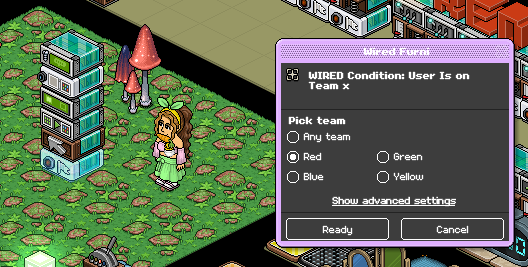
Set your WIRED Condition: User is on Team X to the color that matches team 1
Step 2 - Stack eleven
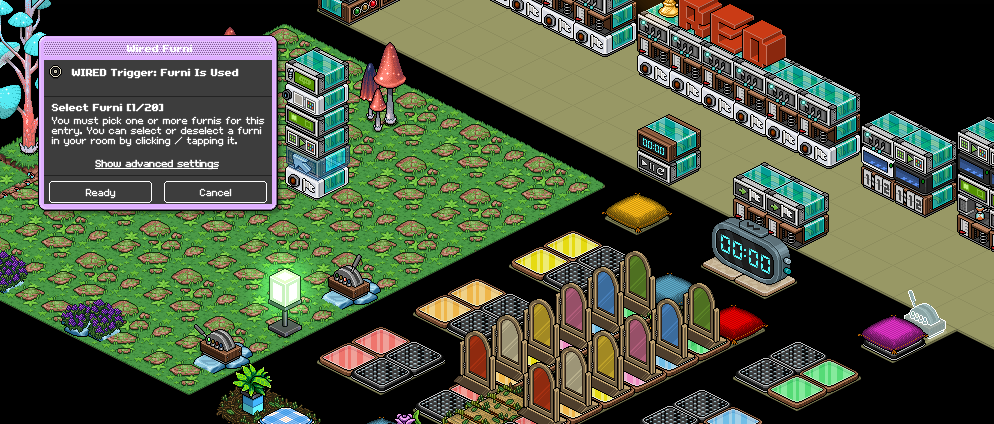
Set your WIRED Trigger: Furni is used to your switch
Step 3 - Stack eleven
Set your WIRED Effect: Match Furni to Position & State to two of the opposite team's gates. (These are recommended)
Make sure they're set to an OFF state and select "Current furni state"
Step 4 - Stack eleven
Set your WIRED Effect: Teleport to Furni and select team 1's starting point when they enter the game.
Step 5 - Stack eleven
Set your WIRED Condition: Furni States & Position match to your lamp, making sure it's set to an ON state and tick "Current furni state"
Step 6 - Stack eleven
Many games will have a bot that announces when someone has sabotaged gates, if you wish to include this add a "WIRED Effect: Bot Talks to all Users" below is an example of what you'd put in the wired. Make sure you have a bot and that the name matches what you put in the wired if you wish to include this.
Step 7 - Stack eleven (b)
Repeat steps 1-5 (6 optional) except with the opposite team. Below is an example of what it should look like.
Step 1- Stack twelve
Place your WIRED Trigger: Game Ends, no adjustments are needed.
Step 2 - Stack twelve
Set your WIRED Selector: Users in Area to the game area. Make sure you get all tiles in the game, don't select the winning pillow/area. Example below, depending on your layout you may need multiple of these. For this example, two was needed to select the switch area as well.
Step 3 - Stack twelve
Set your WIRED Effect: Freeze User under advanced settings to "Users from Selector" under select users source.
Step 4 - Stack twelve
Using your WIRED Effect: Teleport to Furni, set it to where you want users to teleport when they lose the game. Make sure under advanced settings that it's set to "Users from Selector" under select users source.
Step 5 - Stack twelve
Set your WIRED Effect: Unfreeze Users with a 2-second delay. Make sure under advanced settings that it's set to "Users from Selector" under select users source.
Step 6 - Stack twelve
Set your WIRED Effect: Leave Team to "Users from selector" under advanced settings and select user source.
Step 7 - Stack twelve
Set your first WIRED Effect: Match Furni to Position & State to the game used to enter your game. Make sure it's set to an OPEN state, select "Current Furni State" and then set a 7.5-second delay.
Step 8 - Stack twelve
Set your second WIRED Effect: Match Furni to Position & State to your lamp, make sure it's an on OFF state and select "Current furni state"
Step 9 - Stack twelve
Select all gates in the game area, and make sure they're all in a CLOSED state. Tick off "Current furni state" and then add a 3-second delay.
Step 1 - Stack thirteen
Set your WIRED Trigger: Counter Reaches set time to how long you'd like your game to be. The standard is anywhere from 2-3 minutes.
Step 2 - Stack thirteen
Set your WIRED Effect: Control Counter to your timer and select "reset"
Note: If you're using a leaderboard and keeping track of points, make sure that you use a "Most wins" leaderboard of any type!
Use the photo below for references to stacks!
"Place your WIRED Trigger: Game Ends, no adjustments are needed."
The photo has Game Starts wired, so I'm assuming it's Game Starts and not Game Ends?