
This is a tutorial in how to make a timer without using a glitchy counter in your WIRED games, this enables you to customize how long your game is so you don’t have to use the set times that normal counters give.
The extra furniture I will be using is:
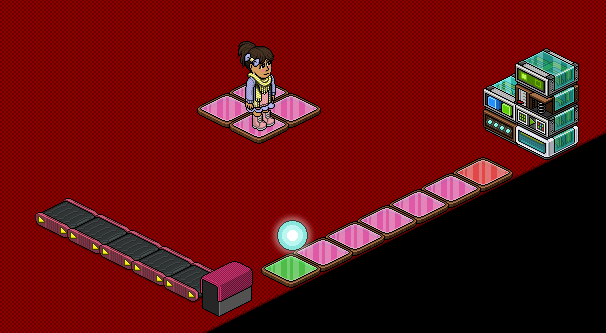
Place out your furni like this image below
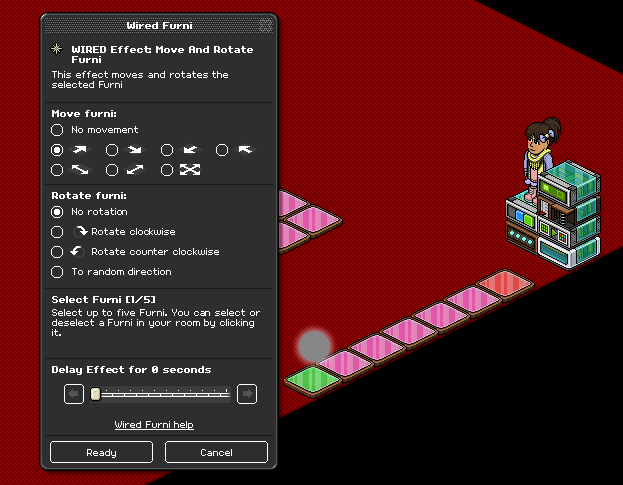
Set the WIRED Effect: Move and Rotate Furni to the glowball and set the direction as the direction to the red tile. Set the WIRED Trigger: Repeat Effect for any time you wish, work out the maths for how long you want your game to be. I’m using 7 tiles and I want my timer to be 30 seconds so I set the repeat effect to 5 seconds.
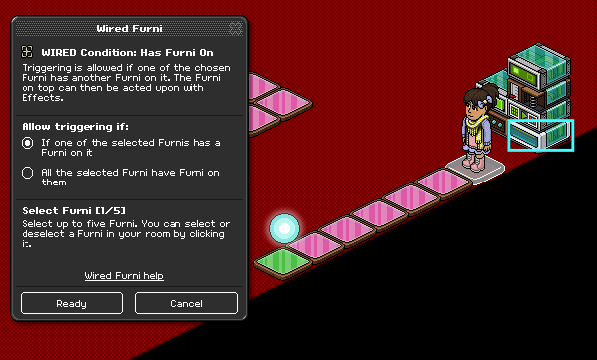
Set the WIRED Condition: Has Furni On to the last tile (the red tile in this instance).
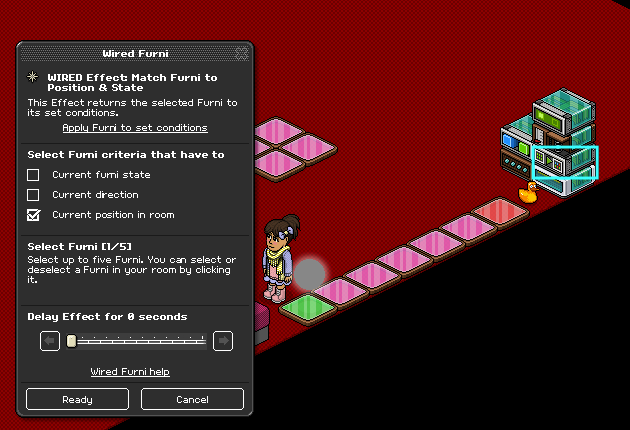
Set the WIRED Effect: Match Furni to Position & State to the glowball on the green tile. Make sure the box is ticked for Current position in room.
Set the WIRED Trigger: User Walks On Furni to the gate.
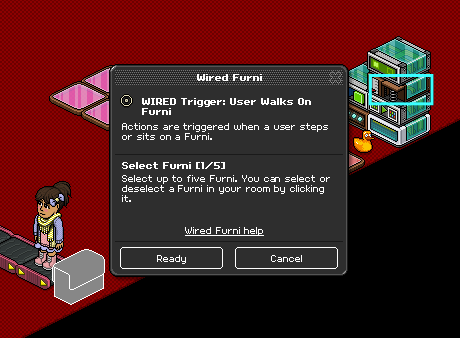
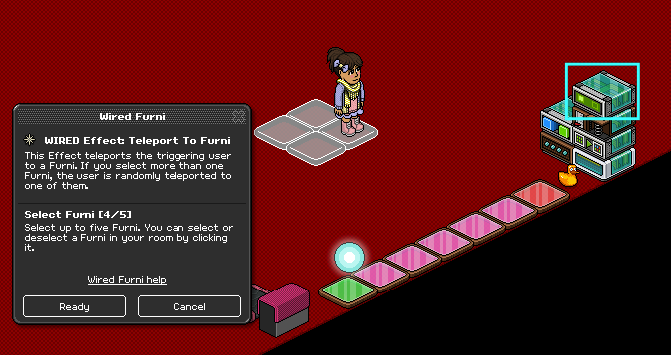
Set the WIRED Effect: Teleport to Furni to the extra tiles you placed
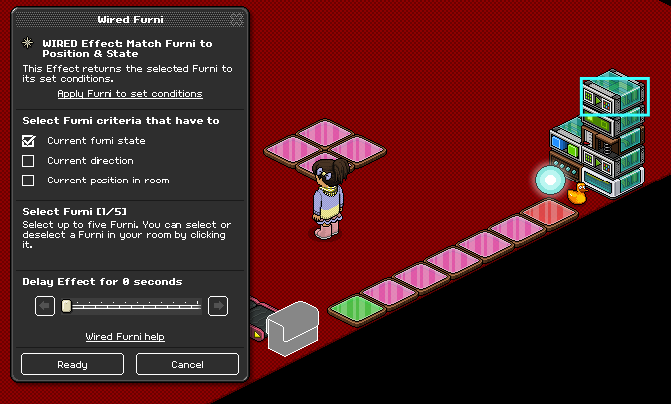
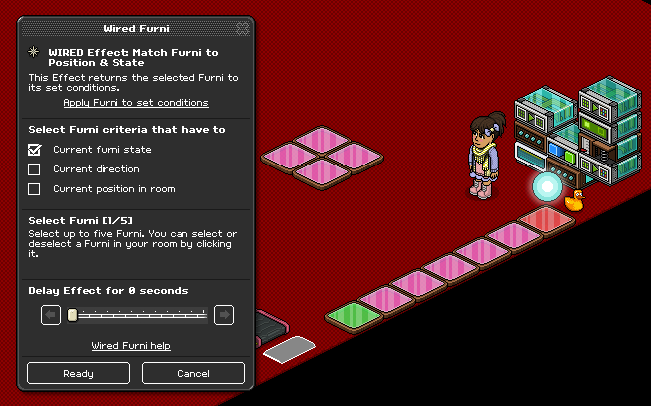
Add a WIRED Effect: Match Furni to Position & State on top of the large stack (with the condition, match, walk on, and teleport to furni WIREDs) and set it to the closed gate. Make sure that Current furni state is ticked.
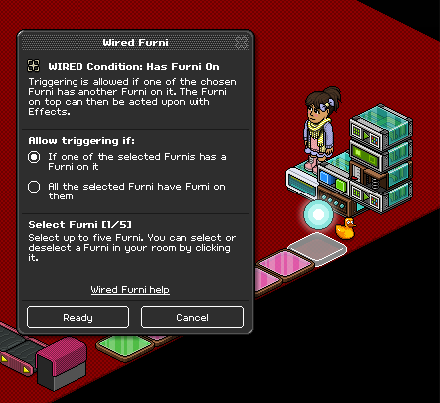
Move the WIRED Condition: Has Furni On to a new stack and make sure it is still selected to the red tile.
Add a WIRED Trigger: Repeat Effect on top of the condition. Set the timer to 0.5 seconds. Then on top of that add a WIRED Effect: Match Furni to Position & State and set the gate to be open.
This tutorial is a tutorial for a user triggering the timer to start, you can make it continuous by replacing the WIRED Trigger: User Walks on Furni with a WIRED Trigger: Repeat Effect. You will need to keep the condition in the original stack for this.
You can customise this, the end game wired is the wired with the condition and and the repeat effect which you can add your own wired to. The start game is the large stack with the teleport to furni wired in, you can add other wired for things to happen at the start of your game.
This should now work as an active timer that is customisable to your wants and needs.
Make sure to check out our other WIRED tutorials!
You will need:
- 1x WIRED Trigger: Repeat Effect
- 1x WIRED Trigger: User Walks On Furni
- 1x WIRED Effect: Move And Rotate Furni
- 1x WIRED Effect: Match Furni to Position & State
- 1x WIRED Condition: Has Furni On (If you do not have this you can alternatively use WIRED Condition: Furni States and Positions Match)
- ?x Tiles (This is up to you on how long you want your timer, and also what kind of tiles you use, in this tutorial I am using 7 color tiles)
- 1x Object (In this tutorial I am using a glowball)1x Duck (or other object) – this should be placed next to the red tile to stop the glowball from moving further.
The extra furniture I will be using is:
- 1x Gate
- 5x Rollers
- 1x WIRED Effect: Teleport to Furni
- 4x Color Tile
Step 1
Place out your furni like this image below
Step 2
Set the WIRED Effect: Move and Rotate Furni to the glowball and set the direction as the direction to the red tile. Set the WIRED Trigger: Repeat Effect for any time you wish, work out the maths for how long you want your game to be. I’m using 7 tiles and I want my timer to be 30 seconds so I set the repeat effect to 5 seconds.
Step 3
Set the WIRED Condition: Has Furni On to the last tile (the red tile in this instance).
Step 4
Set the WIRED Effect: Match Furni to Position & State to the glowball on the green tile. Make sure the box is ticked for Current position in room.
Step 5
Set the WIRED Trigger: User Walks On Furni to the gate.
Step 6
Set the WIRED Effect: Teleport to Furni to the extra tiles you placed
To close the gate
Add a WIRED Effect: Match Furni to Position & State on top of the large stack (with the condition, match, walk on, and teleport to furni WIREDs) and set it to the closed gate. Make sure that Current furni state is ticked.
To open the gate
Move the WIRED Condition: Has Furni On to a new stack and make sure it is still selected to the red tile.
Add a WIRED Trigger: Repeat Effect on top of the condition. Set the timer to 0.5 seconds. Then on top of that add a WIRED Effect: Match Furni to Position & State and set the gate to be open.
Tips:
This tutorial is a tutorial for a user triggering the timer to start, you can make it continuous by replacing the WIRED Trigger: User Walks on Furni with a WIRED Trigger: Repeat Effect. You will need to keep the condition in the original stack for this.
You can customise this, the end game wired is the wired with the condition and and the repeat effect which you can add your own wired to. The start game is the large stack with the teleport to furni wired in, you can add other wired for things to happen at the start of your game.
This should now work as an active timer that is customisable to your wants and needs.
Make sure to check out our other WIRED tutorials!
Eevee7 years ago