
How to add points to highscore!
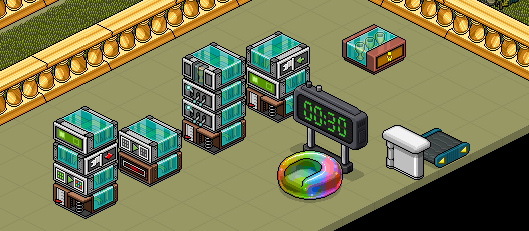
You can start with setting up the wired stacks and the objects as in the picture (the objects can be moved later, does not matter where they are when you are building it. To explain everything very simple first how it will work.
Setting up the first stackSo this step is the easiest one! The stack with “WIRED Trigger: User Walks On Furni” and “WIRED Effect: Teleport To Furni”, set the walks on furni to the object that they will go/sit on (in this case the pod) and set the teleport to the roller.


When the player gets on the rollerSo we have come to the largest stack of wireds (WOHO), so this one is a little more to do on but still easy to do!
A) We will take the ”WIRED Trigger: User Walks On Furni” and set it on the roller.
B) Take the first ”WIRED Effect: Toggle Furni State” and set it on the counter with 0sec delay.
C) The next “WIRED Effect: Toggle Furni State” also on the counter but with 0.5sec delay.
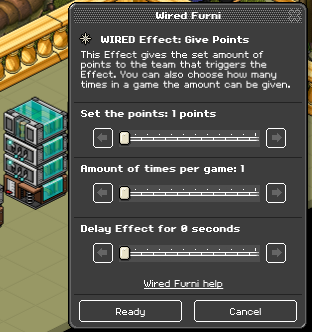
D) We only want the player to get 1 point so we will edit the ”WIRED Effect: Give Points” and set the points to 1 and Amount of times per game will also be 1.
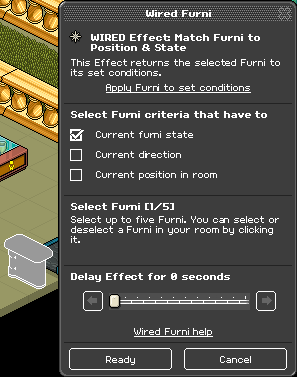
So when the time is out and the player have got the point we need to let him/her out! So the thing we will do here so easy, we will take the ”WIRED Effect: Match Furni to Position & State” and set it on the door (when its open) and select the ”Current furni state” with no delay.

When the player gets on the gateSo in this step we will reset the gate, teleport the player and let him/she leave the team so they don’t have that ugly helmet anymore!
A) Start off by setting the ”WIRED Trigget: User Walks On Furni” on the gate.
B) Set the ”WIRED Effect: Teleport To Furni” to anywhere, in my example im teleporting them on top of a wired, just make sure not to teleport them to the same furni that will teleport them to the roller again!
C) We can’t change the ”WIRED Effect: Leave Team” so less work for us!
D) Last but not least, we need to close the gate when the point is given! So take the ”WIRED Effect: Match Furni to Position & State” and save the ”Current furni state” on the gate when its closed!
What you'll need
- 3x WIRED Trigger: User Walks On Furni
- 2x WIRED Effect: Teleport To Furni
- 2x WIRED Effect: Toggle Furni State
- 2x WIRED Effect: Match Furni to Position & State
- 1x WIRED Effect: Join team
- 1x WIRED Effect: Leave Team
- 1x WIRED Effect: Give points
- 1x WIRED Trigger: Game Ends
- 1x Highscore Classic – Weekly (day, month also works)
- 1x Any kind of gate
- 1x Roller
- 1x Counter/timer
- 1x Object to go/sit on
Step 1
You can start with setting up the wired stacks and the objects as in the picture (the objects can be moved later, does not matter where they are when you are building it. To explain everything very simple first how it will work.
- The player that will get the point will have to go/sit on a furni that will teleport them to the roller.
- When the person gets on the roller the counter start
- Counter will start → she/he will get assigned to a team → will get the point
- Time ends → gate will open → point will show up on the highscore → the person get teleported
Step 2
Setting up the first stackSo this step is the easiest one! The stack with “WIRED Trigger: User Walks On Furni” and “WIRED Effect: Teleport To Furni”, set the walks on furni to the object that they will go/sit on (in this case the pod) and set the teleport to the roller.
Step 3
When the player gets on the rollerSo we have come to the largest stack of wireds (WOHO), so this one is a little more to do on but still easy to do!
A) We will take the ”WIRED Trigger: User Walks On Furni” and set it on the roller.
B) Take the first ”WIRED Effect: Toggle Furni State” and set it on the counter with 0sec delay.
C) The next “WIRED Effect: Toggle Furni State” also on the counter but with 0.5sec delay.
D) We only want the player to get 1 point so we will edit the ”WIRED Effect: Give Points” and set the points to 1 and Amount of times per game will also be 1.
Step 4
So when the time is out and the player have got the point we need to let him/her out! So the thing we will do here so easy, we will take the ”WIRED Effect: Match Furni to Position & State” and set it on the door (when its open) and select the ”Current furni state” with no delay.
Step 5
When the player gets on the gateSo in this step we will reset the gate, teleport the player and let him/she leave the team so they don’t have that ugly helmet anymore!
A) Start off by setting the ”WIRED Trigget: User Walks On Furni” on the gate.
B) Set the ”WIRED Effect: Teleport To Furni” to anywhere, in my example im teleporting them on top of a wired, just make sure not to teleport them to the same furni that will teleport them to the roller again!
C) We can’t change the ”WIRED Effect: Leave Team” so less work for us!
D) Last but not least, we need to close the gate when the point is given! So take the ”WIRED Effect: Match Furni to Position & State” and save the ”Current furni state” on the gate when its closed!
Tips
- This only works for one player at the time to get a point, you can set a delay on the closing gate wired there for let more players in. (Everyone will still get a point)
- This way to give points is for games or mazes where a counter are not used in the same room.
Eevee7 years ago