
In this tutorial, you will learn the wired components to the game “Black Hole.”
You’re going to need to start with an area that vaguely looks like this, rollers spaced to fit 2x2 tiles in 4 places, and a tile for your centre. You will need chairs on the corner rollers, and in the middle of your lines like shown below.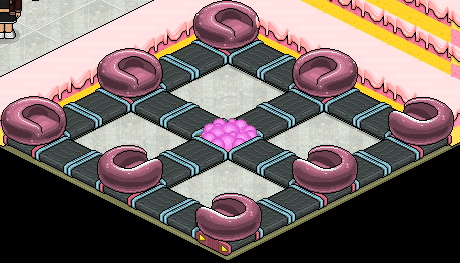
First you will need to place 1x WIRED Effect: Teleport to Furni and 1x WIRED Trigger: User Walks on Furni. Select the 4 (2x2) tiles you have in between your rollers and the tile in the centre for user walks on, and select an area out of game for teleport to a furni.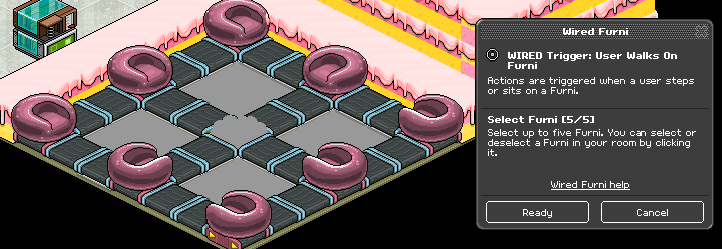
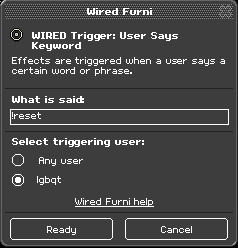
Now you’re going to place 4x WIRED Effect: Match Furni to Position & State and 1x WIRED Trigger: User Says Keyword. With this on your Match Furni to Position & State wired, you’re going to select the chairs ontop of the rollers. (Note: Please make sure the chairs cannot roll off the rollers), make sure to select the position in room and current direction options on the wired, and set the delay to 0.5 seconds. Now with the other two you placed, you’re going to select the rollers UNDER the chairs, select the position in room and current direction options on the wired, and there will be no delay. Finally for this stack, you’re going to set the keyword to something like “!reset” and make sure only YOU can say this command.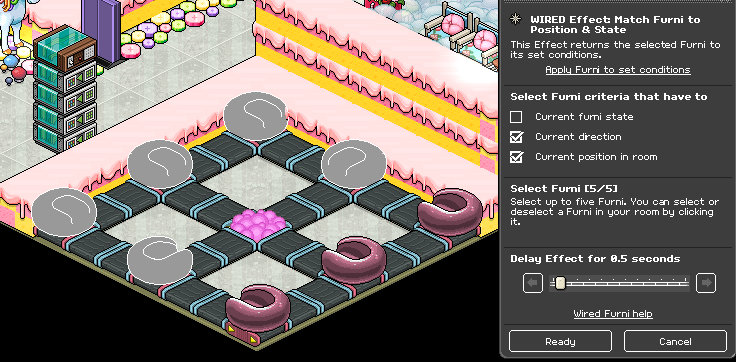
Next you are going to place another 4x WIRED Effect: Match Furni to Position & State, 1x WIRED Trigger: User Says Keyword, and 8 (1x1) tiles. You’re going to put the tiles somewhere they probably wont be seen, stack them over a divider in the air, put them somewhere convenient and out of the way. Now you will move your chairs to these tiles. Next with this on your first two Match Furni to Position & State wired, you’re going to select the chairs ontop of the tiles, make sure to select the position in room option on the wired, and there will be no delay. You will now need to rotate the rollers where if someone stood on them, they would roll off and toward the floor (the rollers that once had chairs on them). Now select those rollers after they are rotated in your next two Match Furni to Position & State, make sure to select the position in room and furniture direction options on the wired and set the delay to 0.5 seconds, Finally with your keyword, you’re going to set it to something like “!begin” and once again make sure ONLY you can say this command.
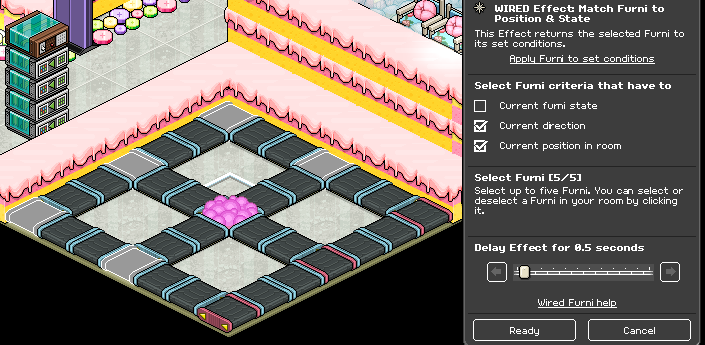
Now what you’re going to do is on your “!begin” stack, you’re going to find the Match Furni to Position & State wired that has open space, and NO delay, and you’re going to select the WIRED Trigger: User Walks on Furni.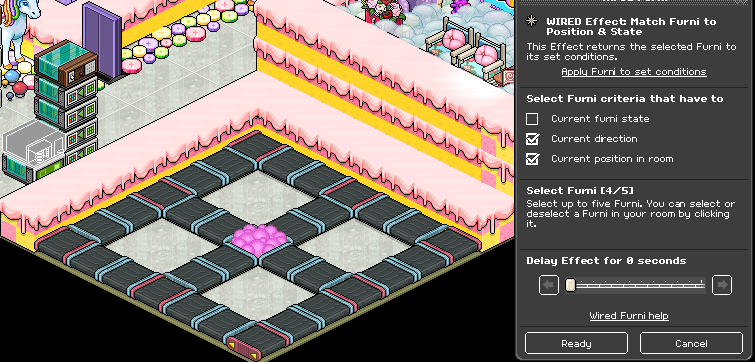
Next you’re going to find the Match Furni to Position & State wired that has open space and NO delay on your “!reset” stack. Move the WIRED Trigger: User Walks on Furni one tile to the side. These last two steps will insure when the game is in progress and you walk on the tiles you will be teleported out, and when you are not in the middle of a game walking to your seat will not teleport you out.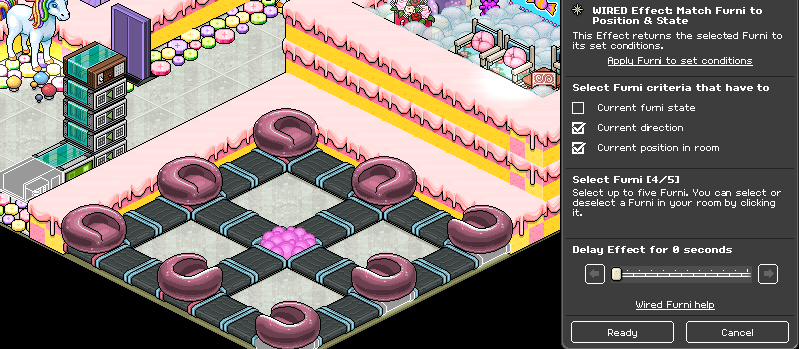
You Will Need:
- 32x Rollers of your choosing
- 8x Any chair of your choosin
- g4x (2x2) Tiles
- 9x (1x1) Tile
- 8x WIRED Effect: Match Furni to Position & State
- 2x WIRED Trigger: User Says Keyword
- 1x WIRED Effect: Teleport to Furni
- 1x WIRED Trigger: User Walks on Furni
Step 1
You’re going to need to start with an area that vaguely looks like this, rollers spaced to fit 2x2 tiles in 4 places, and a tile for your centre. You will need chairs on the corner rollers, and in the middle of your lines like shown below.
Step 2
First you will need to place 1x WIRED Effect: Teleport to Furni and 1x WIRED Trigger: User Walks on Furni. Select the 4 (2x2) tiles you have in between your rollers and the tile in the centre for user walks on, and select an area out of game for teleport to a furni.
Step 3
Now you’re going to place 4x WIRED Effect: Match Furni to Position & State and 1x WIRED Trigger: User Says Keyword. With this on your Match Furni to Position & State wired, you’re going to select the chairs ontop of the rollers. (Note: Please make sure the chairs cannot roll off the rollers), make sure to select the position in room and current direction options on the wired, and set the delay to 0.5 seconds. Now with the other two you placed, you’re going to select the rollers UNDER the chairs, select the position in room and current direction options on the wired, and there will be no delay. Finally for this stack, you’re going to set the keyword to something like “!reset” and make sure only YOU can say this command.
Step 4
Next you are going to place another 4x WIRED Effect: Match Furni to Position & State, 1x WIRED Trigger: User Says Keyword, and 8 (1x1) tiles. You’re going to put the tiles somewhere they probably wont be seen, stack them over a divider in the air, put them somewhere convenient and out of the way. Now you will move your chairs to these tiles. Next with this on your first two Match Furni to Position & State wired, you’re going to select the chairs ontop of the tiles, make sure to select the position in room option on the wired, and there will be no delay. You will now need to rotate the rollers where if someone stood on them, they would roll off and toward the floor (the rollers that once had chairs on them). Now select those rollers after they are rotated in your next two Match Furni to Position & State, make sure to select the position in room and furniture direction options on the wired and set the delay to 0.5 seconds, Finally with your keyword, you’re going to set it to something like “!begin” and once again make sure ONLY you can say this command.
Step 5
Now what you’re going to do is on your “!begin” stack, you’re going to find the Match Furni to Position & State wired that has open space, and NO delay, and you’re going to select the WIRED Trigger: User Walks on Furni.
Step 6
Next you’re going to find the Match Furni to Position & State wired that has open space and NO delay on your “!reset” stack. Move the WIRED Trigger: User Walks on Furni one tile to the side. These last two steps will insure when the game is in progress and you walk on the tiles you will be teleported out, and when you are not in the middle of a game walking to your seat will not teleport you out.
Eevee7 years ago