
In this article, you will learn how to setup collision wired and how it works.
When you're using collision wired, firstly you are using Repeat Effect and Move Furni towards nearest user or Move Furni away from nearest user. Whatever you set the delay to on the Repeat Effect will be fast how your collision item moves. For example, if you set the Repeat Effect to 5 seconds, your item will move every 5 seconds. The second part is the Move Furni towards nearest user or Move Furni away from the nearest user, which you need to use depends on what you are trying to do with collision wired. If you want to setup something where you want the furni to chase the player, then you will want to use the Move Furni towards nearest user. If you want to setup something where it's away from the user and slightly easier, then you'll want to use the Move Furni away from the nearest user. Please note that Wired Effect: Move And Rotate Furni does NOT work with collision wired.
The second part of collision wired is the User Stuff Collision and Teleport To Furni. When your collision item comes in to contact with a user, it triggers the User Stuff Collision. You can use this to then teleport the user to the beginning of your game, or back in line, or wherever you want. Again, this entirely depends on what you're planning to do, but hopefully with this basic knowledge of how collision works, you should be able to figure out how to wire it up for your game or event. Here's a basic guide for using a collision item to teleport a user to the entrance of the room.
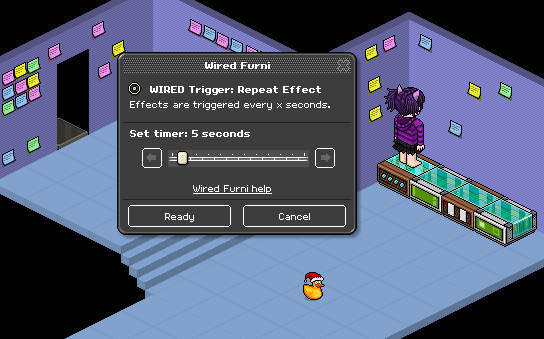
Double click the Wired Trigger: Repeat Effect and set the delay to 5 seconds.
Double click the Wired Effect: Move Furni towards nearest user and select the collision object. In this case, I'm using a Christmas Duck.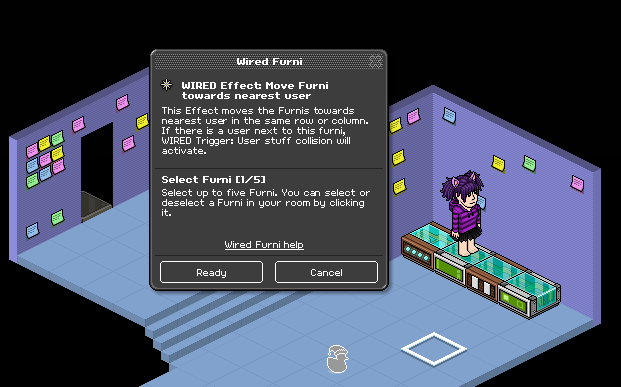
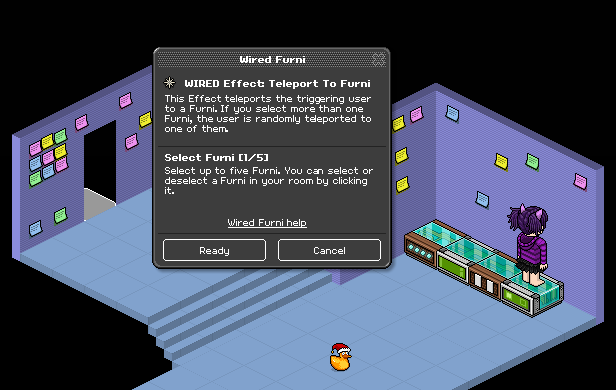
The Wired Trigger: User Stuff Collsion has no options, so don't worry about double clicking this. Instead, double click the Wired Effect: Teleport To Furni and choose an item for the user to be teleported to. In this example, I'm using a Tile With a Halo at the entrance.
Stack the Repeat Effect and Move Furni towards nearest user on top of each other. Stack User Stuff Collision and Teleport to Furni on top of each other. It should look like this.
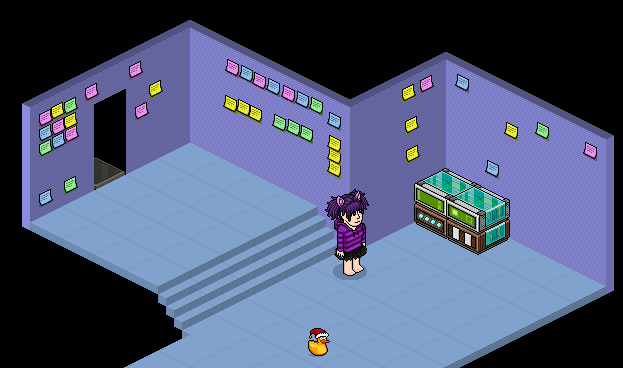
The item should now chase you until it collides with you, at which point it will teleport you back to the entrance.
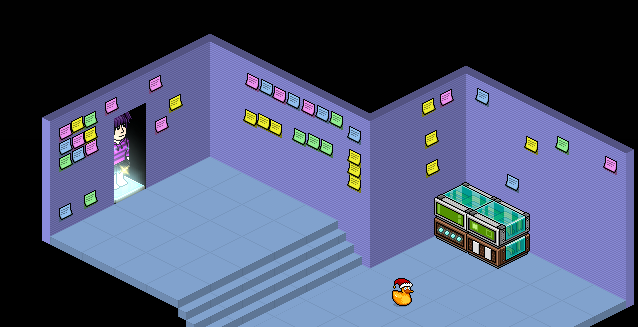
You will need:
- 1x Wired Trigger: Repeat Effect
- 1x Wired Trigger: User Stuff Collision
- 1x Wired Effect: Move Furni towards nearest user *OR* Move Furni away from nearest user
- 1x Wired Effect: Teleport To Furni
- 1x Item to act as the collision item
- 1x Item to be teleported to such as a chair or tile
Explanation:
When you're using collision wired, firstly you are using Repeat Effect and Move Furni towards nearest user or Move Furni away from nearest user. Whatever you set the delay to on the Repeat Effect will be fast how your collision item moves. For example, if you set the Repeat Effect to 5 seconds, your item will move every 5 seconds. The second part is the Move Furni towards nearest user or Move Furni away from the nearest user, which you need to use depends on what you are trying to do with collision wired. If you want to setup something where you want the furni to chase the player, then you will want to use the Move Furni towards nearest user. If you want to setup something where it's away from the user and slightly easier, then you'll want to use the Move Furni away from the nearest user. Please note that Wired Effect: Move And Rotate Furni does NOT work with collision wired.
The second part of collision wired is the User Stuff Collision and Teleport To Furni. When your collision item comes in to contact with a user, it triggers the User Stuff Collision. You can use this to then teleport the user to the beginning of your game, or back in line, or wherever you want. Again, this entirely depends on what you're planning to do, but hopefully with this basic knowledge of how collision works, you should be able to figure out how to wire it up for your game or event. Here's a basic guide for using a collision item to teleport a user to the entrance of the room.
Step 1
Double click the Wired Trigger: Repeat Effect and set the delay to 5 seconds.
Step 2
Double click the Wired Effect: Move Furni towards nearest user and select the collision object. In this case, I'm using a Christmas Duck.
Step 3
The Wired Trigger: User Stuff Collsion has no options, so don't worry about double clicking this. Instead, double click the Wired Effect: Teleport To Furni and choose an item for the user to be teleported to. In this example, I'm using a Tile With a Halo at the entrance.
Step 4
Stack the Repeat Effect and Move Furni towards nearest user on top of each other. Stack User Stuff Collision and Teleport to Furni on top of each other. It should look like this.
Step 5
The item should now chase you until it collides with you, at which point it will teleport you back to the entrance.
Eevee7 years ago