
This tutorial will show you how to wire up a p2k trivia so that you can easily see who won each round.
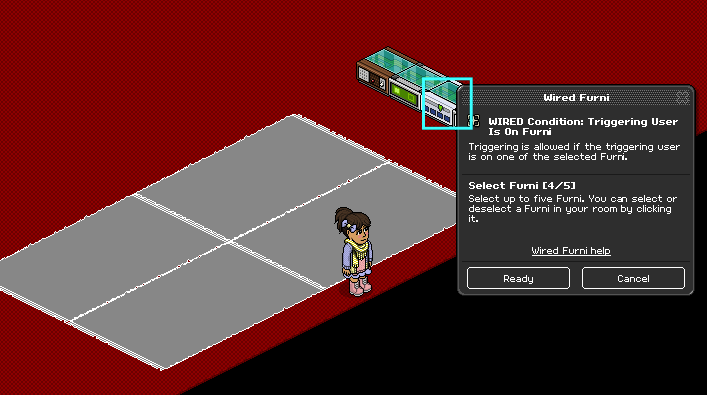
Place your floor mats on the floor and set the WIRED Condition: Triggering User Is On Furni to the mats.
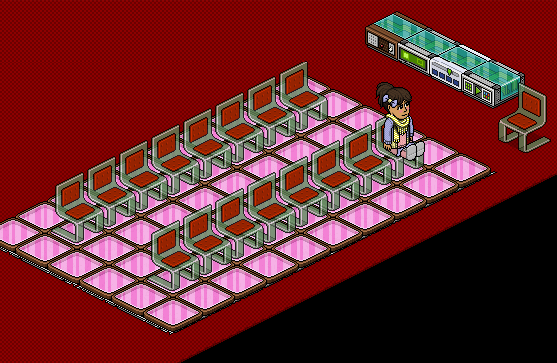
Cover up the rugs (optional) with tiles and place your chairs on the game area.
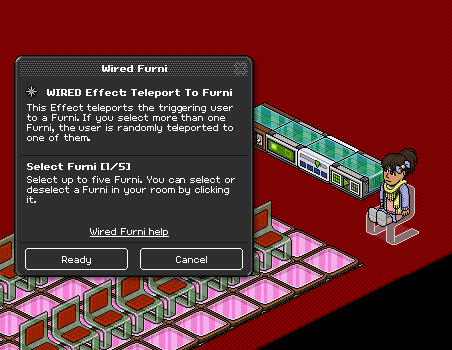
Set the WIRED Effect: Teleport to Furni to the winner chair.
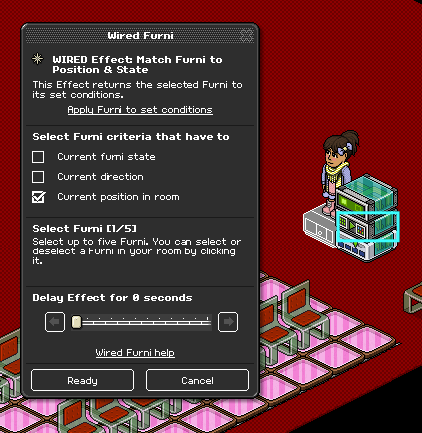
Set the WIRED Effect: Match Furni to Position & State to the WIRED Trigger: User Says Keyword and make sure that the Current position in room box is ticked. Make sure your wired looks like the image below.
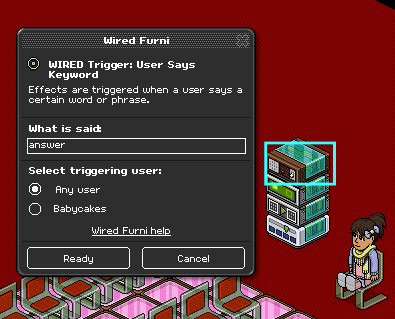
Before you ask your question in the game, put the answer to your question in the WIRED Trigger: User Says Keyword box and stack it on top of the rest of the wired boxes like below.
You will need:
- 1x WIRED Trigger: User Says Keyword
- 1x WIRED Effect: Match Furni to Position & State
- 1x WIRED Effect: Teleport to Furni
- 1x WIRED Condition: Triggering User is on Furni
- ?x Floor Rug (I'm using 4, max 5)
- ?x Tiles (I will be using 60 color tiles for this tutorial)
- ?x Chairs (I will be using 17)
Step 1
Place your floor mats on the floor and set the WIRED Condition: Triggering User Is On Furni to the mats.
Step 2
Cover up the rugs (optional) with tiles and place your chairs on the game area.
Step 3
Set the WIRED Effect: Teleport to Furni to the winner chair.
Step 4
Set the WIRED Effect: Match Furni to Position & State to the WIRED Trigger: User Says Keyword and make sure that the Current position in room box is ticked. Make sure your wired looks like the image below.
Step 5
Before you ask your question in the game, put the answer to your question in the WIRED Trigger: User Says Keyword box and stack it on top of the rest of the wired boxes like below.
Eevee7 years ago