
In this Tutorial, I will be guiding you through on how to make a 1 Second Battle Banzai/Freeze Booster.
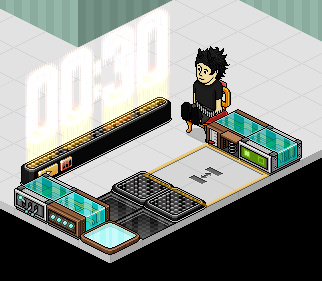
Place the Banzai Area Tiles down. You now want to place your Stacking Tile over the tiles, Double click the Stacking Tile, doing this will make you able to change the height. So then you can teleport from one Banzai Teleporter to another. (The appropriate height I use is 0.68, but you can use whatever you desire.) Place your Color Tile or whatever you're using 1 space the difference from the 1st Banzai Teleporter.
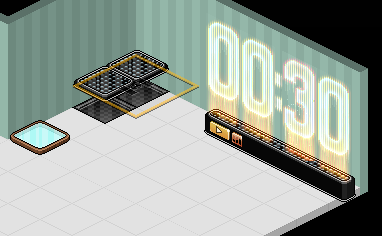
This is where we now set up the wired! First of all, double click the WIRED Trigger:User Walks On Furni and Select the Color Tile or whatever you're using.
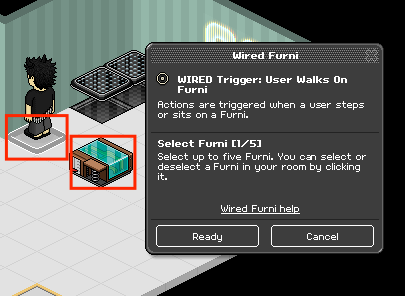
Double click the WIRED EFFECT:Teleport To Furni wired and select the Chair you want to be teleported to when you step on the Color Tile. Once you have done that, stack the wired on top of eachother.
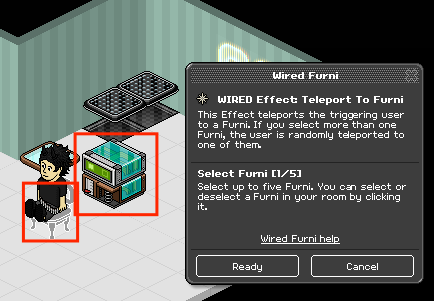
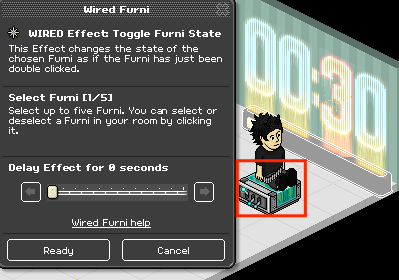
Double click the WIRED Effect:Toggle Furni State wired and select the counter and make the seconds 0.
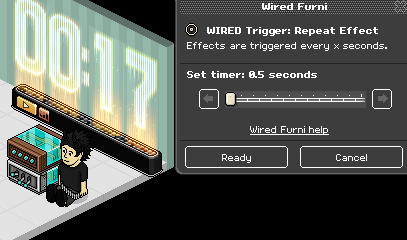
Double click the WIRED Trigger:Repeat Effect wired and select "Ready". Once done, stack both of the wired, (Toggle Furni State and Repeat Effect) on top of eachother.
Now that everything is set up. You can now decorate your room to your own liking. Making it look nice and simple.And Ta-Da! Your booster is now complete.
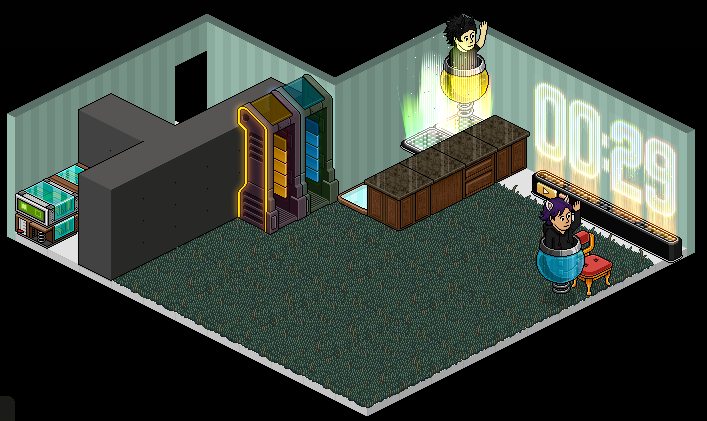
(Note: You can only gain points if one or more people are in a different Color Banzai Portal/Freeze Gates)
Wired Required
- 2x Banzai Area Tiles
- 2x Random Banzai Teleporters
- 1x Stack Magic Tile
- 1x Counter
- 1x Chair
- 1x Color Tile/Doormat
- 1x WIRED Trigger: Repeat Effect
- 1x WIRED Effect: Toggle Furni State
- 1x WIRED Effect: Teleport to Furni
- 1x WIRED Trigger: User Walks On Furni
Step 1
Place the Banzai Area Tiles down. You now want to place your Stacking Tile over the tiles, Double click the Stacking Tile, doing this will make you able to change the height. So then you can teleport from one Banzai Teleporter to another. (The appropriate height I use is 0.68, but you can use whatever you desire.) Place your Color Tile or whatever you're using 1 space the difference from the 1st Banzai Teleporter.
Step 2
This is where we now set up the wired! First of all, double click the WIRED Trigger:User Walks On Furni and Select the Color Tile or whatever you're using.
Step 3
Double click the WIRED EFFECT:Teleport To Furni wired and select the Chair you want to be teleported to when you step on the Color Tile. Once you have done that, stack the wired on top of eachother.
Step 4
Double click the WIRED Effect:Toggle Furni State wired and select the counter and make the seconds 0.
Step 5
Double click the WIRED Trigger:Repeat Effect wired and select "Ready". Once done, stack both of the wired, (Toggle Furni State and Repeat Effect) on top of eachother.
Step 6
Now that everything is set up. You can now decorate your room to your own liking. Making it look nice and simple.And Ta-Da! Your booster is now complete.
(Note: You can only gain points if one or more people are in a different Color Banzai Portal/Freeze Gates)
Eevee7 years ago