
Frustrated with rebuilding your totem for a desired effect? This guide will explain how to do so in seconds!
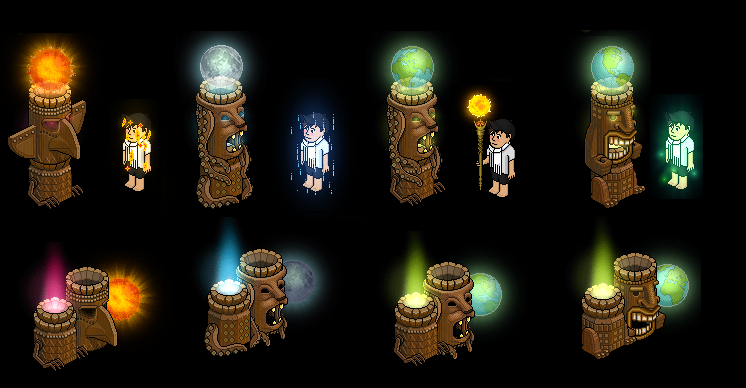
The image below will illustrate the four different totem layouts and their respective effects.
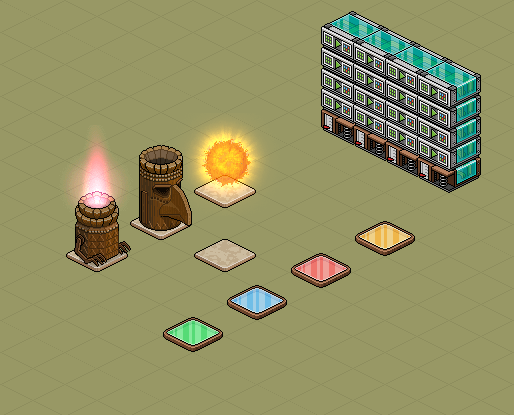
Place all required furni in a room such as the one shown below. Note that the positions & states of the furni do not matter, you can arrange it in any way you would like, but make sure the wired is stacked correctly and the totem pieces are on top of tiles.
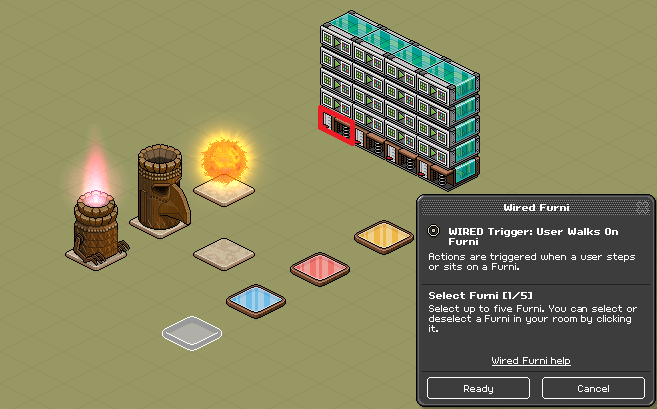
Double click the TRIGGER highlighted below in red. When the interface opens, select the first color tile (or your first trigger furni) and click 'Ready’.
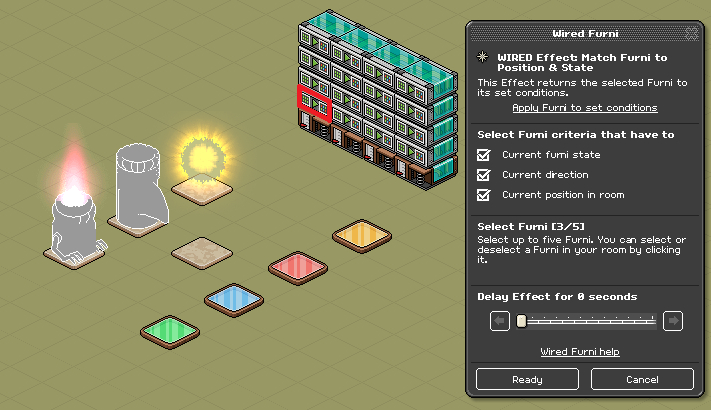
Before you begin the EFFECT wired, make sure your totem furni is in the correct state to build one of the four totems that produce effects (shown above).Double click the EFFECT wired highlighted below in red. When the interface opens, check all three boxes and select all the three totem pieces. Click 'Ready’ when done.
Next, move the Sacred Fire onto the empty marble tile and double click the EFFECT wired highlighted below in red. When the interface opens, check position only, select the Sacred Fire and add a 0.5 second delay. Click 'Ready’ when done.
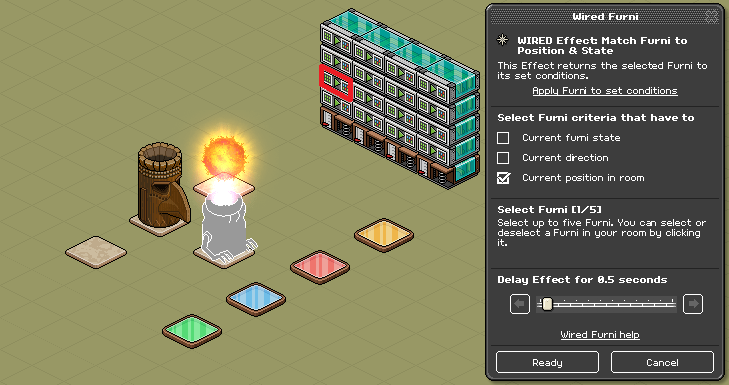
Move the Totem Spirit Head on top of the Sacred Fire and double click the EFFECT wired highlighted below in red. When the interface opens, check position only, select the Totem Spirit Head and add a 1.0 second delay. Click 'Ready’ when done.
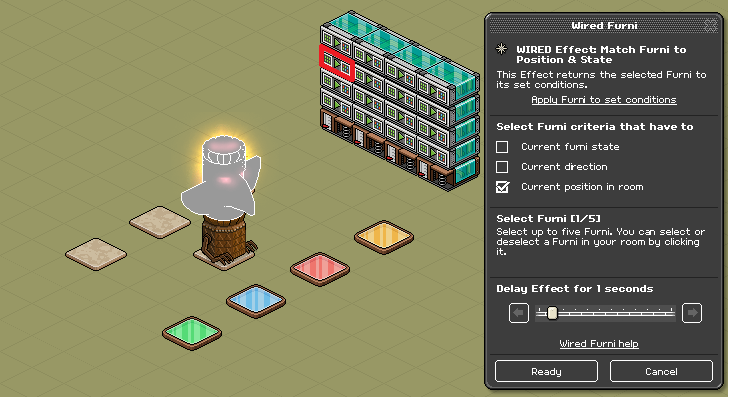
Finally, move the Totem Planet on top of the Totem Spirit Head and double click the EFFECT wired highlighted below in red. When the interface opens, check position only, select the Totem Planet and add a 1.5 second delay. Clck 'Ready’ when done.
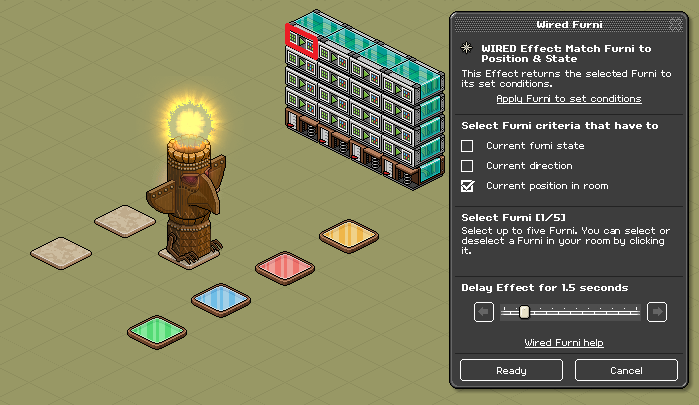
Now that you have successfully set up one stack of wired, you need to wire the other three! Repeat previous steps for each wired stack, giving each TRIGGER a unique color tile. Most importantly, you need to make sure that each stack of wired corresponds to a unique totem layout. There are four totem layouts, thus there are four stacks of wired. The image below is an example on how you should begin when constructing the rain totem.
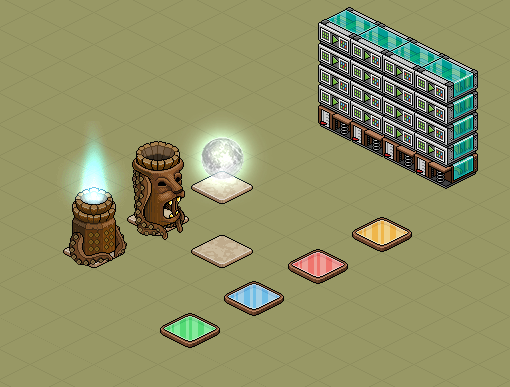
Once you have finished wiring all of the stacks, you are now ready to build your totems. Simply trigger the wired and the totem will reconstruct to your desire!
What you need:
- 1x Sacred Fire
- 1x Totem Spirit Head
- 1x Totem Planet
- 4x WIRED Trigger: User Walks On Furni – other triggers may be used depending if you want to use a switch or say a keyword.
- 16x WIRED Effect: Match Furni to Position & State
- 4x Marble Tiles – these don’t have to be marble tiles, you can choose your own!
- 4x Color Tiles – these are your trigger furnis, if you would rather use levers or keywords, then replace them appropriately!
Totem Layouts
The image below will illustrate the four different totem layouts and their respective effects.
Step 1
Place all required furni in a room such as the one shown below. Note that the positions & states of the furni do not matter, you can arrange it in any way you would like, but make sure the wired is stacked correctly and the totem pieces are on top of tiles.
Step 2
Double click the TRIGGER highlighted below in red. When the interface opens, select the first color tile (or your first trigger furni) and click 'Ready’.
Step 3
Before you begin the EFFECT wired, make sure your totem furni is in the correct state to build one of the four totems that produce effects (shown above).Double click the EFFECT wired highlighted below in red. When the interface opens, check all three boxes and select all the three totem pieces. Click 'Ready’ when done.
Step 4
Next, move the Sacred Fire onto the empty marble tile and double click the EFFECT wired highlighted below in red. When the interface opens, check position only, select the Sacred Fire and add a 0.5 second delay. Click 'Ready’ when done.
Step 5
Move the Totem Spirit Head on top of the Sacred Fire and double click the EFFECT wired highlighted below in red. When the interface opens, check position only, select the Totem Spirit Head and add a 1.0 second delay. Click 'Ready’ when done.
Step 6
Finally, move the Totem Planet on top of the Totem Spirit Head and double click the EFFECT wired highlighted below in red. When the interface opens, check position only, select the Totem Planet and add a 1.5 second delay. Clck 'Ready’ when done.
Step 7
Now that you have successfully set up one stack of wired, you need to wire the other three! Repeat previous steps for each wired stack, giving each TRIGGER a unique color tile. Most importantly, you need to make sure that each stack of wired corresponds to a unique totem layout. There are four totem layouts, thus there are four stacks of wired. The image below is an example on how you should begin when constructing the rain totem.
Step 8
Once you have finished wiring all of the stacks, you are now ready to build your totems. Simply trigger the wired and the totem will reconstruct to your desire!
Eevee7 years ago