
This can be used to count Habbos in games such as Majority Rules!
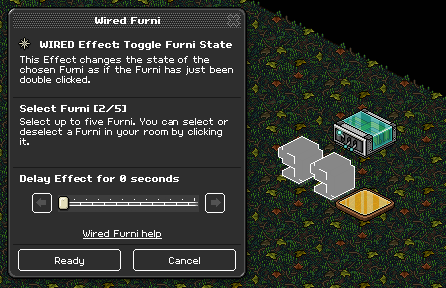
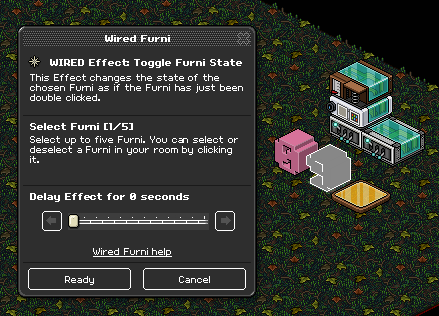
Open up your first WIRED Effect: Toggle Furni State and select both number blocks on it.
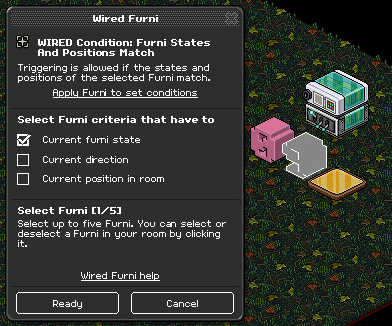
Place your WIRED Condition: Furni States and Positions Match on top of the toggle and select the number on the right and toggle that number to 9. Then check 'Current furni state”.
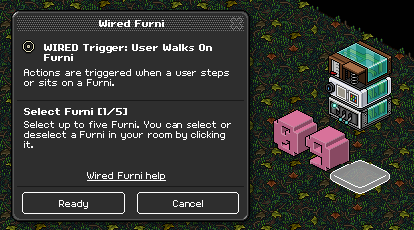
Next place one of your WIRED Trigger: User walks on furni on top of this stack and select your tile with it
Place the second WIRED Effect: Toggle Furni State as a new stack and only select the number block on the right.
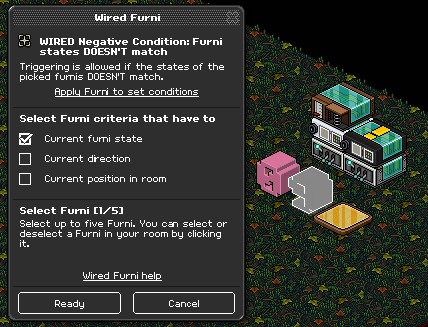
Then place your WIRED negative Condition: Furni States and Positions DOESN’T match on top of the toggle, then select the right number toggled to a 9 and select 'current furni state’
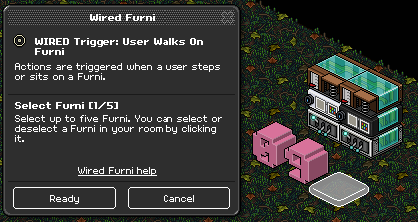
Next place the last WIRED Trigger: User walks on furni on the top of the second stack and select the tile again
You will need:
- 2x WIRED Effect: Toggle Furni State
- 2x WIRED Trigger: User walks on furni (or whichever trigger you would like)
- 1x WIRED Condition: Furni States and Positions Match
- 1x WIRED negative Condition: Furni States and Positions DOESN’T match
- 2x Numeric block
- 1x Tile of your choice
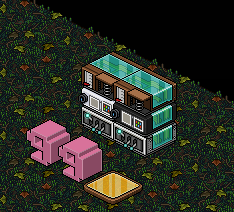
Layout
Step 1
Open up your first WIRED Effect: Toggle Furni State and select both number blocks on it.
Step 2
Place your WIRED Condition: Furni States and Positions Match on top of the toggle and select the number on the right and toggle that number to 9. Then check 'Current furni state”.
Step 3
Next place one of your WIRED Trigger: User walks on furni on top of this stack and select your tile with it
Step 4
Place the second WIRED Effect: Toggle Furni State as a new stack and only select the number block on the right.
Step 5
Then place your WIRED negative Condition: Furni States and Positions DOESN’T match on top of the toggle, then select the right number toggled to a 9 and select 'current furni state’
Step 6
Next place the last WIRED Trigger: User walks on furni on the top of the second stack and select the tile again
Eevee7 years ago