
In this tutorial, you guys will learn how to set up your own Freeze Fighter!
An auto clicker.
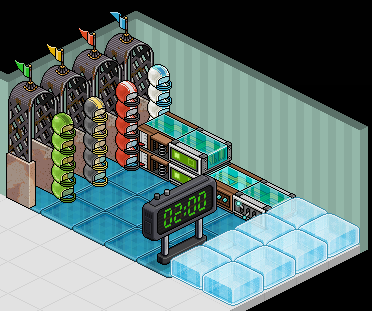
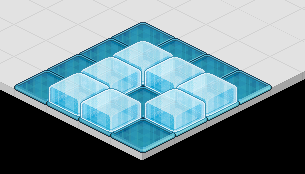
Place the Freeze Tiles and Freeze Blocks kind of how I placed mine for this tutorial. The top is where you will freeze your clones and the bottom is where the clones will be afking the whole time.
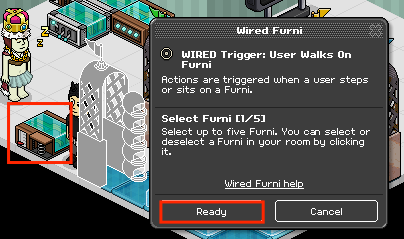
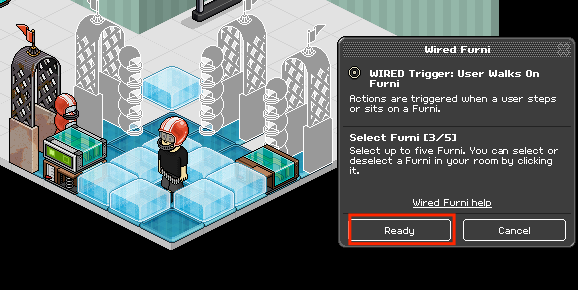
Double click the "WIRED Trigger: User Walks On Furni" wired and select a freeze gate for the team YOU will be on. Click Ready when done.
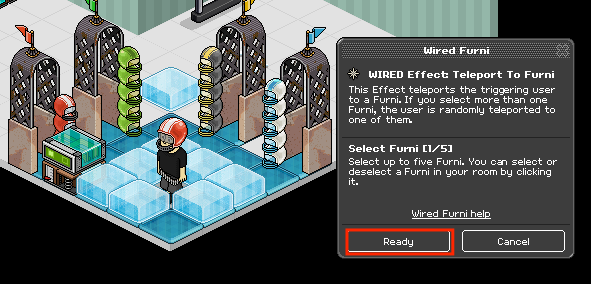
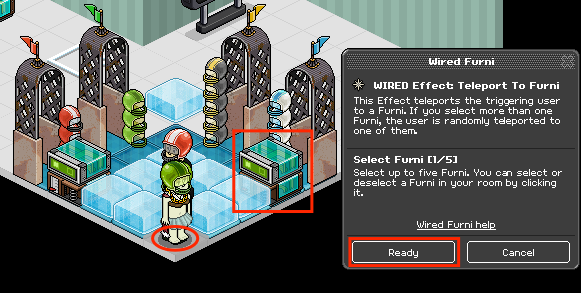
Double click the "WIRED Effect: Teleport To Furni" wired and select the top area of the freeze fighter zone. Click Ready when done.
Now it's time to set the others up! Select the 2nd set of the Wired, "WIRED Trigger: User Walks On Furni" wired and choose the three remaining freeze gates. Click Ready when done.
Now you want to double click the 2nd set of "WIRED Effect: Teleport To Furni" wired and choose the bottom area of the freeze fighter zone. Stack the Wired on top of eachother and click Ready when completed.
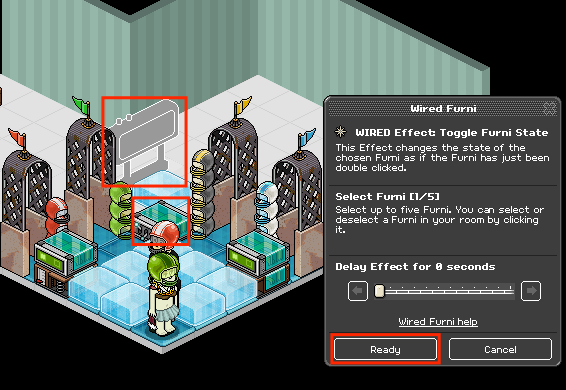
Now we have to set up the Timer.Double click the WIRED Effect: Toggle Furni State wired and select the counter. Leave it as 0 Seconds and click Ready when done.
Note:The Longer the Time, the higher your points will be. You will be also Unlocking the Badge, "Room Arcade Owner" for having points/badges completed in your room!
Double click the WIRED Trigger: Repeat Effect wired and click ready. Place it on the top of the WIRED Effect: Toggle Furni State wired and you will see the timer start to count down.
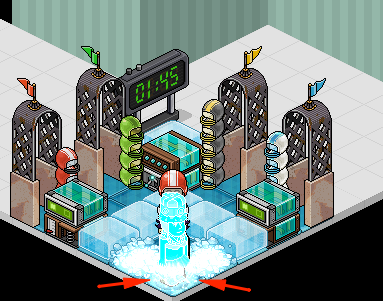
Note🙁Make sure you are clicking the corners of the tile to make your hits perfect.
Requirements
An auto clicker.
Wired Required
- 16x Freeze Tiles.
- 8x Freeze Ice Blocks.
- 1x Counter.
- All Color Freeze Gates.
- 2x WIRED User Walks On Furni
- 2x WIRED Teleport To Furni
- 1x WIRED Repeat Effect
- 1x WIRED Toggle Furni State
Step 1
Place the Freeze Tiles and Freeze Blocks kind of how I placed mine for this tutorial. The top is where you will freeze your clones and the bottom is where the clones will be afking the whole time.
Step 2
Double click the "WIRED Trigger: User Walks On Furni" wired and select a freeze gate for the team YOU will be on. Click Ready when done.
Step 3
Double click the "WIRED Effect: Teleport To Furni" wired and select the top area of the freeze fighter zone. Click Ready when done.
Step 4
Now it's time to set the others up! Select the 2nd set of the Wired, "WIRED Trigger: User Walks On Furni" wired and choose the three remaining freeze gates. Click Ready when done.
Step 5
Now you want to double click the 2nd set of "WIRED Effect: Teleport To Furni" wired and choose the bottom area of the freeze fighter zone. Stack the Wired on top of eachother and click Ready when completed.
Step 6
Now we have to set up the Timer.Double click the WIRED Effect: Toggle Furni State wired and select the counter. Leave it as 0 Seconds and click Ready when done.
Note:The Longer the Time, the higher your points will be. You will be also Unlocking the Badge, "Room Arcade Owner" for having points/badges completed in your room!
Step 7
Double click the WIRED Trigger: Repeat Effect wired and click ready. Place it on the top of the WIRED Effect: Toggle Furni State wired and you will see the timer start to count down.
Note🙁Make sure you are clicking the corners of the tile to make your hits perfect.
Eevee7 years ago