
For this tutorial, you will need the following set of Wired to apply on one roller each.
Rollers and something to teleport the Users.
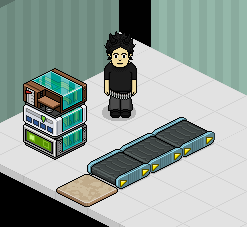
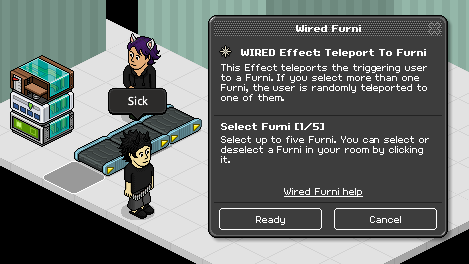
Double click the "WIRED Effect: Teleport To Furni" wired and select the furni you want to teleport the users for walking backwards.
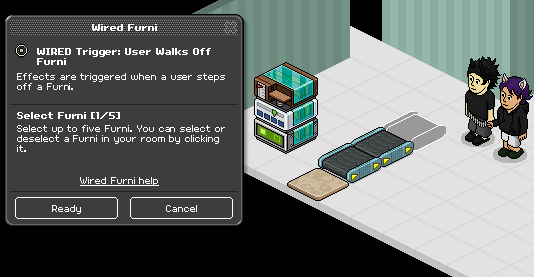
Double click the "WIRED Trigger: User Walks Off Furni" wired and select the roller you don't want the users to walk off of.
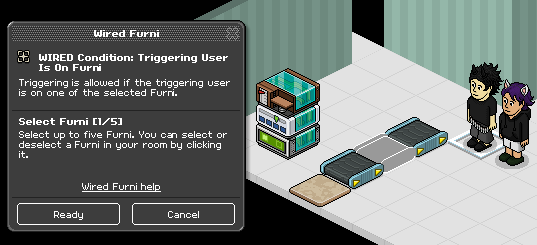
Finally, double click the“WIRED Condition: Triggering User Is On Furni” wired and select a roller behind the one you want the users to walk off of.
This is very helpful for in lines for Automatic Games or just Hosted Games in General. It will prevent Trollers from blocking. The problem is you need the Three Wired shown above for EVERY Roller, which will take up a lot of room and cost a decent amount of credits.
Wired Required
- x1 User Walks Off Furni
- x1 Triggering User Is On Furni
- x1 Teleport To Furni
Rollers and something to teleport the Users.
Step 1
Double click the "WIRED Effect: Teleport To Furni" wired and select the furni you want to teleport the users for walking backwards.
Step 2
Double click the "WIRED Trigger: User Walks Off Furni" wired and select the roller you don't want the users to walk off of.
Step 3
Finally, double click the“WIRED Condition: Triggering User Is On Furni” wired and select a roller behind the one you want the users to walk off of.
This is very helpful for in lines for Automatic Games or just Hosted Games in General. It will prevent Trollers from blocking. The problem is you need the Three Wired shown above for EVERY Roller, which will take up a lot of room and cost a decent amount of credits.
Eevee7 years ago