
In this tutorial I will be showing you how to have your own AFK Chairs.
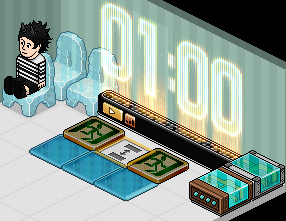
Place down your freeze tiles and put the Exit Tiles on top of them.
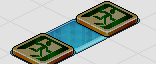
Using your Stack Tile, stack your seats onto the Exit Tiles. This is where the Habbo's will teleport.
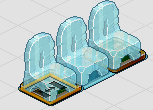
Set your timer to 30 Seconds or 1 Minute. Then double click the WIRED: Repeat Effect and set the Timer to the same as the Counter.
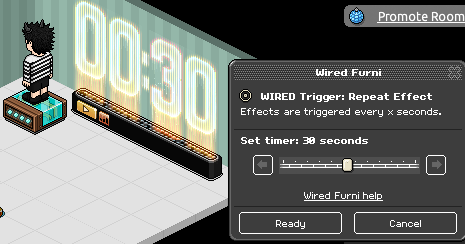
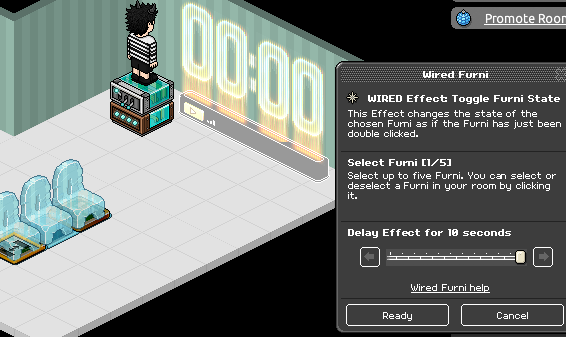
Double click the "WIRED: Toggle Furni State" wired and select the Counter. Make the delay effect for 10 Seconds. Place both of the wired on top of each other when done.
Wired & Furni Required
- Freeze Tiles
- Exit Tiles
- Seats
- 1x Counter
- 1x WIRED: Toggle Furni State
- 1x WIRED: Repeat Effect
- 1x1 Stack Tile
Step 1
Place down your freeze tiles and put the Exit Tiles on top of them.
Step 2
Using your Stack Tile, stack your seats onto the Exit Tiles. This is where the Habbo's will teleport.
Step 3
Set your timer to 30 Seconds or 1 Minute. Then double click the WIRED: Repeat Effect and set the Timer to the same as the Counter.
Step 4
Double click the "WIRED: Toggle Furni State" wired and select the Counter. Make the delay effect for 10 Seconds. Place both of the wired on top of each other when done.
Eevee7 years ago