
In this guide, you will learn how to set up a 3 lane banzai booster!
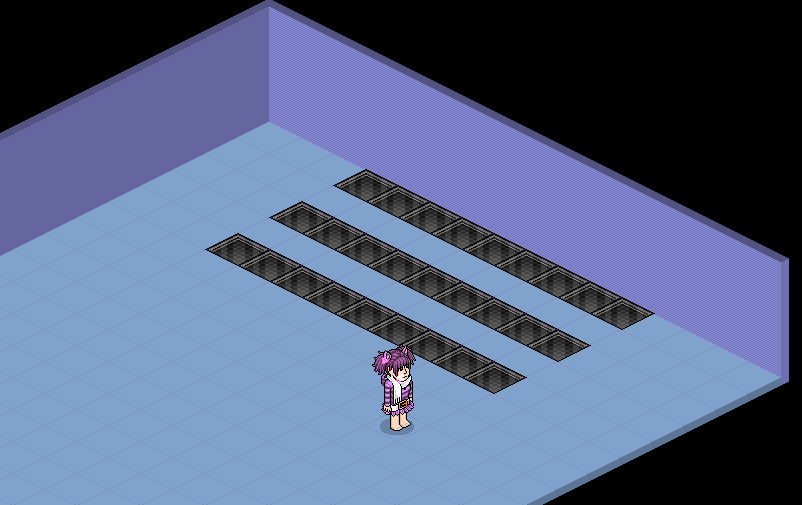
Place 3 lines of 9 banzai tiles like this.Make sure the tiles are in the exact same place.
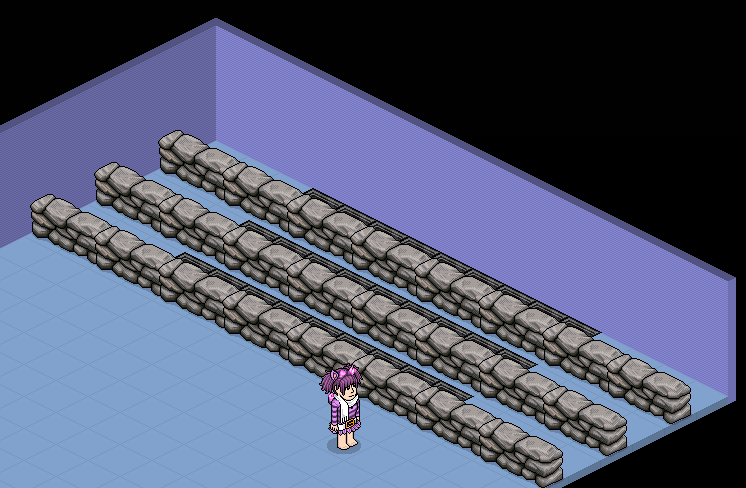
Add in dividers between the lanes, anything will work providing you can't walk on it or through it.
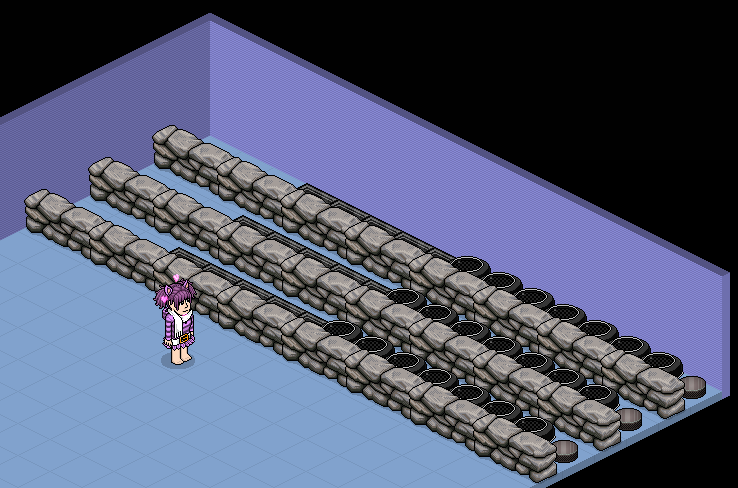
Place a hockey puck at the start of each lane, followed by 7 banzai pucks.
Stack 1 - Repeat Effect, 5x Match Furni to Position & State
Double click the Repeat Effect, set the delay to 1 second.Double click each Match Furni to Position & State, tick all boxes, set delay to 1.5 seconds and put them on all of the ice hockey pucks and banzai pucks. Make sure the pucks are in the correct place before doing this, otherwise it will not work!
Stack 2 - Repeat Effect, Toggle Furni State
Double click the Repeat Effect, set to delay to 0.5 seconds.Double click the Toggle Furni State, click on the timer/counter, set delay to 0 seconds.

Stack 3 - User Walks On Furni, Teleport To Furni
Double click the User Walks On Furni, select the pink banzai portal.Double click the Teleport To Furni, select the FIRST ice hockey puck.

Stack 4 - User Walks On Furni, Teleport To Furni
Double click the User Walks On Furni, select the FIRST ice hockey puck.Double click the Teleport To Furni, select the SECOND ice hockey puck.
Stack 5 - User Walks On Furni, Teleport to Furni
Double click the User Walks On Furni, select the SECOND ice hockey puck.Double click the Teleport To Furni, select the THIRD ice hocket puck.
Stack 6 - User Walks On Furni, Teleport To Furni
Double click the User Walks On Furni, select the THIRD ice hockey puck.Double click the Teleport To Furni, select the FIRST ice hockey puck.
Now enter the pink banzai portal and you should gain points! Make sure you have a friend or clone on blue banzai!
Wired & Furni Required
- 27 Banzai Arena Tiles
- 24 Dividers
- 21 Banzai Pucks
- 3 Ice Hockey Pucks
- 1 Pink Banzai Portal
- 1 Blue Banzai Portal
- 1 Timer/Counter
- 2 Wired Trigger: Repeat Effect
- 4 Wired Trigger: User Walks On Furni
- 5 Wired Effect: Match Furni To Position & State
- 4 Wired Effect: Teleport To Furni
- 1 Wired Effect: Toggle Furni State
Step 1
Place 3 lines of 9 banzai tiles like this.Make sure the tiles are in the exact same place.
Step 2
Add in dividers between the lanes, anything will work providing you can't walk on it or through it.
Step 3
Place a hockey puck at the start of each lane, followed by 7 banzai pucks.
Wired
Stack 1 - Repeat Effect, 5x Match Furni to Position & State
Double click the Repeat Effect, set the delay to 1 second.Double click each Match Furni to Position & State, tick all boxes, set delay to 1.5 seconds and put them on all of the ice hockey pucks and banzai pucks. Make sure the pucks are in the correct place before doing this, otherwise it will not work!
Stack 2 - Repeat Effect, Toggle Furni State
Double click the Repeat Effect, set to delay to 0.5 seconds.Double click the Toggle Furni State, click on the timer/counter, set delay to 0 seconds.
Stack 3 - User Walks On Furni, Teleport To Furni
Double click the User Walks On Furni, select the pink banzai portal.Double click the Teleport To Furni, select the FIRST ice hockey puck.
Stack 4 - User Walks On Furni, Teleport To Furni
Double click the User Walks On Furni, select the FIRST ice hockey puck.Double click the Teleport To Furni, select the SECOND ice hockey puck.
Stack 5 - User Walks On Furni, Teleport to Furni
Double click the User Walks On Furni, select the SECOND ice hockey puck.Double click the Teleport To Furni, select the THIRD ice hocket puck.
Stack 6 - User Walks On Furni, Teleport To Furni
Double click the User Walks On Furni, select the THIRD ice hockey puck.Double click the Teleport To Furni, select the FIRST ice hockey puck.
Now enter the pink banzai portal and you should gain points! Make sure you have a friend or clone on blue banzai!
Eevee7 years ago